Tips on how to be more charismatic with voiceovers?
Master voice overs with expert tips to sound confident and engaging. Learn techniques, equipment, and more for professional results.
Voice overs are a critical component of video content creation, whether for YouTube videos, commercials, audiobooks, or corporate presentations. A compelling voice over can captivate an audience, convey emotion, and enhance the overall impact of a project. However, many creators, like the Reddit user DomesticSheep, struggle with delivering voice overs that feel engaging and natural. The frustration of sounding bland or uninteresting, despite having a clear vision of how the delivery should sound, is a common challenge. This comprehensive guide provides actionable tips, techniques, and tools to help you master voice overs, ensuring your delivery is confident, dynamic, and professional.
Understanding the Challenges of Voice Overs
Delivering a captivating voice over is more complex than simply reading a script aloud. Several factors contribute to a lackluster performance:
- Lack of Audience Connection: Speaking to an empty room or a microphone can feel unnatural, leading to a flat delivery.
- Script Rigidity: Over-reliance on a script can stifle spontaneity, making the voice sound robotic.
- Technical Issues: Poor audio quality, improper microphone use, or inadequate editing can detract from the voice’s clarity and impact.
- Self-Consciousness: Many people are overly critical of their own voice, which can undermine confidence.
- Inexperience: Voice acting is a skill that improves with practice, and beginners often struggle with pacing, inflection, and energy.
To overcome these challenges, you need a combination of preparation, technique, and the right tools. Below, we explore practical strategies to elevate your voice over game, drawing from expert advice and community insights.
Preparation: Setting the Stage for Success
Preparation is key to delivering a confident voice over. Before you hit the record button, consider the following steps to set yourself up for success.
1. Define Your Audience and Tone
Understanding who you’re speaking to and the tone you want to convey is crucial. Are you narrating a fun, upbeat YouTube video or a professional corporate explainer? Visualizing your audience can help you tailor your delivery. For example, imagining a friend or a small group listening to you can make your tone more conversational and engaging.
Tip: Hang a photo of a person or character representing your audience in your recording space. Speaking to this visual cue, as suggested by Reddit user Kelcak, can make your delivery feel more personal and less like you’re talking to a void.
2. Break Down the Script
Long scripts can be overwhelming, leading to a monotonous delivery. Break your script into smaller sections—individual lines or paragraphs—and focus on perfecting each part. This approach, recommended by Kelcak, allows you to concentrate on the emotion and pacing of each segment. Later, you can edit these segments together for a seamless final product.
Technique: Use the “clicker recording” method, where you insert a distinct sound (like a click) between takes to mark transitions. This makes editing easier and ensures a fluid final recording.
3. Practice Without a Script
For some, strictly adhering to a script can feel restrictive. Reddit user volition_vx suggests using a general outline instead of a verbatim script. List key points or topics you want to cover, then record short, improvised segments (e.g., one-minute speeches per point). This method allows for a more natural, conversational tone, as you’re speaking from the heart rather than reading.
Example Outline:
| Section | Key Point | Desired Tone |
|---|---|---|
| Intro | Welcome audience, introduce topic | Warm, inviting |
| Main Point 1 | Explain concept or story | Informative, engaging |
| Conclusion | Summarize and call to action | Confident, inspiring |
4. Warm Up Your Voice and Body
Physical and vocal preparation can significantly improve your delivery. Before recording, try these warm-up exercises:
- Vocal Warm-Ups: Hum, do tongue twisters, or practice scales to loosen your vocal cords.
- Physical Warm-Ups: Stretch your body, do power poses, or take a short walk to reduce tension and boost confidence.
- Breathing Exercises: Practice diaphragmatic breathing to improve projection and control.
Reddit user theonejanitor suggests standing while recording, as it naturally enhances projection and energy. Additionally, smiling while speaking, as advised by ornithine_channel, can make your voice sound more engaged and approachable.
5. Create an Inspiring Environment
Your recording environment can influence your performance. Reddit user akshattchoudharyy recommends playing instrumental music or beats through headphones to set a positive mood. Choose music that matches the tone of your project—upbeat for energetic content, calm for reflective narration.
Example Playlist:
| Track | Artist | Mood |
|---|---|---|
| “Bohemian Rhapsody” | Queen | Uplifting, energetic |
| “Clair de Lune” | Claude Debussy | Calm, introspective |
| “Instrumental Lo-Fi” | Chillhop Music | Relaxed, focused |
6. Address Self-Consciousness
Many creators, like DomesticSheep, feel their voice sounds uninteresting or are self-conscious about their accent. Reddit user mightyalwayz advises leaning into your unique voice, as what you perceive as a flaw may be charming to listeners. Accents, for example, can add personality and authenticity to your narration.
Tip: Record a test take and share it with a trusted friend or colleague for feedback. You may be surprised to find that your voice sounds more natural than you think.
During Recording: Techniques for a Dynamic Delivery
Once you’re prepared, it’s time to record. The following techniques will help you deliver a voice over that’s engaging and professional.
1. Use Physical Expression
Physicality can enhance your vocal performance. Reddit user nicktron10, who describes themselves as an animated speaker, suggests using hand and arm gestures to make your delivery feel more natural. Even if you’re alone, moving your body as you speak can help you sound like you’re addressing a real person.
Tip: Keep your hands visible but avoid covering your face. If using a headset microphone, ensure it’s positioned correctly to capture clear audio without distortion.
2. Vary Your Takes
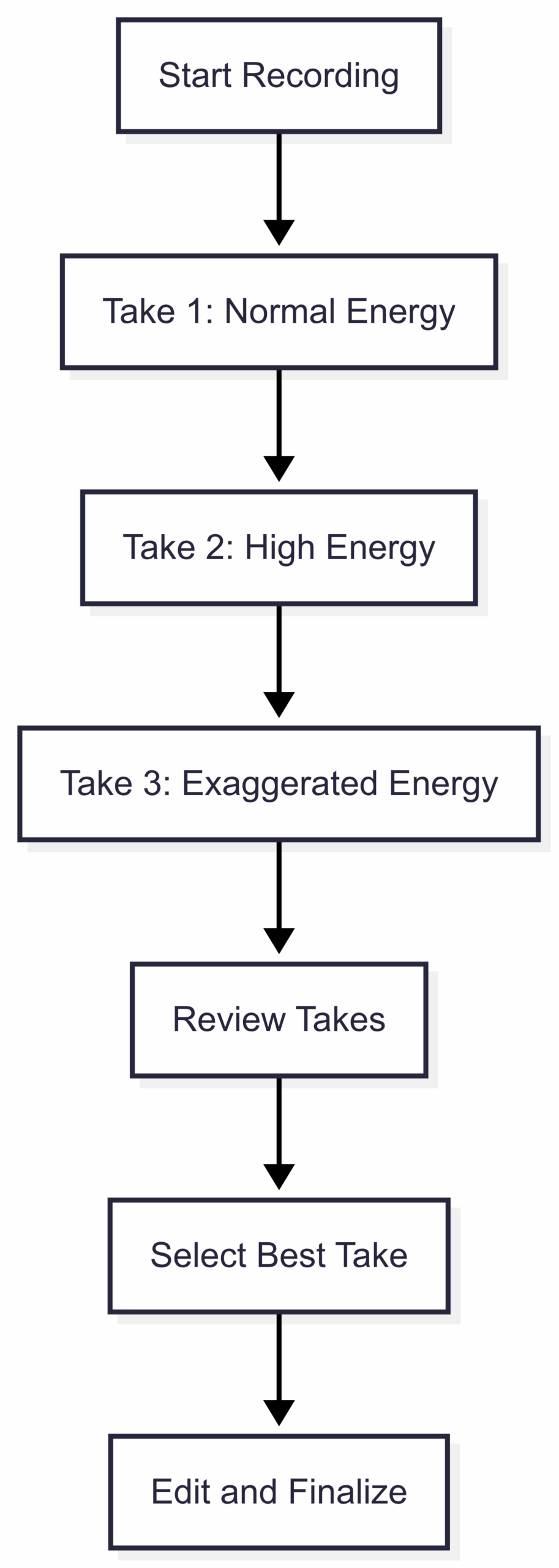
Professional voice actors often record multiple takes to capture the best performance. Reddit user theonejanitor recommends doing several takes with different energy levels, including one that feels overly exaggerated or “phony.” This comparison can help you find the sweet spot between flat and over-the-top.
Recording Workflow:
3. Imagine an Audience
To combat the isolation of recording alone, envision an audience listening to you. Reddit user TheWarriorene suggests picturing your audience staring back at you through the camera lens, treating it like a “small robot eye” receiving your words. This mental trick can make your delivery more engaging and less mechanical.
4. Maintain Good Posture
Posture affects both your confidence and vocal projection. Sit or stand upright, take up space, and lean slightly forward to convey authority, as recommended in the video call tips section. This physical stance translates to a stronger, more confident voice.
5. Experiment with Pacing and Inflection
Vary your pacing and inflection to keep listeners engaged. Practice emphasizing key words, pausing for effect, and modulating your tone to match the content’s mood. If you struggle with a flat or mumbled delivery, as fibrefarmer noted, consider taking a public speaking or voice acting class to refine your skills.
Resources for Improvement:
| Resource | Description | Link |
|---|---|---|
| Voice Acting Boards | Technical guides for audio editing | voiceacting.boards.net |
| TED Talks | Examples of expressive speaking | ted.com |
| Coursera Public Speaking | Online course for vocal delivery | coursera.org |
Technical Setup: Equipment and Editing
A professional-sounding voice over requires the right equipment and editing techniques. Poor audio quality can make even the best delivery sound amateurish.
1. Invest in Quality Gear
High-quality equipment is essential for clear, professional audio. Below is a recommended setup for beginners and intermediates, including specifications and approximate prices.
Equipment Recommendations:
| Item | Model | Specifications | Price (USD) |
|---|---|---|---|
| Microphone | Audio-Technica ATR2100x-USB | USB/XLR, Cardioid, 24-bit/192kHz | ~$99 |
| Headphones | Sony MDR-7506 | Closed-back, 10Hz-20kHz frequency response | ~$99 |
| Audio Interface | Focusrite Scarlett Solo | 2-in/2-out, 24-bit/192kHz | ~$119 |
| Pop Filter | Neewer NW(B-3) | 6-inch double-layer mesh | ~$10 |
| DAW Software | Audacity | Free, open-source, multi-track editing | Free |
Total Estimated Cost: ~$327 (excluding free software)
2. Optimize Your Recording Environment
Choose a quiet space with minimal background noise. Use soft furnishings like blankets or foam panels to reduce echo. Ensure your microphone is positioned 6-12 inches from your mouth, and use a pop filter to minimize plosive sounds (e.g., “p” and “b” sounds).
3. Normalize Audio and Create a Noise Floor
Reddit user Kelcak emphasizes the importance of normalizing audio and establishing a noise floor. Normalization adjusts the audio volume to a consistent level, while a noise floor ensures background sounds are minimized, allowing your voice to stand out.
How to Normalize in Audacity:
- Record a few seconds of silence to capture the room’s ambient noise.
- Select your audio track, go to Effect > Noise Reduction, and use the silence sample to remove background noise.
- Go to Effect > Normalize and set the peak amplitude to -1 dB for optimal volume.
4. Edit for Clarity and Flow
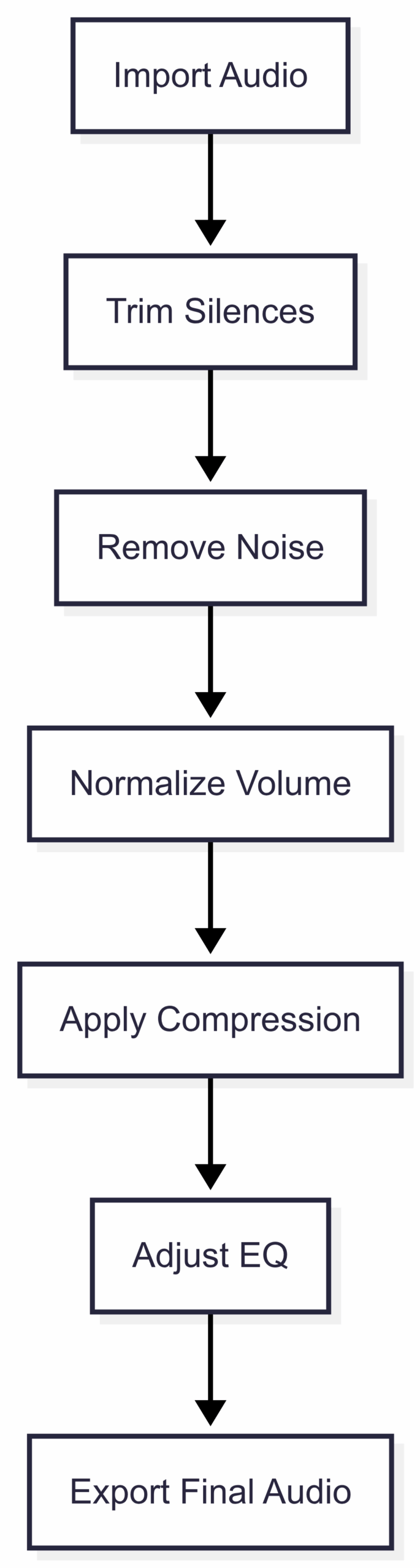
Editing is where your voice over comes together. Use software like Audacity or Adobe Audition to:
- Trim silences and mistakes.
- Adjust pacing by shortening or lengthening pauses.
- Apply compression to even out volume levels.
- Add subtle effects like EQ to enhance clarity.
Editing Workflow:
Overcoming Common Pitfalls
Even with preparation and technique, you may encounter challenges. Here’s how to address common issues:
- Sounding Monotonous: Practice varying your pitch and pacing. Record a take with exaggerated emotion to break out of a flat delivery.
- Mic Issues: If using a headset mic, as DomesticSheep did, ensure it’s worn correctly and positioned close to your mouth. Consider upgrading to a dedicated microphone for better quality.
- Lack of Confidence: Repeated practice builds confidence. Record multiple videos to refine your skills, as Kelcak suggests.
- Accent Concerns: Embrace your accent as a unique asset. Add subtitles if clarity is a concern, as suggested by a deleted Reddit user.
Collaborating for Success
If voice overs remain challenging, consider collaboration. As Kelcak notes, many successful YouTubers work in teams, with one person writing scripts and another delivering voice overs. Partnering with a skilled public speaker can elevate your content while allowing you to focus on your strengths, such as video editing.
Advanced Tips for Professional Voice Overs
For those looking to take their skills to the next level, consider these advanced techniques:
- Study Professional Voice Actors: Listen to audiobooks or watch animated films to analyze how professionals use tone, pacing, and emotion.
- Take a Voice Acting Class: Platforms like Udemy or MasterClass offer courses on voice acting and public speaking.
- Experiment with Character Voices: If your project allows, try different vocal styles to add variety and personality.
- Use Reference Tracks: Record a “guide track” with the ideal tone and energy, then use it as a reference for your final takes.
Conclusion: Practice Makes Perfect
Mastering voice overs is a journey that combines preparation, technique, and technical know-how. By visualizing your audience, breaking down scripts, using quality equipment, and refining your delivery through practice, you can transform bland recordings into captivating performances. Embrace your unique voice, experiment with different approaches, and don’t be afraid to seek feedback or collaborate with others. With time and dedication, your voice overs will not only sound professional but also resonate with your audience, making your videos stand out.
Call to Action: Try these tips in your next recording session. Share your progress with a community like Reddit’s r/Creator or seek feedback from peers to continue improving. Happy recording!
Please share this Boost your Charisma on Video Calls with these 14 Tips with your friends and do a comment below about your feedback.
We will meet you on next article.
Until you can read, I’m a digital nomad and I want to live in Latvia for few months