
Can Lawyers Work From Home?
Yes — and a significant proportion already do. Approximately 30% of attorneys now operate fully remotely, with the majority of the remainder in hybrid arrangements. The legal profession, once anchored to physical offices, courthouses, and filing rooms, has shifted substantially toward digital practice — driven by cloud-based case management, electronic court filings, secure client portals, and video conferencing.
Whether you are a solo practitioner, an in-house counsel, or an associate at a firm, remote legal work is structurally achievable for most practice areas. The key constraints are practice-area dependent: some legal work requires physical presence, while most does not.
Which Legal Tasks Can Be Done Remotely?
The division is not between remote-eligible and non-remote-eligible lawyers — it is between tasks that require physical presence and tasks that do not.
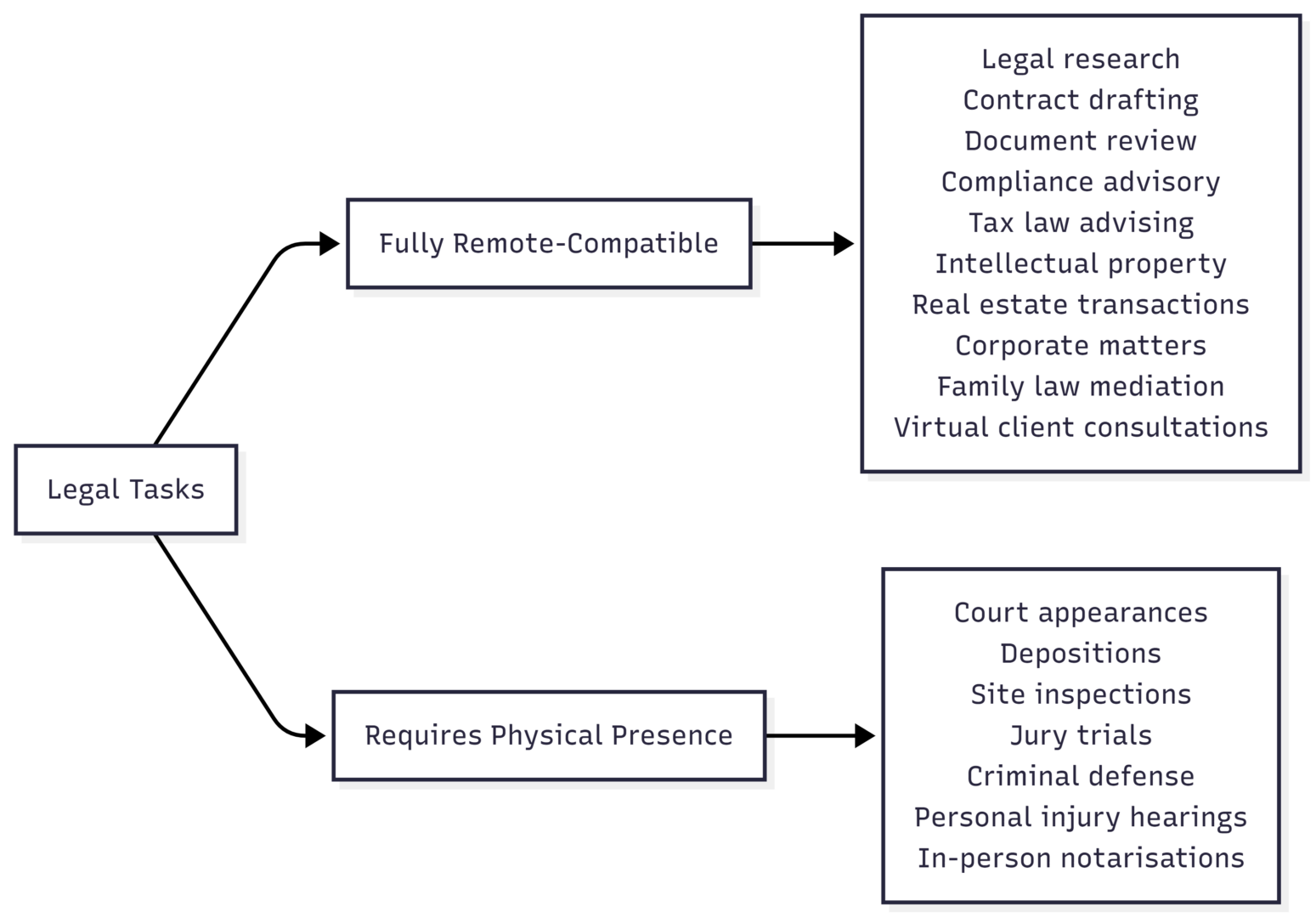
| Task | Remote? | Notes |
|---|---|---|
| Legal research | Yes | Westlaw, LexisNexis accessible remotely |
| Contract drafting and review | Yes | Core document work, no presence needed |
| Compliance advisory | Yes | Primarily research and analysis |
| Tax law advising | Yes | No in-person requirements in most cases |
| Intellectual property (TM, patent, copyright) | Yes | Documentation and search work |
| Real estate transactions | Yes | Title review, contract prep, digital signatures |
| Corporate and securities law | Yes | Document-heavy, primarily digital |
| Family law (divorce, custody mediation) | Mostly | Mediation via video; court appearances on-site |
| Criminal defense | Partial | Research remote; hearings, trials on-site |
| Court appearances | No | Physical presence required |
| Depositions | No | In-person standard; some jurisdictions allow remote |
| Immigration hearings | Partial | Some hearings remote since pandemic |
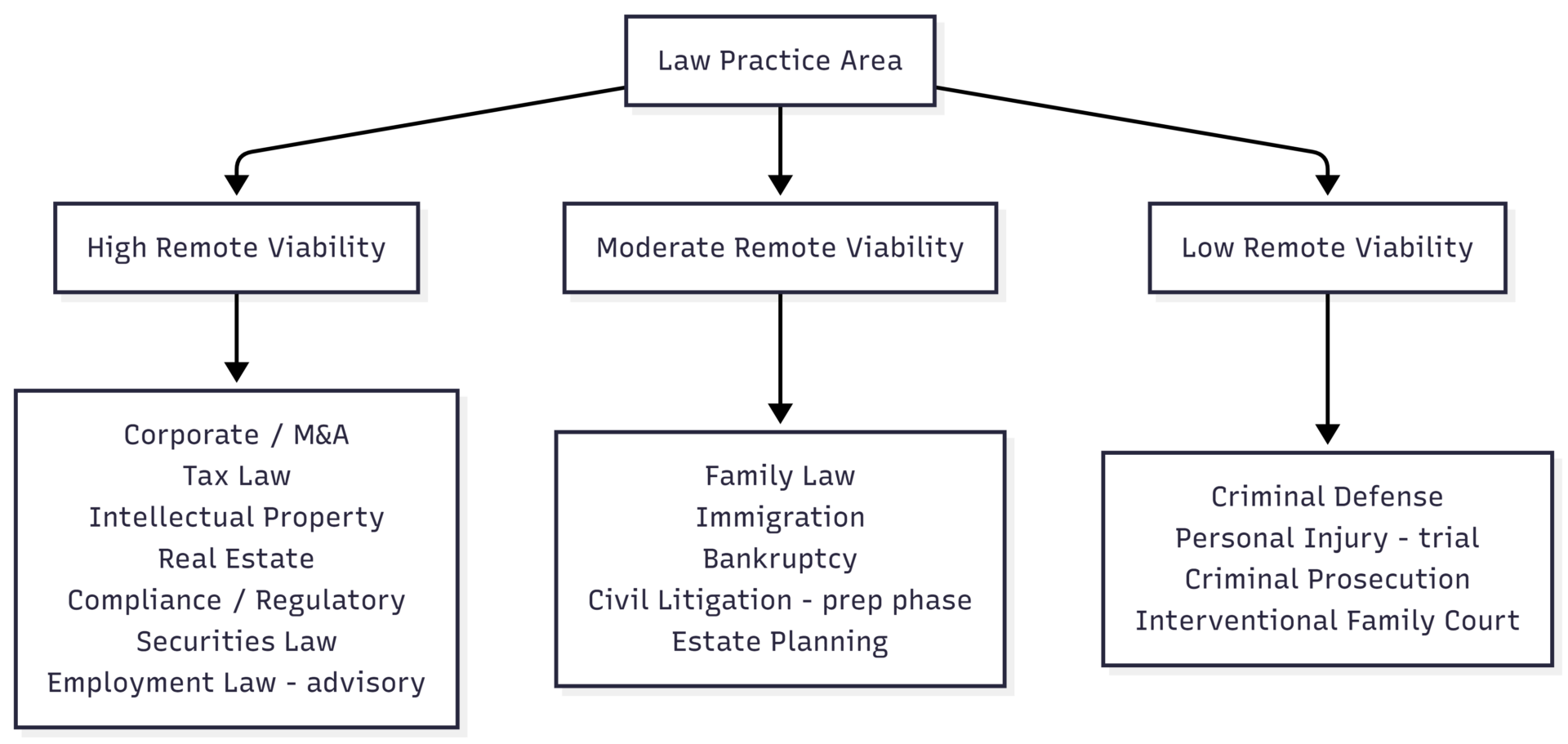
Practice Areas and Remote Viability
Solo practitioners and freelance lawyers have the highest rate of full remote work — they control their own client selection, scheduling, and practice area focus.
In-house corporate counsel frequently operate remotely or hybrid, as their work centres on advising internal stakeholders, reviewing contracts, and managing compliance — all achievable digitally.
Law firm associates and partners most commonly work hybrid, with firms typically requiring two to three office days per week for team collaboration, client meetings, and firm culture.
Contract lawyers and legal writers — those providing research, drafting, or document review services to other firms — are among the most fully remote legal professionals, often working across multiple clients simultaneously.
Lawyer Types Best Suited for Full Remote Work
| Lawyer Type | Remote Suitability | Typical Arrangement |
|---|---|---|
| Freelance / contract lawyer | Very High | 100% remote, multiple clients |
| In-house corporate counsel | High | Hybrid or fully remote |
| Tax attorney | High | Fully remote viable |
| IP lawyer (non-litigation) | High | Fully remote viable |
| Legal writer / research attorney | Very High | Fully remote |
| Solo practitioner | High | Remote with occasional in-person |
| Compliance / regulatory attorney | High | Fully remote viable |
| Civil litigator | Moderate | Hybrid — research remote, hearings on-site |
| Family law attorney | Moderate | Hybrid — mediation remote, court on-site |
| Criminal defense attorney | Low | Primarily on-site |
Essential Tools for Remote Legal Practice
A remote law practice requires a specific technology stack. The core categories are case management, communication, document handling, security, and billing.
| Category | Tools | Approx. Cost |
|---|---|---|
| Legal Practice Management | Clio Manage, MyCase, PracticePanther | $49–$129/user/month |
| Document Management | Clio Docs, NetDocuments, iManage, SharePoint | $15–$75/user/month |
| E-Signature | DocuSign, Adobe Sign, HelloSign | $10–$40/user/month |
| Video Conferencing | Zoom, Microsoft Teams, GoToConnect | Free–$20/user/month |
| Secure Client Portal | Clio for Clients, MyCase portal | Included in case management |
| Legal Research | Westlaw, LexisNexis, Fastcase | $50–$500+/month |
| VPN (if needed) | NordVPN Teams, Cisco AnyConnect | $5–$15/user/month |
| Encrypted Email | ProtonMail, Microsoft 365 with encryption | $6–$22/user/month |
| Time Tracking & Billing | Clio Manage, FreshBooks, TimeSolv | $19–$65/user/month |
| E-Filing | InfoTrack, Clio File, Tyler Technologies | Per-filing or subscription |
| Virtual Receptionist | Ruby, Smith.ai, LEX Reception | $200–$600+/month |
| Phone / VOIP | Vonage, Nextiva, GoToConnect | $15–$35/user/month |
Total estimated monthly cost for a solo practitioner’s remote stack: $350–$900/month depending on tools selected and usage volume.
Setting Up a Remote Legal Practice: Step-by-Step

Step 1 — Licensing and ethics compliance. Remote legal work is permitted in all US states, but jurisdiction-specific rules govern where you can practice. You must be licensed in the state where the client is located or where the legal matter arises. Confirm your state bar’s rules on remote client meetings, virtual offices, and any requirements for a physical address in each state where you practice. If working across multiple states, look into multi-state bar admissions or limited scope agreements.
Step 2 — Cloud infrastructure. Replace physical filing cabinets and on-premise servers with cloud-based systems before going remote. Cloud-based practice management software (Clio Manage, MyCase) provides case files, billing, calendars, and document storage in one accessible platform. A VPN is only required if your firm uses on-premise servers; cloud-based tools eliminate that dependency.
Step 3 — Communication systems. Set up a secure client portal for document sharing and sensitive communications — this is essential for maintaining attorney-client privilege in a remote environment. A VOIP phone number maintains professionalism and keeps your personal number private. Virtual receptionist services ensure no client call is missed.
Step 4 — Client onboarding. Digital onboarding is the foundation of a functional remote practice. Intake forms, e-signatures, and automated follow-up workflows allow you to onboard clients without a single in-person meeting in most practice areas. CRM tools integrated with your case management platform keep prospective and active clients organised.
Step 5 — Physical workspace. A dedicated room matters for confidentiality. Client conversations about sensitive legal matters require a private space — not a shared living area. If meeting clients in person at your home is permitted in your state, a separate entrance and soundproofing considerations are worth the investment. For video calls, a tidy background, consistent lighting, and a quality headset project professionalism.
Step 6 — Billing and time tracking. Remote work makes disciplined time tracking more critical, not less. Cloud-based time tracking ensures billable hours are captured accurately regardless of where work is performed. Online invoicing with integrated payment processing reduces collection friction.
Step 7 — Marketing your remote practice. Remote lawyers have access to clients across their licensed states — not just their local area. A professional website, search engine optimisation for your practice areas and geography, and profiles on legal directories (Avvo, Martindale-Hubbell, Justia) generate inbound leads. Legal lead generation platforms provide direct client referrals for specific practice areas.
Home Office Setup: What You Need
| Component | Specification / Recommendation | Approx. Cost |
|---|---|---|
| Computer | Laptop with 16 GB RAM, SSD, modern CPU | $1,000–$2,500 |
| External monitor | 24″–27″ for document review | $200–$600 |
| Headset | Noise-canceling for calls (Jabra, Plantronics) | $80–$300 |
| Scanner | ScanSnap iX1600 (integrates with Clio) | $400–$500 |
| Webcam | 1080p for client video meetings | $80–$200 |
| Internet | Fibre or cable, min 100 Mbps / 20 Mbps upload | $50–$120/month |
| Printer | Laser, duplex for any physical document needs | $200–$500 |
| UPS Battery Backup | Prevents work loss during power interruptions | $100–$300 |
Total one-time workstation investment: approximately $2,100–$5,000 for a professional remote setup.
Security and Ethics Obligations
Data security is not optional in remote legal practice — it is an ethical obligation. Attorneys are bound by duties of confidentiality and competence, which extend to the technology used to handle client information.
Core security requirements:
- End-to-end encrypted communication for all client discussions
- Two-factor authentication on all platforms accessing client data
- HIPAA-compliant tools if your practice touches medical records (personal injury, medical malpractice, estate matters)
- Role-based access controls for any staff or contractors with system access
- Regular security audits and updated antivirus/firewall protection
Home network risks: Home and public Wi-Fi networks are less secure than enterprise office infrastructure. If your firm does not mandate a VPN for remote access, using one for any work involving confidential client data is best practice. Cloud-based platforms with built-in security (rather than local files) reduce exposure significantly.
Remote work policy for firms: Law firms operating with distributed teams need a formal remote work policy covering security expectations, approved tools, communication norms, and data handling protocols. Ambiguity creates compliance risk.
Pros and Cons of Remote Legal Work
| Pros | Cons |
|---|---|
| Eliminated commute (5–10+ hours/week saved) | Court appearances still require physical presence |
| Access to clients across licensed states | Multi-state licensing complex and costly |
| Lower overhead (no office rent, reduced attire costs) | Risk of isolation from professional community |
| Greater schedule flexibility | Blurred work-home boundaries without discipline |
| Ability to work for higher-paying markets from lower-cost locations | Initial technology investment required |
| Fewer office interruptions for deep focus work | Cybersecurity responsibility falls more on individual |
Remote Legal Work: Salary and Income
Remote legal work does not require an income trade-off. In-house and employed remote attorneys typically earn equivalent to on-site peers; the location shift is a benefit, not a pay cut.
| Role | Avg. Annual Salary (US) | Remote Feasibility |
|---|---|---|
| Contract / Freelance Lawyer | $70,000–$150,000+ | Very High |
| In-House Corporate Counsel | $130,000–$250,000+ | High |
| Remote Tax Attorney | $90,000–$180,000 | High |
| Legal Writer / Research Attorney | $55,000–$100,000 | Very High |
| IP Attorney (non-litigation) | $130,000–$200,000+ | High |
| Solo Practitioner (remote) | Variable — $60,000–$300,000+ | High |
| Compliance Attorney | $90,000–$160,000 | High |
Freelance and contract lawyers working across multiple clients on platforms like Counsel On Call, Axiom, or UpCounsel have significant earning flexibility based on volume and specialisation.
FAQs
Requirements vary by state. Some bars require a physical address in the state of licensure; a registered agent service or shared office address often satisfies this without a full office lease. Check your specific state bar’s rules.
This depends on your jurisdiction. Some states permit home-based client meetings; others restrict it. If permitted, a private, professional space with a separate entrance is standard. If not permitted or impractical, shared conference room rentals are widely available by the hour.
Yes, as long as you use encrypted, secure platforms. Using unsecured email or consumer-grade messaging apps for confidential client communications can create ethical exposure. Encrypted client portals and legal-grade video tools maintain privilege.
Licensing complexity for multi-state practice and maintaining professional visibility within the legal community are the most commonly cited challenges. Active participation in bar associations, virtual CLEs, and professional networks helps address the latter.
Conclusion
Lawyers can work from home, and most practice areas support remote or hybrid arrangements when the right infrastructure is in place. The core requirements are consistent: a secure cloud-based practice management platform, encrypted client communications, disciplined time tracking, and compliance with bar rules in each jurisdiction where you practice.
The financial case is straightforward. Remote work eliminates commute time, reduces overhead, and extends geographic reach to clients across licensed states. The professional case is equally sound — deep focus work like research, drafting, and analysis is often done more effectively in a controlled home environment than in a busy office.
The transition requires an upfront investment in technology and systems, but the ongoing operational cost of a remote practice is substantially lower than a traditional office, and the career flexibility it provides is significant.
Please share this Can Lawyers Work From Home? with your friends and do a comment below about your feedback.
We will meet you on next article.
Until you can read, Can Radiologists Work From Home? A Clear, Simple Guide