16 Tips for Successful Online Video Interviews
Video interviews are now a standard part of the hiring process, used by companies of every size for everything from first-round screenings to final decision-making conversations. They save both employers and candidates time and travel costs, but they also introduce a new set of challenges: unstable Wi-Fi, awkward eye contact, distracting backgrounds, and the general discomfort of performing for a webcam instead of a person sitting across the table.
The good news is that a strong online interview is entirely a matter of preparation. With the right technical setup, environment, and mindset, a video interview can showcase your professionalism just as effectively as an in-person meeting — sometimes more so, since it removes commute stress and lets you interview from a space where you feel most comfortable. Below are 16 practical, field-tested tips to help you prepare for and succeed in any online video interview.
Quick-Reference Checklist
| Category | Key Actions |
|---|---|
| Technology | Test camera, mic, speakers, and internet at least a day ahead |
| Environment | Quiet room, neutral background, strong front-facing light |
| Attire | Dress fully professional, not just from the waist up |
| Body Language | Look at the camera lens, sit upright, smile, and nod |
| Timing | Log in 10–15 minutes early; pause briefly before answering |
| Follow-Up | Send a thank-you email within 24 hours referencing specific discussion points |
1. Test Your Technology in Advance
Don’t wait until interview day to discover your microphone is muted at the hardware level or your webcam driver needs an update. Test your camera, microphone, and speakers at least one full day before the interview — ideally by placing a practice call with a friend or family member using the exact platform the employer will use (Zoom, Microsoft Teams, Google Meet, or Skype). Confirm your internet connection can support smooth, high-quality video without lag. If your connection is inconsistent, consider connecting your device directly to your router with an ethernet cable rather than relying on Wi-Fi.
2. Choose a Professional Screen Name and Login
Many candidates overlook this detail: the display name attached to your video account should be your full, professional name — not a nickname, an old gamer tag, or a shared family email address. Interviewers form an impression before the call even connects, so update your profile name and photo on the platform beforehand.
3. Practice With a Mock Interview
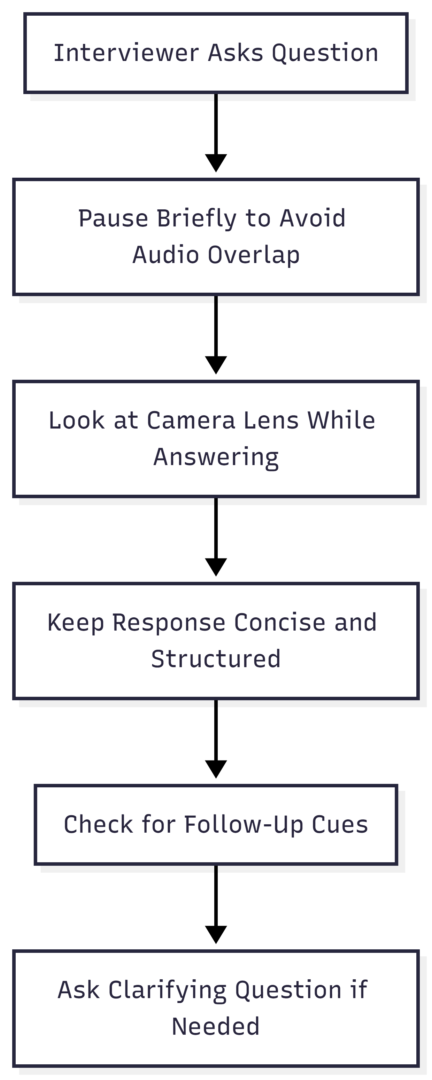
Once your technology is confirmed working, use that same test call to rehearse. Ask a friend or family member to run through common interview questions with you over video. Video calls often have a slight audio delay, so practicing helps you get comfortable pausing briefly before responding and avoiding talking over the interviewer. The more repetitions you complete beforehand, the calmer and more natural you’ll sound on the actual call.
4. Set Up a Quiet, Well-Lit Space
Select a quiet room with minimal background noise and nothing distracting behind you. Natural light is ideal — position yourself facing a window or light source rather than having it behind you, which creates a silhouette effect. If natural light isn’t available, a simple desk lamp placed behind your camera works well. Let others in your household know your interview time so they can avoid interruptions, and keep pets in a separate room if possible.
Video Interview Setup at a Glance
| Element | Recommendation |
|---|---|
| Camera height | Eye level (use a stack of books or a laptop stand if needed) |
| Light source | In front of or beside your face, never directly behind you |
| Background | Plain wall or tidy, neutral space — avoid clutter and movement |
| Distance from camera | Arm’s length, with some space above your head in frame |
| Audio | Wired headphones or earbuds reduce echo and background noise |
5. Keep Notes and Key Documents Within Reach
Have a notebook and pen beside your computer, or a document open on a second screen, so you can jot down important details during the conversation. If you plan to take notes, mention this to the interviewer so they understand what you’re doing rather than assuming you’re distracted. Notes are also useful afterward — they help you reference specific points in a follow-up email or prepare more effectively for a second-round interview.
6. Have Your Resume and Portfolio Ready
Keep a copy of your resume on hand, either printed or open on your screen in a way that doesn’t block your view of the interviewer. Highlighting key dates, achievements, or responsibilities beforehand gives you quick reference points when answering questions. If your field relies on visual work — design, writing, or development — have your portfolio pulled up and ready to share your screen at a moment’s notice.
7. Prepare Thoughtful Questions of Your Own
Every interview is a two-way conversation. Prepare several specific questions about the role, team structure, company culture, and expectations for the first 90 days. Thoughtful questions demonstrate genuine interest and help you evaluate whether the opportunity is the right fit for you, not just the other way around.
8. Log In Early
Open the video platform five to ten minutes before your scheduled time. This buffer gives you room to resolve any last-minute technical hiccups and signals professionalism and reliability, just as arriving early to an in-person interview would.
9. Dress Professionally From Head to Toe
It might be tempting to pair a blazer with pajama pants since only your upper body is visible, but dressing fully professional — including your bottom half — boosts confidence and reduces the risk of an awkward moment if you need to stand up unexpectedly. Choose clean, well-fitted clothing that reflects the norms of the industry you’re interviewing for.
10. Practice Active Listening
Show engagement through small, consistent cues: nodding, maintaining an attentive posture, and using brief verbal affirmations like “I see” or “that makes sense.” Let the interviewer finish completely before responding, and don’t hesitate to ask a clarifying question if you need a moment to think through your answer.
11. Look at the Camera, Not the Screen
This is one of the most commonly cited — and most commonly ignored — video interview tips. Looking at the interviewer’s face on your screen instead of the camera lens can make it appear as though you’re looking down or away. Position the video window as close to your camera as possible, and make a conscious effort to glance at the lens when delivering key points, especially during your opening introduction and closing remarks.
12. Prepare a Backup Plan for Technical Issues
Have backup equipment ready: an alternate device such as a tablet or phone, a mobile hotspot in case your home Wi-Fi drops, and a spare pair of headphones. Agree with your interviewer in advance on a backup communication method — such as a phone number — so the interview can continue smoothly if the primary platform fails.
13. Do Light Exercise or Stretch Beforehand
Because you’re likely interviewing from home, you have privacy that isn’t available before an in-office interview. Use it. A short walk, light stretching, or a few minutes of deep breathing before the call can reduce nervous energy and help you feel more grounded and focused once the interview begins.
14. Rehearse Answers to Likely Questions
Review common interview questions for your industry and draft concise answers using a structured format such as STAR (Situation, Task, Action, Result). Practicing these answers out loud — ideally over video with a friend — helps you internalize the structure without sounding scripted or robotic during the real conversation.
15. Arrange Childcare and Pet Care in Advance
If you share your home with children or pets, arrange care for at least the hour surrounding your interview. This minimizes the risk of interruptions and allows you to fully focus on the conversation. If a caregiver is present in your home, ask them to keep children or pets in a separate area away from your interview space.
16. Send a Follow-Up Message Promptly
Within 24 hours of the interview, send a brief thank-you email. Reference something specific from the conversation, restate your interest in the role, and attach any documents the interviewer requested. A thoughtful, prompt follow-up reinforces the strong impression you built during the call and keeps you top of mind as the employer makes their decision.
Handling Technical Issues During the Interview
Even with careful preparation, technical problems occasionally happen. If your video freezes or audio cuts out, stay calm and use the platform’s chat feature to alert the interviewer. If you can’t reconnect within a minute or two, offer to continue by phone or dial back in immediately. Most interviewers have experienced similar issues themselves and will appreciate a composed, solutions-oriented response far more than a flustered one.
| Issue | Quick Fix |
|---|---|
| Frozen video | Turn camera off and back on, or refresh the browser tab |
| Audio delay or echo | Switch to wired headphones and mute when not speaking |
| Weak Wi-Fi signal | Move closer to the router or switch to a mobile hotspot |
| Platform won’t load | Have the interviewer’s phone number ready as backup |
| Background noise | Use noise-canceling headphones or a quieter room if available |
One-Way (Pre-Recorded) Video Interviews
Some employers use one-way interviews as an early screening step, where candidates record answers to pre-set questions instead of speaking with a live interviewer. If you’re asked to complete one:
- Follow the employer’s instructions closely regarding deadlines, login details, and any special requirements.
- Assume you’ll only get one attempt to record each answer unless told otherwise.
- Set up your lighting, background, and technology exactly as you would for a live interview.
- Watch for an on-screen timer, since most platforms cap response length.
- Complete the interview well before the deadline in case you run into technical issues that require employer support.
Why Preparation Matters More Than the Format
A video interview is still, fundamentally, an interview — the format doesn’t change what employers are evaluating: your qualifications, communication skills, and fit for the role. What it does change is the number of small technical and environmental details that can either support or undermine your presentation. Candidates who invest time in testing their setup, rehearsing their answers, and controlling their environment consistently come across as more composed and professional, regardless of the platform being used.
Final Thoughts
Succeeding in an online video interview comes down to three things: technical readiness, a distraction-free environment, and confident, camera-aware communication. Test your equipment well ahead of time, dress and prepare as you would for an in-person meeting, and use small non-verbal cues — eye contact with the lens, nodding, a steady posture — to build rapport through the screen.
Combine that with a backup plan for technical hiccups and a prompt, thoughtful follow-up message, and you’ll be positioned to make a strong impression no matter how the interview is conducted. With enough practice, a video interview can feel just as natural — and just as effective — as sitting across the table from your interviewer.
Please share this what is the volume of a kitchen sink in gallons your friends and do a comment below about your feedback.
We will meet you on next article.
Until you can read, Industries with the most remote work opportunities