
What Is Gigabit Internet and How Does It Work?
Gigabit internet has become the benchmark for “fast” home broadband, but most people upgrading to it don’t actually know what they’re paying for, how it’s delivered, or whether they need it at all. This guide breaks down what gigabit internet is, how the technology works, what it costs, and how to figure out if your household actually needs it or if a lower tier would serve you just as well.
What Is Gigabit Internet?
Gigabit internet is a broadband connection capable of speeds at or above 1 gigabit per second (Gbps) — equal to 1,000 megabits per second (Mbps). At that speed, a two-hour HD movie downloads in under a minute, and large files that used to take an hour transfer in seconds.
Most providers advertise “up to” gigabit speeds rather than a guaranteed flat 1,000 Mbps. That’s because a portion of total bandwidth is reserved for network management overhead, so real-world speeds typically land in the 900–950 Mbps range even on a fully functioning gigabit line.
How Gigabit Internet Is Delivered
Gigabit speeds reach homes through two main types of infrastructure:
Fiber-optic cable. Data travels as pulses of light through thin glass strands. Fiber is the gold standard for gigabit service because it supports symmetrical speeds — meaning uploads move just as fast as downloads — and it’s far less prone to signal degradation over distance compared to older wiring.
Coaxial cable (DOCSIS). The same copper-and-shielding cable historically used for cable TV can also deliver gigabit download speeds using DOCSIS 3.1 or newer standards. However, cable connections are typically asymmetrical: downloads can hit gigabit speeds while uploads are usually capped much lower, often in the 20–50 Mbps range.
This asymmetry matters more than most buyers realize. If you regularly upload large files, host video calls, or back up data to the cloud, a cable gigabit plan may still bottleneck you on the upload side even though the download number looks identical to fiber.
Fiber vs. Cable Gigabit: Quick Comparison
| Feature | Fiber Gigabit | Cable Gigabit (DOCSIS 3.1) |
|---|---|---|
| Typical download speed | Up to 940–1,000 Mbps | Up to 940–1,000 Mbps |
| Typical upload speed | Symmetrical (up to 940–1,000 Mbps) | Usually 20–50 Mbps |
| Latency | Very low, typically under 10-15 ms | Low, but slightly higher than fiber |
| Weather resistance | High — not affected by electrical interference | Moderate — can degrade in extreme weather |
| Signal degradation over distance | Minimal | More noticeable over long cable runs |
| Typical monthly cost | Roughly $60–$100+ | Roughly $60–$90 |
| Best suited for | Remote work, large uploads, video production, multi-user households | General streaming, gaming, browsing, moderate multi-device use |
Note: exact pricing varies significantly by provider, region, promotional terms, and equipment fees, so treat the ranges above as a general guide rather than a quote.
How Much Bandwidth Do You Actually Need?
This is the question most people never actually answer before paying for a gigabit plan. The U.S. Federal Communications Commission publishes minimum recommended download speeds for common activities, and they’re a useful reality check:
| Activity | Minimum Recommended Speed |
|---|---|
| General web browsing and email | 1–5 Mbps |
| Standard-definition video streaming | 3–4 Mbps |
| HD video streaming | 5–8 Mbps |
| Video conferencing (per stream) | 1–4 Mbps |
| 4K video streaming | 25 Mbps |
| Online multiplayer gaming | 3–6 Mbps |
| Remote work with cloud tools and video calls | 25 Mbps |
| Large file transfers / cloud backups | Faster is better; no hard minimum |
Add up the simultaneous devices in a typical household — a couple of streaming TVs, a few phones, laptops for remote work, smart home devices, and a gaming console — and most homes land somewhere between 100–300 Mbps of real, simultaneous demand. That’s well under a full gigabit.
So why do so many households still choose gigabit plans? Three legitimate reasons:
- Headroom during peak simultaneous use. If four people in a household are all on video calls while a game console updates in the background, having extra bandwidth prevents any single activity from slowing down the others.
- Large, recurring uploads or downloads. Video editors, software developers, and remote workers who move multi-gigabyte files daily benefit directly from the extra capacity, especially on the upload side with fiber.
- Future-proofing. As smart home devices, 4K/8K streaming, cloud-based AI tools, and virtual reality applications become more common, bandwidth demand per household continues to climb.
For a single person or couple doing standard browsing, streaming, and remote work, a 200–500 Mbps plan is often functionally identical to gigabit in daily use. The main difference shows up during very large downloads or heavy simultaneous multi-user activity.
A Common Misconception: Bufferbloat vs. Bandwidth
One of the most overlooked factors in home internet performance isn’t raw speed at all — it’s bufferbloat. This happens when a router’s buffer queues too much data during periods of heavy use, causing latency spikes even on a fast connection. It’s often the real cause of video calls stuttering or games lagging, even on plans well above 100 Mbps.
Enabling Smart Queue Management (SQM) on a router, or using modern routers and mesh systems that handle Quality of Service (QoS) automatically, frequently fixes performance complaints that people mistakenly try to solve by upgrading their plan speed. In other words: many households experiencing “slow internet” actually have a queuing problem, not a bandwidth problem.
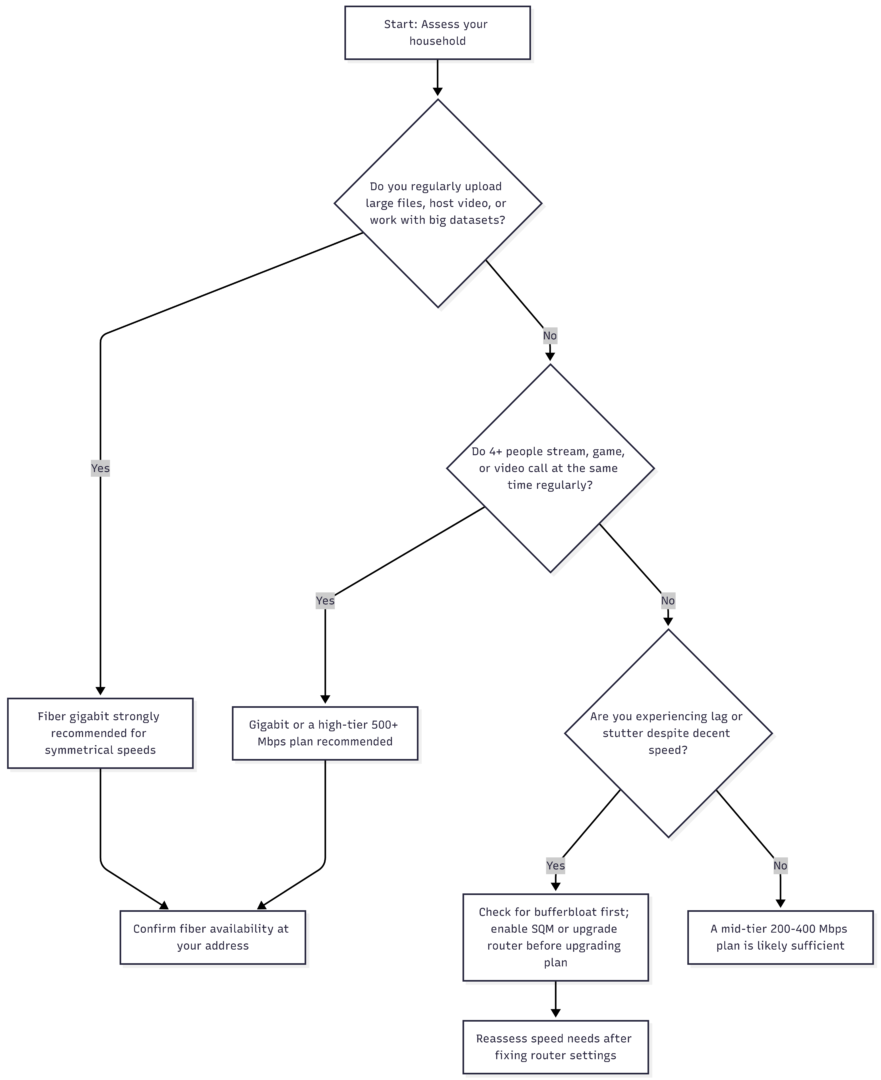
Decision Flow: Do You Need Gigabit Internet?
Setting Up Your Home for Gigabit Speeds
Buying a gigabit plan doesn’t automatically mean every device in your home experiences gigabit speeds. A few practical requirements matter:
- Wired connections (Ethernet) will always outperform Wi-Fi for hitting true gigabit speeds on a single device.
- Wi-Fi 6 or Wi-Fi 6E routers are necessary to approach gigabit speeds wirelessly; older Wi-Fi 5 hardware caps out well below that.
- Mesh Wi-Fi systems help distribute strong signal evenly across larger homes, preventing dead zones where speeds drop dramatically.
- Network cards and device hardware matter too — some older laptops and smart TVs have network adapters that can’t physically exceed a few hundred Mbps, regardless of the plan you’re paying for.
- Router placement — centralizing the router and minimizing interference from walls, appliances, and other electronics meaningfully improves real-world speeds.
Benefits of Gigabit Internet in Practice
Faster downloads and updates. Large game installs, software updates, and file downloads that once took hours complete in minutes.
Smoother 4K and multi-stream entertainment. Multiple people can stream high-resolution video simultaneously without one stream stealing bandwidth from another.
Reliable remote work performance. Video conferencing, large file uploads to shared drives, and cloud-based collaboration tools run without the lag spikes common on lower-tier plans during peak household usage.
Better performance for smart home and security devices. Connected cameras, video doorbells, and sensors all draw on shared bandwidth; a gigabit connection handles a growing number of these devices without degrading other activity.
Low-latency online gaming. While gaming itself doesn’t require gigabit bandwidth, a well-provisioned connection reduces the chance that someone else’s download or stream introduces lag into a competitive match.
Who Doesn’t Need Gigabit Internet?
Not every household benefits from paying for the top tier. If your home has one or two people who mostly browse, stream in HD (not 4K), and occasionally video call, a mid-tier plan in the 200–400 Mbps range will likely feel identical day to day, at a noticeably lower monthly cost. The main scenarios where gigabit stops being worth it: minimal simultaneous device usage, no large recurring uploads, and no plans to add multiple bandwidth-heavy smart home devices.
Gigabit Internet and Home Security Systems
One benefit that often gets overlooked is how gigabit bandwidth supports the growing number of connected security devices in modern homes. Video doorbells, indoor and outdoor cameras, motion sensors, and smart locks all maintain a constant or near-constant connection to send alerts, store footage, and stream live video on demand.
Individually, these devices don’t need much bandwidth — but they add up quickly in a household running six, eight, or more of them at once, especially if footage is uploaded continuously to cloud storage rather than a local hub.
A connection with ample headroom means these background processes won’t compete with a video call or a large file upload at the exact moment it matters. This is especially relevant for anyone using their home network for both work and home security monitoring simultaneously, since a dropped or lagging camera feed at the wrong moment can matter just as much as a dropped work call.
Making the Final Decision
Before committing to a gigabit plan, it’s worth running a quick audit: count the number of devices active in your home at peak times, note whether anyone regularly uploads large files or hosts video calls for work, and check your router’s age and Wi-Fi standard. If the numbers point to heavy simultaneous use or frequent large uploads, gigabit — ideally over fiber — is the safer long-term choice. If usage is lighter, a mid-tier plan paired with a properly configured router will likely deliver a nearly identical experience for less money each month.
Ultimately, the “right” speed tier isn’t about chasing the biggest number available. It’s about matching bandwidth to how a household actually uses its connection, while leaving enough headroom that no single activity — a big download, a video call, a security camera upload — ever competes with another for the same limited pipe.
Frequently Asked Questions
No. Gigabit refers to the speed tier (1,000 Mbps), while fiber refers to the type of infrastructure delivering it. Gigabit speeds can be delivered over both fiber and cable networks, though fiber typically offers symmetrical upload and download speeds while cable does not.
Pricing varies by provider, region, and promotional offers, but gigabit plans generally fall in the $60–$100+ per month range, sometimes with equipment or installation fees added.
Most remote work tasks — video calls, cloud tools, file sharing — run comfortably on 25–100 Mbps. Gigabit mainly helps households with multiple simultaneous remote workers, frequent large file transfers, or heavy household bandwidth competition.
This is frequently caused by bufferbloat, outdated router hardware, weak Wi-Fi coverage, or device-level limitations rather than insufficient plan speed. Checking for bufferbloat and upgrading router hardware often resolves the issue without needing a faster plan.
Symmetrical speeds mean uploads and downloads perform equally fast, which fiber connections typically offer. Asymmetrical speeds, common on cable networks, provide fast downloads but much slower uploads, which can bottleneck video calls, cloud backups, and large file uploads.
Yes. A properly configured gigabit connection with modern router hardware can comfortably support numerous simultaneous 4K streams, video calls, gaming sessions, and smart home devices without noticeable performance loss.
Gigabit internet isn’t a requirement for every household, but for anyone doing serious remote work, managing multiple heavy internet users, or wanting a long runway before their connection feels outdated, it remains the most reliable way to guarantee speed won’t be the bottleneck in your day.
Please share this The 20 Most Popular Bible Verses with your friends and do a comment below about your feedback.
We will meet you on next article.
Until you can read, Why working from home should be standard practice