3 Steps To Successful Remote Meetings
Remote meetings have become a cornerstone of modern work, enabling teams to collaborate across geographies and time zones. As remote work continues to dominate, mastering the art of virtual meetings is critical for fostering productivity, engagement, and meaningful outcomes. Unlike in-person meetings, remote gatherings come with unique challenges—technical glitches, distractions, and the absence of nonverbal cues can derail discussions. However, with careful planning and execution, virtual meetings can be just as effective, if not more so, than their in-person counterparts.
This guide outlines three essential steps—preparation, execution, and follow-up—to ensure your remote meetings are productive, inclusive, and engaging. We’ll also explore best practices, tools, and strategies to address common challenges and elevate your virtual collaboration. Whether you’re a team leader, remote worker, or digital nomad, this article will equip you with actionable insights to make your remote meetings a success.
Why Remote Meetings Matter?
The shift to remote work has transformed how teams communicate. According to data from job listing platforms, remote-friendly job postings have surged, with over 50% of listings in recent years offering remote options, compared to just 20% previously. This trend underscores the growing reliance on virtual meetings to maintain team alignment and drive collaboration.
However, remote meetings are often plagued by inefficiencies. A poorly planned meeting can waste time, frustrate participants, and lead to unclear outcomes. Common pain points include technical issues, lack of engagement, and meetings that could have been emails. To address these, organizations must adopt a structured approach to virtual meetings, focusing on clear objectives, participant engagement, and actionable follow-ups.
Step 1: Preparation—Setting the Stage for Success
Preparation is the foundation of any successful remote meeting. Without a clear plan, meetings can quickly become disorganized and unproductive. Here’s how to prepare effectively:
Define the Purpose and Necessity
Before scheduling a meeting, ask yourself: Is this meeting necessary? Many discussions can be handled asynchronously through email, collaborative documents, or tools like Slack or Notion. Reserve meetings for situations requiring real-time interaction, such as brainstorming, decision-making, or team-building.
- Actionable Tip: Use the “Two-Pizza Rule” inspired by Jeff Bezos. Limit meetings to the number of people who can be fed by two pizzas (typically 6–10 participants) to ensure focused discussions and active participation.
Select the Right Participants
Invite only those who are essential to the meeting’s objectives. Overcrowding a meeting with unnecessary attendees can dilute focus and reduce productivity. Consider each participant’s role and how they contribute to the agenda.
- Actionable Tip: Create a participant list with clear roles (e.g., presenter, decision-maker, note-taker) to streamline contributions.
Choose the Right Time and Platform
Scheduling a meeting across time zones requires careful consideration. Tools like World Clock Meeting Planner can help identify a time that works for most participants. For example, if your team spans Sydney and New York, avoid scheduling meetings at inconvenient hours like 4 AM for either group.
Selecting the right platform is equally critical. Popular options include:
| Platform | Key Features | Best For | Price |
|---|---|---|---|
| Zoom | Video conferencing, screen sharing, breakout rooms | Large team meetings, webinars | Free (basic); $14.99–$19.99/month (pro) |
| Microsoft Teams | Integration with Office 365, file sharing | Corporate teams, document collaboration | Free (basic); $5–$12.50/user/month |
| Google Meet | Seamless Google integration, easy access | Small to medium teams | Free; $6–$18/user/month (Google Workspace) |
| Krisp | AI noise cancellation, transcription, notes | Noise-free meetings, detailed summaries | Free (basic); $8–$12/month |
- Actionable Tip: Test the platform’s features (e.g., screen sharing, chat, recording) before the meeting to avoid technical hiccups.
Craft a Detailed Agenda
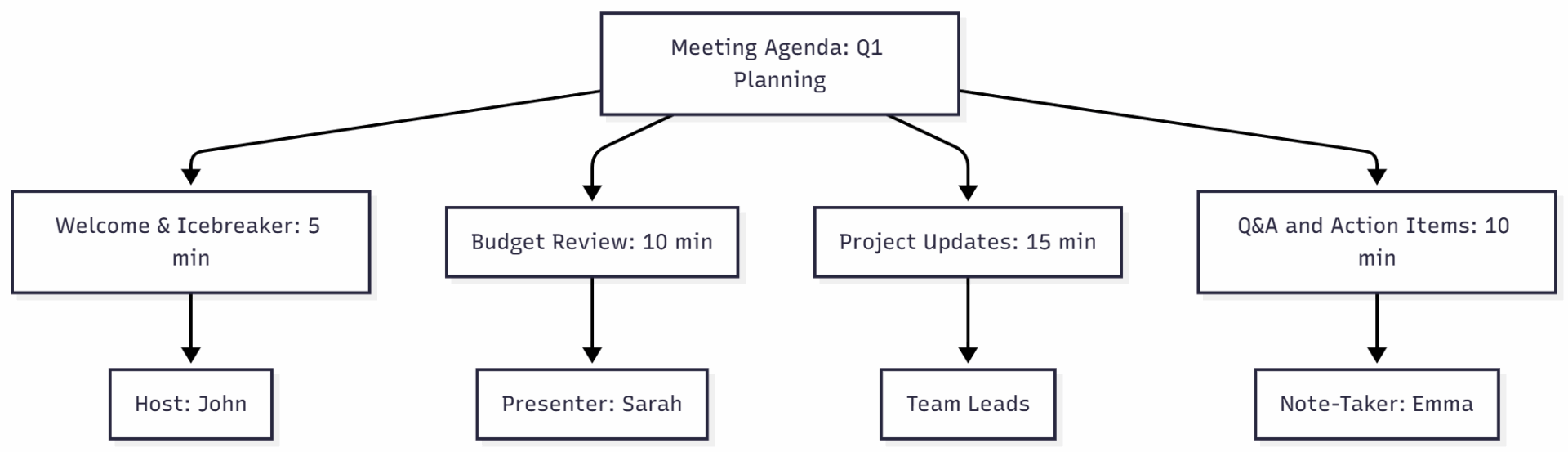
A well-structured agenda keeps the meeting on track and ensures all participants are prepared. Include:
- Meeting objectives (e.g., “Decide on Q1 marketing budget”).
- Key discussion points with time allocations (e.g., “Budget review: 10 minutes”).
- Assigned roles (e.g., host, note-taker, timekeeper).
- Relevant materials or pre-reading.
Here’s an example agenda in a chart format for clarity:
- Actionable Tip: Share the agenda at least 48 hours in advance to allow participants to prepare talking points or questions.
Set Ground Rules
Establish virtual meeting etiquette to maintain professionalism and engagement. Common rules include:
- Test technology (camera, microphone, Wi-Fi) before joining.
- Mute microphones when not speaking to minimize background noise.
- Avoid multitasking or distractions (e.g., checking emails).
- Use a quiet, well-lit space with a professional background.
- Actionable Tip: Include etiquette guidelines in the meeting invite or remind participants at the start of the call.
Plan for Engagement
Start the meeting with an icebreaker to build rapport, especially for teams that rarely meet in person. Examples include asking participants to share their current mood via emojis or a quick update about their day.
- Actionable Tip: Use tools like Mentimeter or Slido for interactive polls or icebreakers to kick off the meeting.
Step 2: Execution—Running a Seamless and Engaging Meeting
The success of a remote meeting hinges on how it’s conducted. A well-executed meeting keeps participants engaged, adheres to the agenda, and achieves its objectives.
Start on Time and Set the Tone
Punctuality signals respect for participants’ time. If you’re the host, log in 5–10 minutes early to admit participants and troubleshoot any issues. Begin with a warm welcome, addressing participants by name and allowing brief introductions or updates to foster connection.
- Actionable Tip: Use a “silent start” where participants review the agenda or key documents for 2–5 minutes to align everyone.
Follow the Agenda
Stick to the planned timeline and agenda to maintain focus. If discussions veer off-topic, gently redirect the conversation. Assign a timekeeper to monitor progress and ensure each section stays within its allocated time.
- Actionable Tip: Phrase agenda items as questions (e.g., “How can we optimize our Q1 campaign?”) to encourage problem-solving and engagement.
Encourage Participation
Remote meetings can feel impersonal, making it easy for participants to disengage. Foster interaction by:
- Asking open-ended questions to spark discussion.
- Using collaborative tools like digital whiteboards (e.g., Miro, Mural) for brainstorming.
- Incorporating breakout sessions for smaller group discussions.
- Encouraging use of the chat function for quick questions or feedback.
Here’s a breakdown of engagement tools:
| Tool | Purpose | Key Features | Price |
|---|---|---|---|
| Miro | Virtual whiteboard, collaboration | Real-time collaboration, templates | Free (basic); $8–$16/user/month |
| Mural | Brainstorming, visual collaboration | Sticky notes, voting, timers | Free (basic); $12–$20/user/month |
| Slido | Polls, Q&A, engagement | Live polls, quizzes, analytics | Free (basic); $6–$50/month |
| Mentimeter | Interactive presentations, polls | Real-time responses, word clouds | Free (basic); $11.99–$24.99/month |
- Actionable Tip: Rotate the meeting chair role to give team members leadership opportunities and keep meetings dynamic.
Manage Distractions and Technical Issues
Distractions like background noise or multitasking can disrupt the flow. Encourage participants to use tools like Krisp for noise cancellation. If technical issues arise, have a backup plan (e.g., switch to audio-only or reschedule).
- Actionable Tip: Dedicate the last 5 minutes to a “tech-free” discussion to reduce screen fatigue and encourage open dialogue.
Wrap Up Effectively
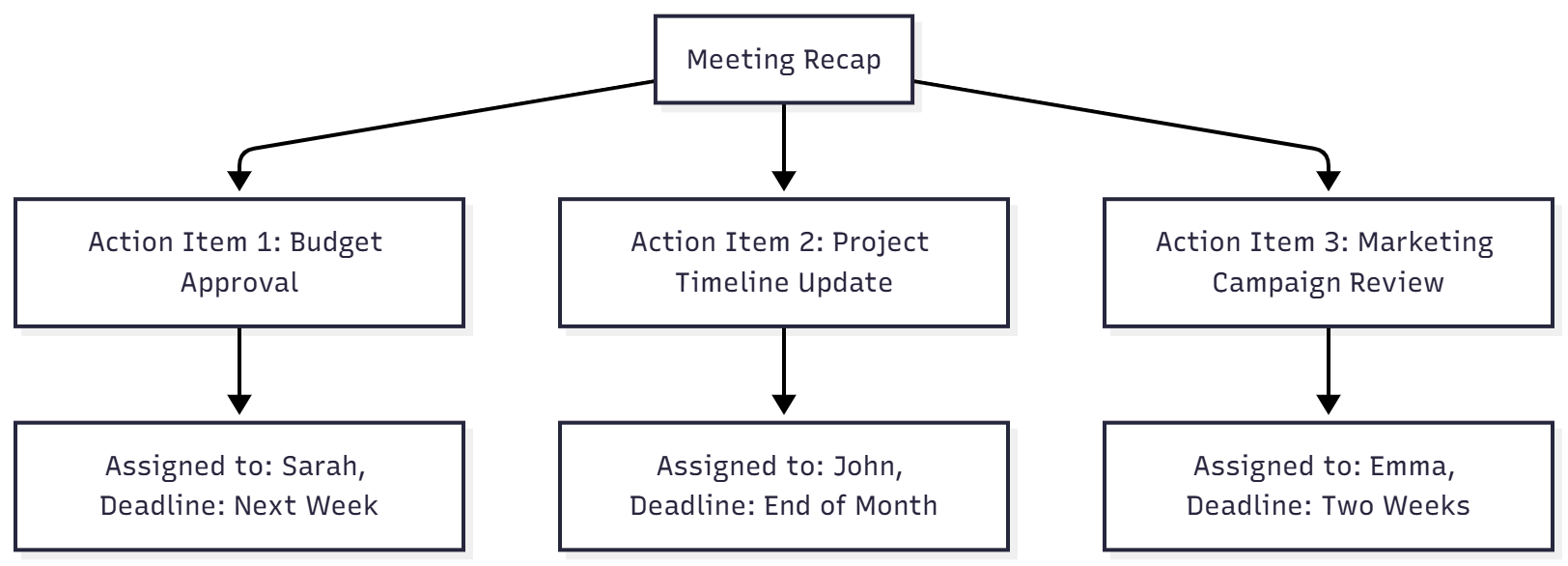
End the meeting with a clear summary of decisions, action items, and deadlines. Confirm the note-taker will circulate minutes and announce the date for the next meeting, if applicable. Allow time for questions to clarify responsibilities.
- Actionable Tip: Use a visual recap on a shared whiteboard to summarize action items, as shown in this chart:
Step 3: Follow-Up—Ensuring Accountability and Continuous Improvement
The work doesn’t end when the meeting does. Effective follow-up ensures that decisions are implemented and lessons are learned for future meetings.
Circulate Meeting Minutes
The note-taker should compile and share minutes within 24 hours, highlighting key discussions, decisions, and action items. Store minutes in a centralized location (e.g., Notion, Google Drive) for easy access.
- Actionable Tip: Use Krisp’s AI meeting assistant to generate automatic transcriptions and summaries, reducing manual note-taking.
Assign and Track Action Items
Clearly outline tasks, deadlines, and responsible parties in the follow-up email. Use project management tools like Asana, Trello, or Monday.com to track progress.
Here’s a sample action item table:
| Task | Assigned To | Deadline | Status |
|---|---|---|---|
| Finalize Q1 budget | Sarah | Next Week | In Progress |
| Update project timeline | John | End of Month | Not Started |
| Review marketing campaign | Emma | Two Weeks | In Progress |
- Actionable Tip: Schedule brief check-ins to monitor progress on critical tasks.
Collect Feedback
Encourage participants to share feedback on the meeting’s effectiveness, format, and engagement level. Use tools like Google Forms or Slido to gather anonymous input.
- Actionable Tip: Ask specific questions, such as “What worked well?” and “How can we improve the next meeting?”
Plan for the Next Meeting
If the meeting is part of a recurring series, confirm the next date and time. Share a draft agenda early to allow participants to suggest topics.
- Actionable Tip: Reassess the need for recurring meetings regularly. If the agenda is empty, cancel the meeting to respect participants’ time.
Overcoming Common Challenges in Remote Meetings
Remote meetings present unique hurdles that can undermine their effectiveness. Here are the top challenges and how to address them:
1. Technical Issues: Unstable internet, platform glitches, or audio problems can disrupt meetings.
- Solution: Test technology in advance and have a backup plan (e.g., phone dial-in, alternative platform).
2. Distractions: Household interruptions or multitasking can reduce focus.
- Solution: Enforce etiquette rules and use noise-canceling tools like Krisp.
3. Communication Barriers: Lack of nonverbal cues can lead to misunderstandings.
- Solution: Encourage clear verbal communication and use video to enhance connection.
4. Meeting Fatigue: Back-to-back video calls can cause burnout.
- Solution: Keep meetings concise (25–50 minutes) and schedule breaks.
5. Lack of Social Interaction: Remote meetings lack the casual bonding of in-person settings.
- Solution: Incorporate icebreakers, virtual coffee chats, or themed backgrounds (e.g., favorite vacation spots).
Best Practices for Remote Meetings
To elevate your remote meetings, adopt these proven strategies:
- Embrace Asynchronous Communication: Use tools like Loom or Yac for information sharing to reduce meeting frequency.
- Leverage Documentation: Store agendas, minutes, and action items in a transparent database like Notion for easy access.
- Experiment with Formats: Try async video updates, Slack standups, or email threads to replace unnecessary meetings.
- Limit Meeting Duration: Cap meetings at 25 minutes with a 5-minute buffer to avoid fatigue.
- Foster Inclusivity: Ensure introverts and remote workers have equal opportunities to contribute.
Tools to Enhance Remote Meetings
Investing in the right tools can transform your remote meetings. Here are top recommendations:
- Video Conferencing: Zoom, Microsoft Teams, Google Meet.
- Collaboration: Miro, Mural, Microsoft Whiteboard.
- Scheduling: Calendly, Google Calendar, Rally.
- Note-Taking: Krisp, Hugo, Evernote.
- Hardware: Meeting Owl (360° camera, $999), Jamboard (interactive whiteboard, $4,999), high-speed Wi-Fi routers ($100–$300).
For example, Krisp’s AI-powered features, such as noise cancellation and automatic transcription, ensure clear communication and accurate records, priced at $8–$12 per month for premium plans.
Conclusion
Remote meetings are more than a necessity—they’re an opportunity to foster collaboration, drive innovation, and maintain team cohesion in a distributed world. By following the three steps—preparation, execution, and follow-up—you can transform virtual meetings into productive, engaging experiences. Embrace tools like Krisp, Miro, and Calendly to streamline processes, and adopt best practices like asynchronous communication and concise agendas to respect participants’ time.
As remote work continues to evolve, so must our approach to virtual meetings. By planning meticulously, engaging participants actively, and following up diligently, you can ensure your remote meetings deliver meaningful outcomes and strengthen team dynamics. Start implementing these strategies today, and watch your virtual collaboration soar.
Please share this 3 Steps To Successful Remote Meetings with your friends and do a comment below about your feedback.
We will meet you on next article.
Until you can read, Top 10 Online Side Investment Ideas for Digital Nomads