
How to Transition from Onsite To Remote Work
Transitioning from an onsite role to remote work is more than a logistics change — it restructures how you communicate, manage time, build relationships, and separate work from personal life.
Whether you are an individual making the shift on your own or a business moving an entire team to a distributed model, the principles are the same: establish clear structure, invest in the right tools, and be deliberate about every habit that the office once handled automatically.
Why the Transition Requires Active Planning
In a physical office, the environment does a lot of invisible work. Your commute primes your brain to focus. A supervisor’s presence provides natural accountability. Overhearing colleagues keeps you in the loop without effort. Lunchbreaks happen because coworkers leave for them.
Remote work strips all of that away. Without active planning, remote workers commonly experience boundary erosion, isolation, difficulty managing time, and a creeping sense that they are always at work because they never truly leave it. A structured approach prevents these outcomes.
Step-by-Step Transition Checklist
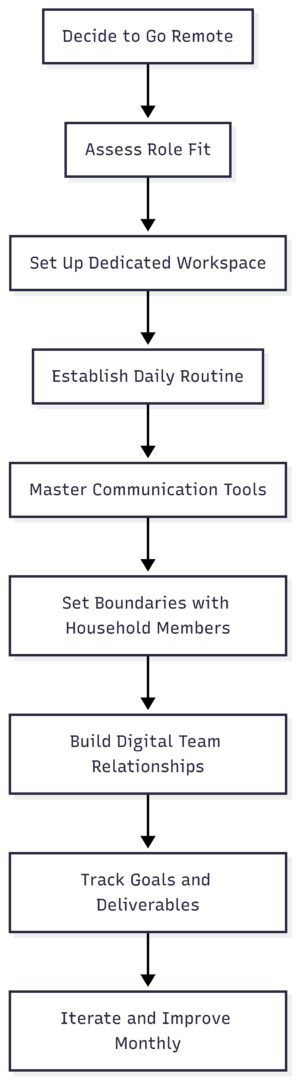
1. Assess Whether Your Role Fits Remote Work
Before building your home setup, evaluate which parts of your current job can be done remotely and which may require adaptation.
| Task Type | Remote Feasibility | Notes |
|---|---|---|
| Documentation and writing | High | Fully software-based |
| Meetings and presentations | High | Video conferencing replaces in-person |
| Data analysis | High | Cloud tools handle large datasets |
| Client consultations | Medium | VoIP and video work well for most |
| Physical deliverables or lab work | Low | Requires on-site presence |
| Hands-on training or mentorship | Medium | Requires deliberate virtual structure |
If 70% or more of your weekly tasks can be executed digitally, your role is well-suited for remote work. If significant portions depend on physical equipment, materials, or in-person client interaction, a hybrid model — some days remote, some on-site — is likely the better fit.
2. Build a Dedicated Home Workspace
One of the most consistent findings from remote workers is that workspace quality directly affects productivity and mental health. Working from a couch or bed blurs the psychological line between rest and work, making it harder to focus during hours and harder to decompress after.
Core workspace requirements:
| Element | Minimum | Recommended |
|---|---|---|
| Chair | Adjustable with lumbar support | Ergonomic (Herman Miller, Secretlab, Branch) |
| Desk | Stable flat surface at elbow height | Height-adjustable standing desk |
| Monitor | Single 24″ display | Dual 27″ monitors |
| Internet | 50 Mbps | 200 Mbps+ (fiber preferred) |
| Headset | Basic with mic | Noise-cancelling (e.g., Jabra Evolve2, Bose 700) |
| Webcam | 720p built-in | 1080p external (e.g., Logitech C920) |
| Lighting | Natural window light | Ring light or key light for video calls |
Place the workspace away from high-traffic areas — not adjacent to the kitchen, television, or your bed. The physical separation reinforces a mental one. When you leave your desk at the end of the day, that act signals to your brain that work is over.
3. Establish a Daily Routine
The commute you are eliminating served a purpose beyond transportation — it was a transitional ritual that told your brain when work began and ended. Without it, you need to create substitute rituals.
Morning routine structure for remote workers:

Getting dressed — even casually — before sitting at your desk is a small signal with a measurable psychological effect. It tells your brain the workday has started. Similarly, a “shutdown ritual” at the end of the day (closing tabs, writing tomorrow’s task list, turning off work notifications) prevents the blur into evening.
Experienced remote workers consistently recommend setting hard start and stop times and protecting them. Overworking is as common a problem as underworking in remote environments.
4. Master Your Digital Communication Tools
In an office, proximity substitutes for communication. You see a colleague is busy, you wait. You need a quick answer, you walk over. Remote work removes all of that ambient awareness — which means communication must become far more deliberate and frequent than it was in person.
Core tool categories and recommended platforms:
| Category | Tools | Best For |
|---|---|---|
| Team messaging | Slack, Microsoft Teams | Real-time chat, quick questions, async updates |
| Video conferencing | Zoom, Google Meet, Teams | Meetings, presentations, 1:1s |
| Project management | Asana, Trello, ClickUp, Monday.com | Task tracking, deadlines, team visibility |
| Document collaboration | Google Workspace, Notion, Confluence | Shared documents, knowledge bases |
| File storage | Google Drive, Dropbox, SharePoint | Cloud file access and sharing |
| Time tracking | Clockify, Toggl, Hubstaff | Billing, productivity monitoring, focus |
| Security | NordVPN, 1Password, Duo Security | VPN, password management, MFA |
Communication principles for remote workers:
Overcommunication is not a negative in remote environments — it is the baseline. Post status updates before anyone has to ask. Flag blockers early. Send a brief end-of-day summary when working on high-stakes projects. Use the right channel for the right message: urgent questions via chat, longer decisions via a document or email thread, tone-sensitive conversations via video.
Response time expectations should be agreed upon explicitly. In a well-functioning remote team, the unwritten assumption is that chat messages receive a response within a few hours during working hours — not instantly, and not after days.
5. Set Boundaries with Household Members
If you share your home with a partner, children, roommates, or family members, they need to understand that physical presence in the house during working hours does not mean availability. This conversation is not a one-time discussion — it requires ongoing reinforcement, especially in the early weeks.
Practical approaches include:
- A closed door as a universal signal for “do not disturb”
- Shared calendar visibility so household members know your meeting times
- Designated break windows communicated in advance when interruptions are welcome
- Noise-cancelling headphones as both a focus tool and a visible indicator of concentration
If young children are in the home, remote work without childcare is exceptionally difficult to sustain at full capacity. Many experienced remote workers with young children maintain some form of childcare even while working at home.
6. Manage Isolation and Build Team Culture Remotely
Isolation is among the most commonly cited challenges of remote work. The solution is not to recreate the office virtually — it is to build intentional, lighter-weight touchpoints that maintain human connection without simulation overhead.
Practical tactics:
- Schedule a weekly virtual coffee with one colleague — not about work
- Use video for meetings where camera-off has become the default; seeing faces matters
- Create a Slack channel for non-work topics (hobbies, local news, sports)
- Recognize colleagues’ contributions publicly in shared channels
- Participate in virtual team-building when offered, even if it feels awkward
For those working 100% remotely and feeling isolated, coworking spaces are an underutilized resource. A coworking membership (typically $150–$400/month depending on location and access level) provides office infrastructure, professional community, and a physical separation from the home environment for those who need it.
7. Prioritize Tasks and Manage Time Without Supervision
Remote work shifts accountability from visibility to output. Nobody is watching you work — what matters is whether you deliver. This is liberating for self-directed workers and challenging for those who relied on external structure.
Time management approaches that work for remote workers:
- Time blocking — Reserve specific calendar slots for deep focus, meetings, and administrative work. Protect focus blocks by declining non-essential meeting requests during those windows.
- Pomodoro method — Work in 25-minute focused intervals separated by 5-minute breaks. After four intervals, take a 20–30 minute break. This prevents attention fatigue over a long day.
- Weekly priority setting — Every Monday, list the three to five outcomes that must be achieved by Friday. Every other task is secondary. This prevents urgency from crowding out importance.
- Daily shutdown ritual — Write tomorrow’s top three tasks before closing your laptop. The act of writing them reduces the mental overhead of carrying them into the evening.
8. Set Up the Right Equipment and Keep It Updated
Reliable hardware is non-negotiable. An internet outage, a crashing laptop, or a broken webcam during an important client call are not just inconveniences — they are professional liabilities.
Remote work equipment checklist:
- Primary computer capable of running work software without performance issues
- Backup internet source (mobile hotspot is a practical contingency)
- UPS (uninterruptible power supply) if power reliability is a concern
- External webcam and noise-cancelling microphone for client-facing roles
- VPN client and active subscription if handling sensitive data
- Password manager with all work credentials
- Updated operating system and security patches
Ask your employer about equipment stipends. Many companies that support remote work provide a one-time setup allowance ($500–$2,000 is common) or reimburse ongoing costs like a portion of internet service.
9. Transitioning a Business from Onsite to Remote
For managers and business owners leading an organizational shift to remote work, the challenges extend beyond individual habit change.
Key steps for business transition:
Audit role suitability first. Not every position translates to remote work cleanly. Assess each role against its daily collaboration requirements, technology needs, and client interaction patterns before deciding on fully remote, hybrid, or on-site designation.
Create a formal remote work policy that defines:
- Core working hours (e.g., 10 AM–3 PM overlap for all time zones)
- Communication channels and expected response times
- Performance measurement approach (deliverables, not time)
- Security requirements (VPN usage, approved devices, data handling)
- Feedback mechanisms for employees to flag issues
Build a structured onboarding process for new remote hires with a day-one, first-week, and first-month milestone plan. Assign a peer mentor — not just a manager — to answer informal questions and communicate cultural norms.
Measure outcomes, not activity. Time tracking has its place in billing contexts, but using monitoring software to prove remote workers are at their desks produces resentment without improving results. Track project deliverables, deadline adherence, and quality instead.
Remote Hiring Platforms (for Businesses)
| Platform | Best For | Cost |
|---|---|---|
| We Work Remotely | Developers, designers, marketers | Free to browse; paid to post |
| FlexJobs | Multi-industry flexible roles | Subscription-based for job seekers |
| Remote OK | Global remote job seekers | Pay-per-post for employers |
| Toptal | Top 3% freelancers in tech/design | Premium; vetted talent |
| Hubstaff Talent | Freelance and contract roles | Free for employers |
| AngelList (Wellfound) | Startup and tech remote hiring | Free to post |
Measuring Remote Work Success
Success in remote work cannot be determined by who is online the most. The relevant indicators are:
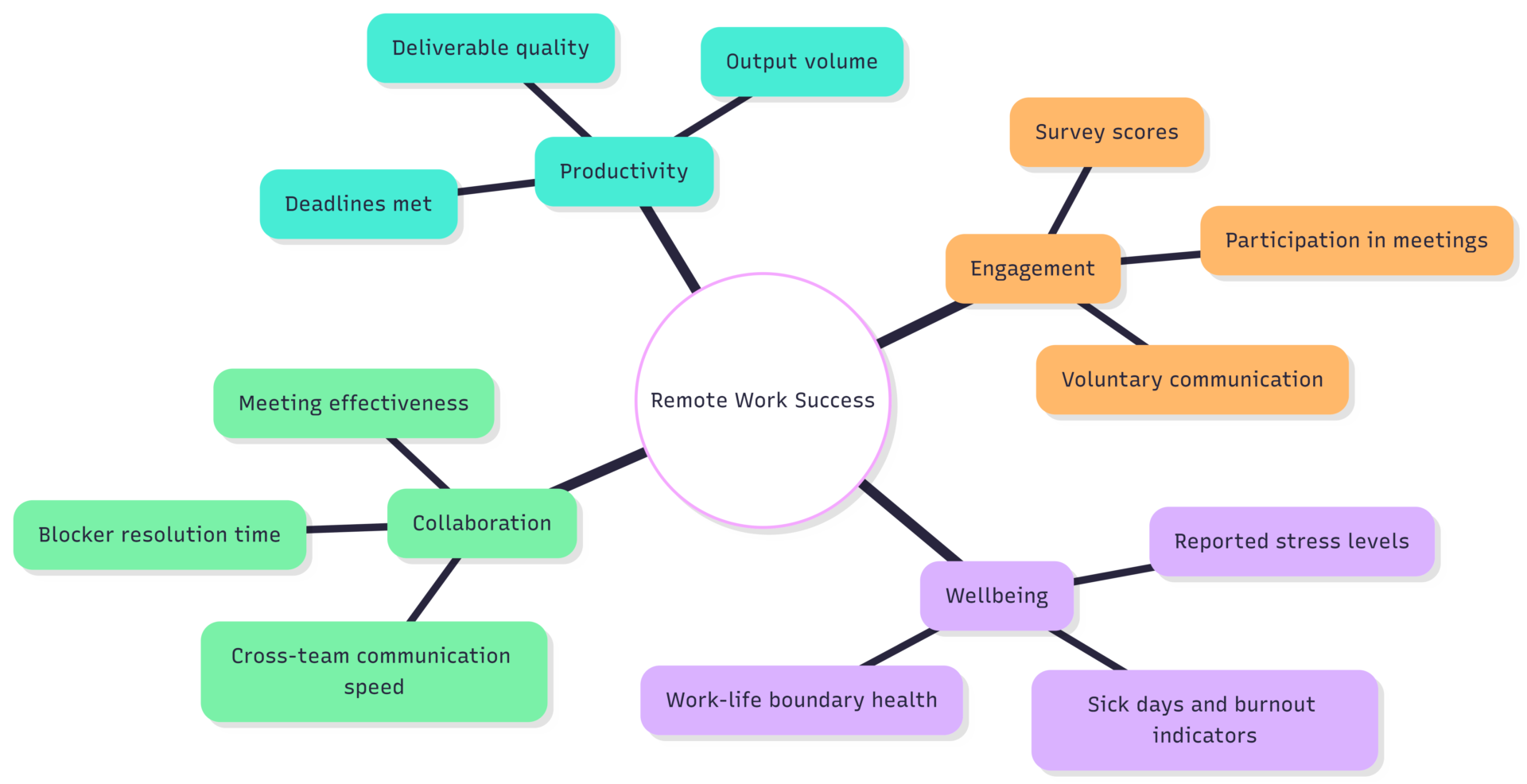
Schedule regular one-on-one check-ins that go beyond task updates — ask directly about workload, challenges, and satisfaction. Use anonymous pulse surveys quarterly to surface issues that employees may not raise in direct conversation. Iterate on policy when feedback reveals friction.
FAQs
Most workers find their rhythm within four to eight weeks. The first two weeks are typically the most disorienting as habits that the office enforced automatically need to be rebuilt deliberately.
Neither is objectively harder — they are structurally different. Remote work requires stronger self-discipline, communication initiative, and boundary-setting. Office work requires more tolerance for interruption, commute costs, and schedule rigidity.
Yes, but with more intentional support. Early-career workers miss the informal learning that happens by proximity to experienced colleagues. Companies with strong remote onboarding, peer mentorship programs, and frequent video touchpoints can compensate for this — but it requires deliberate effort.
Working from wherever they happen to be — couch, bed, kitchen table — without a dedicated space. The absence of a designated workspace makes it nearly impossible to create the psychological separation between work and rest that sustains long-term productivity.
Not necessarily. Compensation depends on the employer, role, and location. Some companies offer location-adjusted pay that reduces compensation for remote workers in lower cost-of-living areas; others maintain flat rates regardless of location. Clarify the policy before accepting a remote arrangement.
The transition from onsite to remote work rewards those who treat it as a design problem. The office was an environment engineered to support work — commute, schedule, physical presence, peer accountability. Remote work requires you to engineer those conditions yourself. Do that well, and the flexibility and focus gains that remote work offers become real and sustainable.
Please share this How to Transition from Onsite To Remote Work with your friends and do a comment below about your feedback.
We will meet you on next article.
Until you can read, What is the definition of remote work?