
Top AI Skills You Need to Get a Remote Job
AI skills are no longer reserved for engineers. In this era, they are the baseline expectation for remote professionals across every discipline — marketing, administration, customer support, content, project management, and beyond. Employers reviewing remote candidates are actively filtering for people who can use AI tools to work independently, produce high-quality output, and reduce operational drag on distributed teams.
This guide covers the exact AI skills that matter, why generalists with AI knowledge win remote hiring, and how to build these abilities without a technical background.
Why AI Skills Are Non-Negotiable for Remote Work
Remote work eliminates the passive oversight of a physical office. That means remote workers must self-manage, communicate clearly, and maintain output quality without constant supervision. AI tools support all three — but only if you know how to use them effectively.
Research consistently shows that AI-augmented professionals significantly outperform peers who work without it. One study found generative AI can boost a skilled worker’s performance by nearly 40% compared to non-users. Yet surveys indicate more than half of workers feel unprepared to use AI at work. That gap is an opportunity.
For remote hiring specifically, AI literacy signals:
- Digital self-sufficiency — you can solve problems without hand-holding
- Productivity at scale — you can handle workloads that previously required a team
- Adaptability — you embrace tools that evolve, rather than resist them
Employers building distributed teams need versatile, self-directed people. AI skills are the fastest credible signal of both.
Technical vs. Practical AI Skills: What Employers Actually Want
A common misconception is that AI roles require coding or machine learning expertise. For the vast majority of remote positions, that is false.
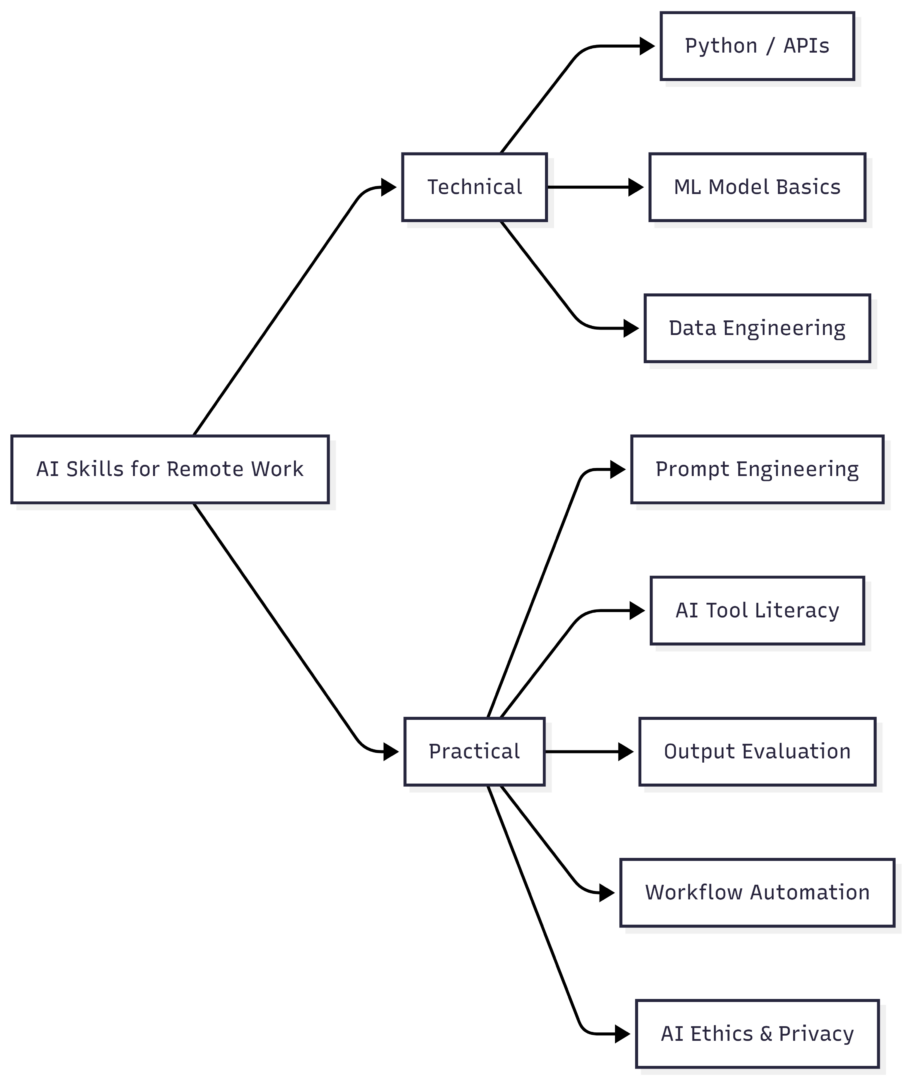
| Skill Type | Required For | Technical Barrier |
|---|---|---|
| Prompt Engineering | Most remote roles | Low |
| AI Tool Literacy | All roles | Low |
| Output Evaluation | Writing, research, analysis | Low |
| Workflow Automation (no-code) | Ops, admin, marketing | Low–Medium |
| Data Literacy | Analytics, reporting | Medium |
| Python / Coding | Engineering, data science | High |
| ML / Model Training | AI/ML specialist roles | Very High |
The top five rows account for the majority of remote AI job requirements in 2026. You do not need the bottom two to compete for most positions.
The 10 Core AI Skills for Remote Jobs
1. Prompt Engineering
Prompt engineering is the ability to write instructions that produce accurate, useful AI outputs consistently. It is the most universally applicable AI skill across all roles and tools.
A weak prompt produces generic output. A strong prompt produces work you can actually use.
What it involves:
- Setting context, role, and tone before asking for output
- Defining format constraints (e.g., bullet points, tables, word counts)
- Iterating and refining based on output quality
- Using system-level instructions for consistency across sessions
Example: Instead of “write a product description,” a skilled prompt looks like: “You are a senior copywriter for a B2B SaaS product. Write a 100-word product description for a project management tool targeting remote teams. Tone: confident, clear, no jargon.”
The output difference is significant — and the skill gap between professionals who can engineer prompts well and those who cannot is closing fast.
2. AI Tool Literacy
Knowing which tools exist and how to use them within your specific workflow is a distinct, practical skill. The AI tooling landscape is large, and knowing what to reach for — and when — separates effective AI users from overwhelmed ones.
| Category | Example Tools | Use Case |
|---|---|---|
| Writing & Content | ChatGPT, Claude, Gemini | Drafting, editing, summarising |
| Productivity & Automation | Zapier, Make, n8n | Workflow automation, app integration |
| Research & Analysis | Perplexity, NotebookLM | Summarising documents, extracting insights |
| Meeting Intelligence | Otter.ai, Zoom AI Companion | Transcription, action items, summaries |
| Visual Content | Canva AI, Midjourney, Runway | Graphics, images, short video |
| Data & Reporting | Power BI, Tableau AI | Dashboards, data interpretation |
| No-Code Development | Bubble, Glide, Softr | Simple apps and internal tools |
You do not need expertise in every category. Know the tools relevant to your role deeply, and maintain awareness of adjacent categories.
3. Critical Output Evaluation
AI models hallucinate. They produce confident-sounding content that is factually incorrect, biased, or contextually wrong. The ability to evaluate AI output critically is one of the most valuable safety skills in any remote role.
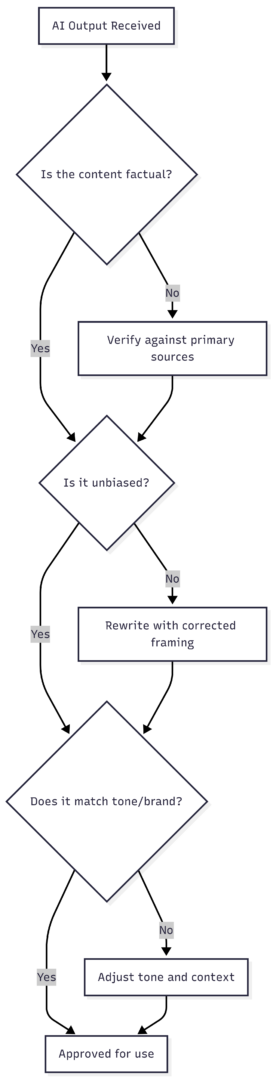
Skills within output evaluation:
- Fact-checking numbers, statistics, and links against primary sources
- Detecting robotic, generic, or overly hedged language
- Identifying potential bias in tone, representation, or framing
- Knowing when AI output requires human expert review
4. Workflow Automation and Integration
Remote work runs on processes. The ability to automate repetitive steps — routing emails, summarising reports, categorising tickets, updating records — saves hours per week and reduces errors.
No-code tools like Zapier, Make, and n8n allow non-technical users to connect applications and build automated workflows without writing code. When paired with AI capabilities, these automations become significantly more powerful.
Common automation scenarios for remote workers:
- Auto-summarise meeting transcripts and send to Slack
- Route client emails to the correct CRM category using AI classification
- Generate weekly status reports from task management data
- Trigger follow-up emails based on project milestones
Understanding the logic of automation — triggers, conditions, actions — is a transferable skill across any tool in this category.
5. Meeting and Context Synthesis
Distributed teams generate large volumes of asynchronous communication — recorded calls, Slack threads, email chains, shared docs. The ability to extract signal from that noise using AI tools is a high-value remote work skill.
AI meeting assistants generate transcripts, highlight action items, and surface relevant timestamps automatically. Internal knowledge bases allow employees to query company documents directly, reducing back-and-forth communication.
Key abilities here:
- Using AI to generate structured meeting notes with clear action items
- Querying internal documents using AI-powered search
- Synthesising multiple threads into a single coherent brief
- Reducing time spent rewatching or re-reading asynchronous content
6. Data Literacy and AI-Supported Analytics
You do not need to be a data scientist. You do need to understand what data means, how to read dashboards, and how to ask the right questions of AI-powered analytics tools.
Data literacy for remote workers includes:
- Interpreting reports and trend visualisations
- Identifying anomalies or gaps in datasets
- Communicating data-driven insights to stakeholders
- Validating AI-generated predictions against business context
Tools like Power BI, Google Looker, and AI-enhanced spreadsheet functions have lowered the barrier significantly. The skill is increasingly in the interpretation, not the computation.
7. Generative Content Skills
Writing, image creation, and multimedia production are now AI-assisted by default in most content, marketing, and communications roles. Knowing how to use generative tools — and how to edit and refine their output — is a core practical requirement.
This includes:
- Writing with AI assistance while maintaining brand voice
- Using image generation tools for content and presentations
- Editing AI drafts to sound human, specific, and accurate
- Producing content at higher volume without sacrificing quality
8. AI Ethics and Data Privacy
Understanding what can and cannot be shared with AI tools is non-negotiable in professional settings. Feeding confidential client data, proprietary business information, or sensitive employee records into public AI models creates legal and compliance risks.
Key areas to understand:
- Which data is safe for public AI tools vs. enterprise-only environments
- Copyright implications of AI-generated text, code, and images
- Bias recognition and responsible use of AI in hiring, customer decisions, and communications
- Your organisation’s specific AI usage policy
Remote workers often operate with less direct oversight, which makes individual AI ethics awareness more important, not less.
9. No-Code AI Development
Building simple internal tools — chatbots, form processors, content pipelines — using no-code platforms is increasingly within reach for non-developers. This skill is especially valuable for virtual assistants, operations roles, and team leads managing remote processes.
Platforms like Bubble, Glide, and Voiceflow allow users to build functional AI-enabled applications without writing code. Understanding the logic behind how these tools connect is a significant career differentiator.
10. Continuous Learning and Adaptability
AI tooling evolves faster than any certification can track. The most durable AI skill is the discipline to keep learning — experimenting with new tools, following developments in the space, and updating your workflows as better options emerge.
Professionals who embrace learning as an ongoing practice, rather than a one-time investment, consistently outperform those who rely on fixed expertise.
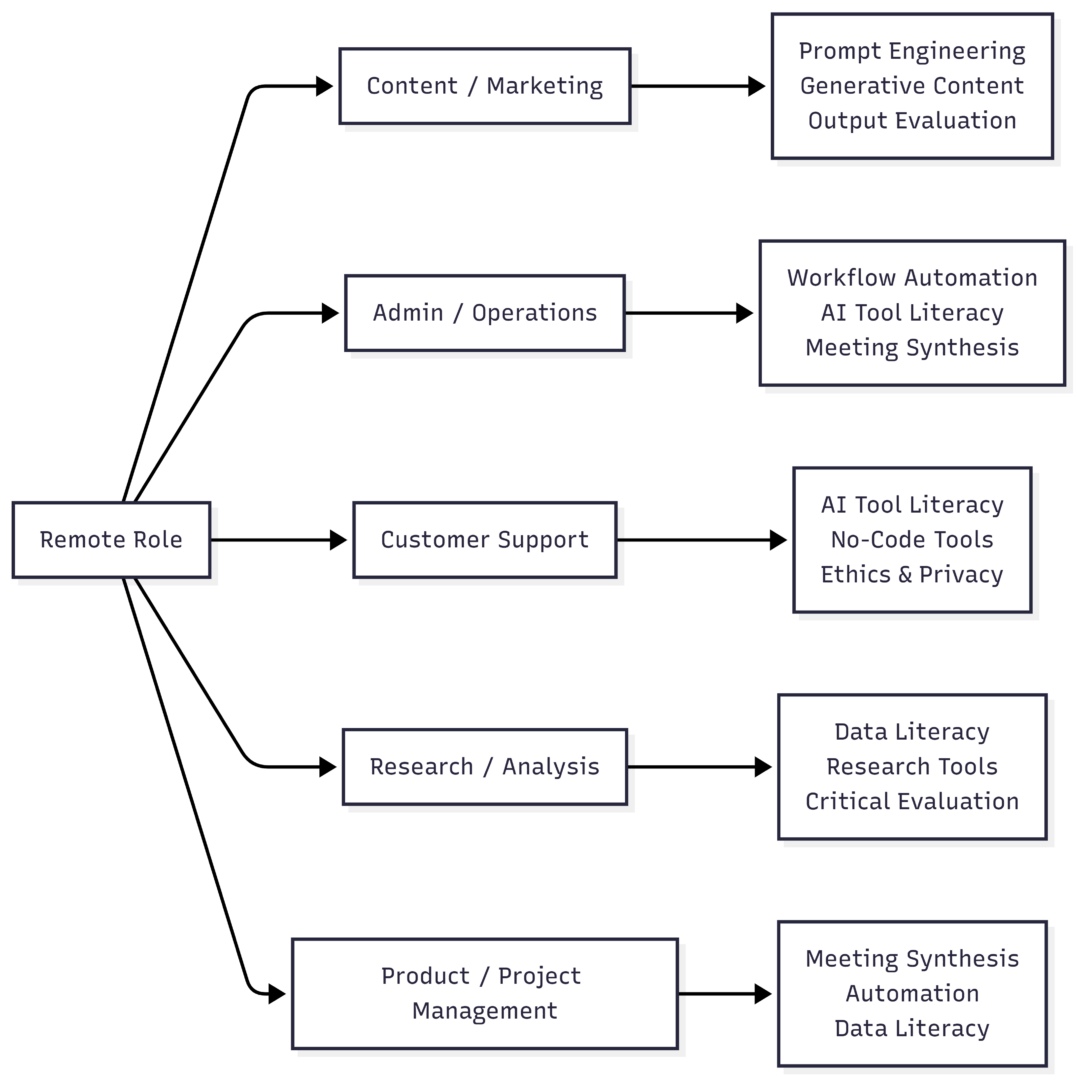
Skills Priority by Remote Role Type
How to Build These Skills Without a Technical Background
The fastest path is consistent, practical use — not theory. Start with one tool relevant to your current role and use it daily. The learning compounds quickly.
Beginner starting path:
- Pick one AI writing or productivity tool (ChatGPT, Claude, Gemini)
- Use it for a real task daily — emails, summaries, drafts, research
- Learn to write structured prompts by testing variations
- Add one automation tool (Zapier or Make) once comfortable
- Progress to data tools or no-code platforms based on your role
Free learning resources:
- OpenAI Prompt Engineering Guide (free)
- AI for Everyone by Andrew Ng on Coursera (audit free)
- Google’s AI Essentials course (free)
- Zapier’s automation guides (free)
- YouTube channels covering n8n, Make, and no-code workflows
You do not need a certification to demonstrate AI skills. A portfolio of small, real projects — an automated workflow you built, a piece of content you improved with AI, a process you documented — carries more weight.
FAQs
No. Most remote roles require practical AI skills, not programming. Prompt engineering, automation, and AI-assisted workflows require zero coding knowledge.
Prompt engineering. It is the foundation of effective AI use across every tool and every role.
Virtual assistant, content writer, social media coordinator, research assistant, customer support specialist, marketing coordinator, and administrative support roles all actively value AI literacy.
List specific tools and concrete outcomes. “Used Claude and Zapier to automate weekly report generation, saving 4 hours per week” is far stronger than “familiar with AI tools.”
The more accurate picture is that remote workers who use AI effectively will replace those who do not. The advantage goes to professionals who treat AI as a collaborator, not a threat.
Conclusion
AI skills are a baseline requirement for remote work, not a specialist differentiator. Employers expect remote candidates to be independently productive, digitally capable, and able to leverage available tools — and AI is now central to all three.
The skills that matter most are not technical. Prompt engineering, tool literacy, output evaluation, workflow automation, and AI ethics are all learnable without a programming background. Start with what is relevant to your current role, use it on real tasks, and build from there. Professionals who combine these practical AI abilities with strong communication and critical thinking will be among the most employable remote workers in the market.
Please share this Top AI Skills You Need to Get a Remote Job with your friends and do a comment below about your feedback.
We will meet you on next article.
Until you can read, The 20 Most Popular Bible Verses About Patience