
How to Work From Home With a Baby
Working from home with a baby is one of the most demanding combinations a parent can manage. Unlike standard remote work — where discipline and a quiet space are the main requirements — working with an infant means building an entirely different kind of workday. One that is broken, flexible, and constantly adapting to a person who cannot communicate their needs in words.
This guide covers what actually works: scheduling strategies, workspace setup, essential gear, communication approaches, and the mental framework you need to sustain it long-term.
The Reality Before the Strategies
Babies do not follow corporate schedules. A newborn needs feeding every two to three hours. A four-month-old may nap twice a day or not at all. A nine-month-old learning to crawl is unpredictable by definition.
The first adjustment is expectation. You will not have eight uninterrupted hours of focused work. Your day will be broken into work blocks measured in minutes, not hours. That is not failure — that is the baseline. Everything else is optimisation around it.
Build Your Schedule Around Your Baby’s Patterns
The single most effective strategy for working from home with a baby is scheduling around their natural rhythms rather than fighting them.
Spend one week tracking your baby’s daily patterns before attempting to fix a work schedule:
- When do they wake?
- How long are their nap windows?
- When are they calmest and most independent?
- When are they fussiest?
Most babies have predictable daily arcs even if individual days vary. Use this data to assign your work tasks to the windows that match the required focus level.
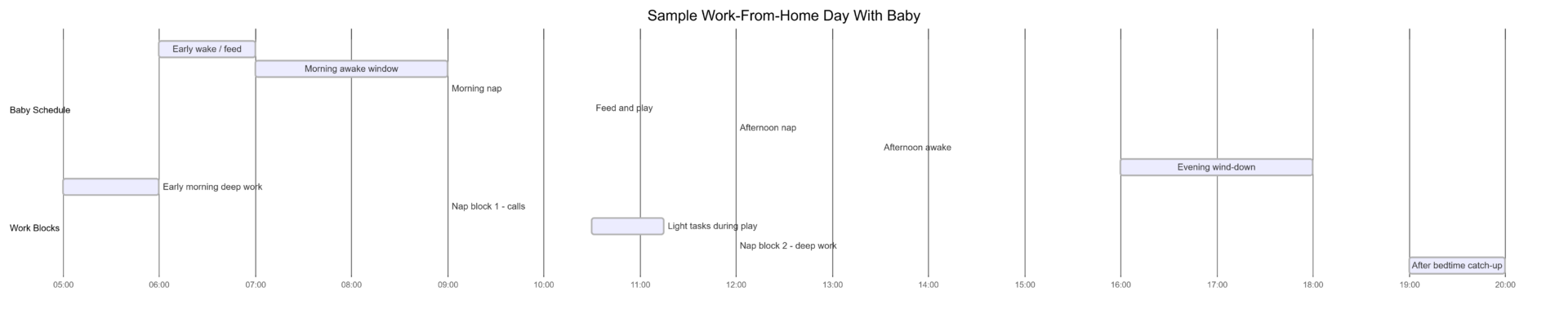
Deep focus tasks (writing, analysis, complex projects) → nap blocks and early morning before baby wakes
Light tasks (email, admin, scheduling, file organisation) → awake and calm windows when you can maintain partial attention
Calls and meetings → second nap or first nap if predictable, or scheduled with a partner taking over
Match Task Type to Available Time
The biggest productivity mistake when working with a baby is trying to do deep work in unpredictable windows. You lose the task setup time if the baby wakes early, and the frustration compounds.
| Work Window | Baby State | Best Tasks |
|---|---|---|
| Early morning (pre-wake) | Sleeping | Deep focus: writing, analysis, coding |
| Nap block (predictable) | Sleeping | Calls, meetings, structured projects |
| Calm awake window | Playing nearby | Email, admin, light review tasks |
| Feeding or wearing | Semi-occupied | Reading, research, voice notes |
| Evening post-bedtime | Asleep | Catch-up, planning, low-stakes tasks |
| Fragmented moments | Unpredictable | Quick replies, task prioritisation |
The goal is to stop attempting the wrong type of work in the wrong window. Five focused minutes on the right task outperforms twenty frustrated minutes on the wrong one.
Set Up a Baby-Friendly Workspace
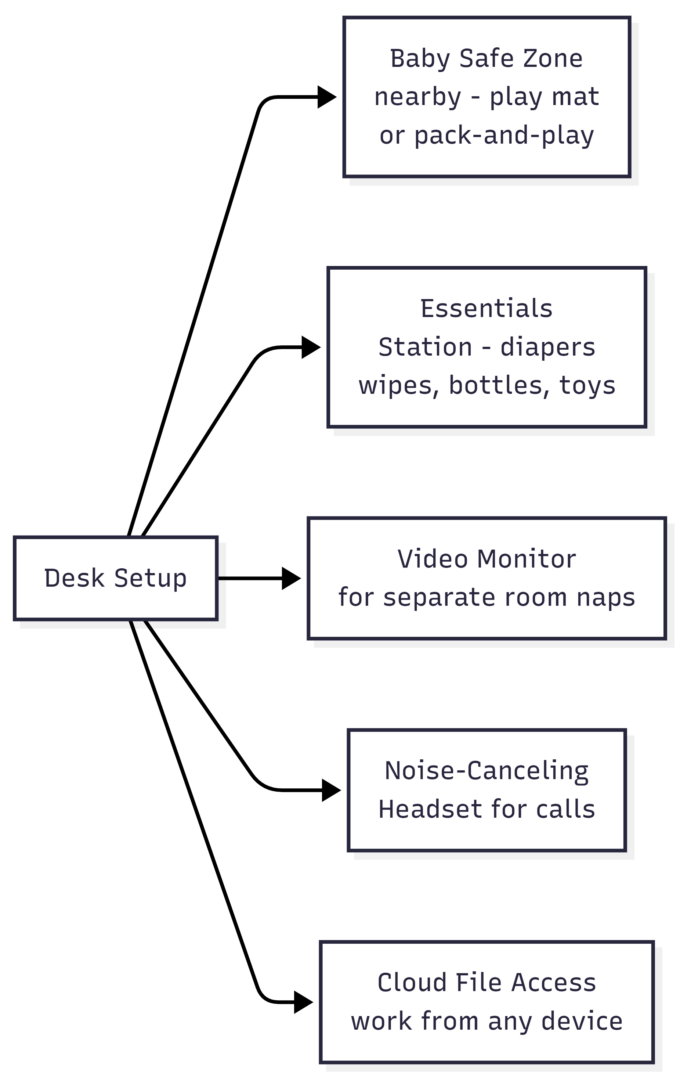
Your physical setup determines how long you can stay productive before needing to fully disengage from work. A workspace designed around baby access reduces friction significantly.
Core setup elements:
- Safe zone near your desk — a play mat, bouncer, or pack-and-play within eyeline. Babies often settle longer when they can see you.
- Essentials within arm’s reach — diapers, wipes, a bottle, and a few rotating toys at your desk. Every trip away from your desk breaks momentum.
- Baby monitor with video — if your baby sleeps in another room, a monitor with mobile access lets you stay aware without constant physical checks.
- Standing desk or desk-height surface — makes baby-wearing while working significantly easier.
Baby-Wearing as a Productivity Tool
Ergonomic baby carriers are one of the most practical tools for work-from-home parents of infants. Many babies are content when worn and unsettled when set down — the carrier eliminates that variable entirely.
With a properly fitted carrier, you can:
- Stand at a desk and type
- Read documents or take notes
- Attend passive meetings or listen to recordings
- Move around the house without breaking the baby’s calm state
What works well while wearing: reading, light typing, research, phone calls, standing desk tasks
What does not work well: video calls (the movement is distracting), tasks requiring full concentration, anything requiring both hands at a level other than desk height
Carriers vary significantly in suitability for extended work use. Structured carriers with lumbar support are better for multi-hour wear than ring slings.
| Carrier Type | Best For | Work Compatibility |
|---|---|---|
| Structured buckle carrier | Extended wear, older infants | High — hands free, stable |
| Stretchy wrap | Newborns, closeness | Medium — good for typing, tiring long-term |
| Ring sling | Quick carries, nursing | Low — one shoulder, limited for extended use |
| Soft-structured backpack | Older babies, back carry | High — good weight distribution |
Manage Noise During Professional Calls
Background noise from a baby during a call is manageable with the right tools. The goal is not to pretend the baby does not exist — it is to ensure audio quality does not become a problem.
Hardware: Noise-canceling Bluetooth headsets (Sony WH-1000XM5, Jabra Evolve2 series, Apple AirPods Pro) use beamforming microphones that reduce ambient sound significantly. Approximate price range: $100–$350 depending on model.
Software: Tools like Krisp or NVIDIA RTX Voice run as audio filters between your microphone and your call application. They remove background noise including baby sounds in real time. Krisp offers a free tier with limited hours; the paid plan is approximately $8–$16/month.
Scheduling: For high-stakes calls where audio quality cannot be variable — important client calls, presentations, performance reviews — arrange for a partner, family member, or sitter to take over during that specific window. One hour of childcare cover for a critical meeting is worth arranging.
Communicate Early and Honestly With Your Employer or Clients
The second biggest mistake after poor scheduling is managing up poorly. Attempting to appear fully available when you are not creates stress, missed expectations, and eventual credibility problems.
If employed:
- Discuss your adjusted availability with your manager before issues arise, not after
- Request that standing meetings be scheduled during your reliable work windows
- Focus the conversation on output and deliverables rather than hours online
- Flag deadline conflicts proactively rather than discovering them day-of
If freelancing:
- Build buffer time into project timelines during the infant period
- Set clear turnaround expectations at project start
- Avoid overbooking — two well-executed projects are better than four late ones
- Communicate delays early; clients respond better to early notice than last-minute scrambling
You do not need to share detailed personal information. A simple “I work flexible hours and am most reliably available between [windows]” is sufficient. Most reasonable employers and clients value honesty and consistent delivery over performing a 9-to-5 facade.
Partner Scheduling: Shift-Based Childcare
If you have a partner at home, whether working or not, coordinated shifts are significantly more effective than both parents attempting to work and parent simultaneously.
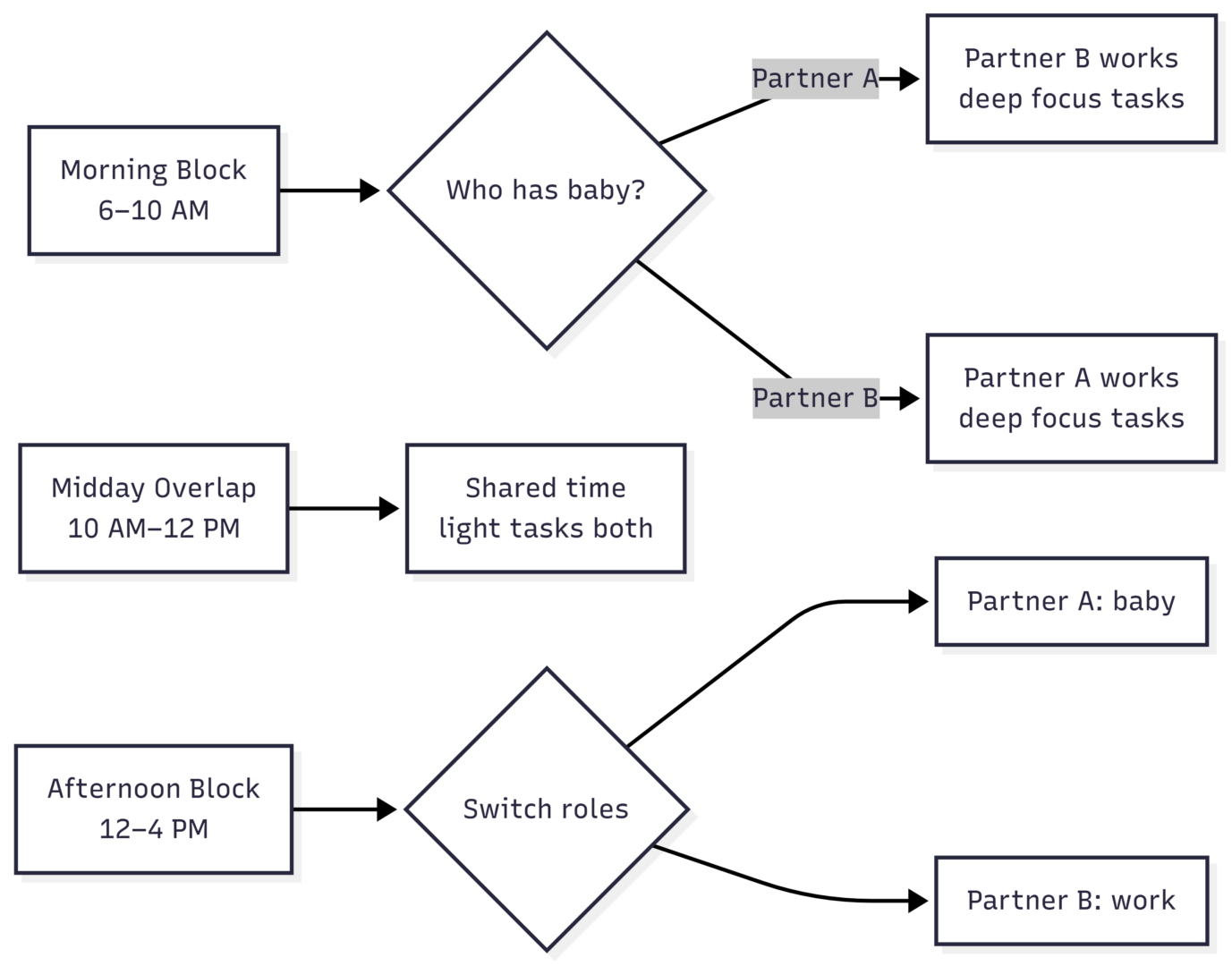
Even two uninterrupted hours per day significantly reduces the cognitive load compared to constant interruption. Assign “coverage hours” and respect them — the parent on childcare duty is fully on baby duty; the parent on work duty is fully on work.
Essential Gear Checklist
| Item | Purpose | Approx. Cost |
|---|---|---|
| Ergonomic baby carrier | Hands-free baby care while working | $60–$200 |
| Pack-and-play / playpen | Safe zone in home office | $80–$200 |
| Noise-canceling headset | Professional call quality | $100–$350 |
| Noise-filtering software (Krisp) | Remove background audio on calls | Free–$16/month |
| Video baby monitor with app | Monitor napping baby remotely | $50–$200 |
| White noise machine | Extend nap duration | $25–$60 |
| Bouncer or swing | Self-settling during work windows | $60–$200 |
| Cloud storage (Google Drive, Dropbox) | Access work from any device | Free–$10/month |
Total estimated setup: $475–$1,200 depending on items already owned and quality tier selected.
Build Sustainable Systems, Not Perfect Days
No system survives a sleep regression intact. Teething, growth spurts, illness, and developmental leaps will periodically disrupt any schedule you establish. The parents who sustain remote work through the infant period are not the ones with the perfect system — they are the ones who adapt quickly and lower the bar when necessary.
On difficult days:
- Identify the two or three tasks that genuinely must be done and do only those
- Move non-critical deadlines before the day becomes unmanageable, not after
- Accept that the baby’s needs take precedence on bad days and catch up when the window opens
On good days:
- Use unexpected calm windows to get ahead on future deadlines
- Batch similar tasks to reduce task-switching overhead
- Resist the urge to do household tasks in work windows — that time is finite
When to Add Outside Help
Working from home with a baby is not an alternative to childcare — it is a supplementary arrangement for roles that allow flexibility. For most parents, some level of additional support significantly improves both work quality and parenting presence.
Options by commitment level:
| Option | Time Commitment | Cost Range | Best For |
|---|---|---|---|
| Part-time babysitter | 10–20 hours/week | $15–$25/hour | Reliable deep work windows |
| Mother’s helper | 2–4 hours/day | $10–$18/hour | Nearby support without full care |
| Family support | Variable | Often free | Occasional coverage |
| Daycare (2–3 days/week) | Set days | $800–$2,000/month | Predictable full-day work blocks |
| Nanny share | Full or part-time | Lower than solo nanny | Cost-effective full coverage |
Even five to ten hours of weekly support creates predictable, protected work time that transforms productivity for the rest of the week.
FAQs
Schedule high-stakes calls during predictable nap windows, arrange partner coverage, or book a short childcare session specifically for that block. Krisp or similar noise-filtering tools handle most incidental background sounds.
Most parents find the no-childcare arrangement sustainable for several months, particularly in flexible or asynchronous roles. As the baby becomes more mobile and interactive, the need for dedicated childcare coverage typically increases.
The newborn phase (0–3 months) is paradoxically workable because of high sleep volume, though unpredictably timed. The 4–8 month window with more predictable nap schedules is often the most manageable for structured remote work.
Keep a running prioritised task list so you never spend your work window deciding what to do. Match task complexity to window length. Emails and file organisation in short windows; deep work only in nap blocks.
Conclusion
Working from home with a baby requires a fundamentally different approach to productivity — one built on short focused bursts, strategic scheduling, the right physical setup, and honest communication with the people depending on your output.
The goal is not to replicate a full office workday. It is to protect your highest-value work windows, match task types to available time, and build enough flexibility into your schedule to absorb the days when nothing goes to plan. With the right systems, the right gear, and realistic expectations, it is entirely sustainable — and for many parents, ultimately preferable to any alternative.
Please share this How to Work From Home With a Baby with your friends and do a comment below about your feedback.
We will meet you on next article.
Until you can read, AI Skills Every Remote Worker Should Learn in 2026