
5 Tips for Planning a Weekly Schedule as a Remote Worker
A well-structured weekly schedule is the single most effective tool a remote worker has. Without the external structure of a commute, an office, and visible colleagues, the workday expands or contracts unpredictably — leading to either overwork and burnout or scattered, low-output days. A deliberate weekly plan replaces those external pressures with internal architecture that you control.
These five tips address the full cycle of remote scheduling: from planning at the start of the week through daily execution, boundary-setting, break management, and the digital tools that hold it all together.
Tip 1: Do a Weekly Brain Dump and Prioritize Before Monday Starts
The biggest scheduling mistake remote workers make is starting Monday without a plan. When your inbox and Slack messages determine your day’s direction, reactive work crowds out important work.
Set aside 20–30 minutes at the end of Friday or on Sunday to complete a weekly brain dump. Write down every task, project, deadline, meeting, and personal commitment you are aware of for the coming week — without filtering. Get it all out of your head and onto paper or a digital doc.
Then apply a three-step filter:
Eliminate — Cross out anything that is not actually necessary or that can be deferred without consequence.
Delegate — Identify tasks that can be handled by a colleague, contractor, or tool.
Prioritize — From what remains, identify your Big 3: the three tasks that, if completed by Friday, would make the week a clear success regardless of what else happened.
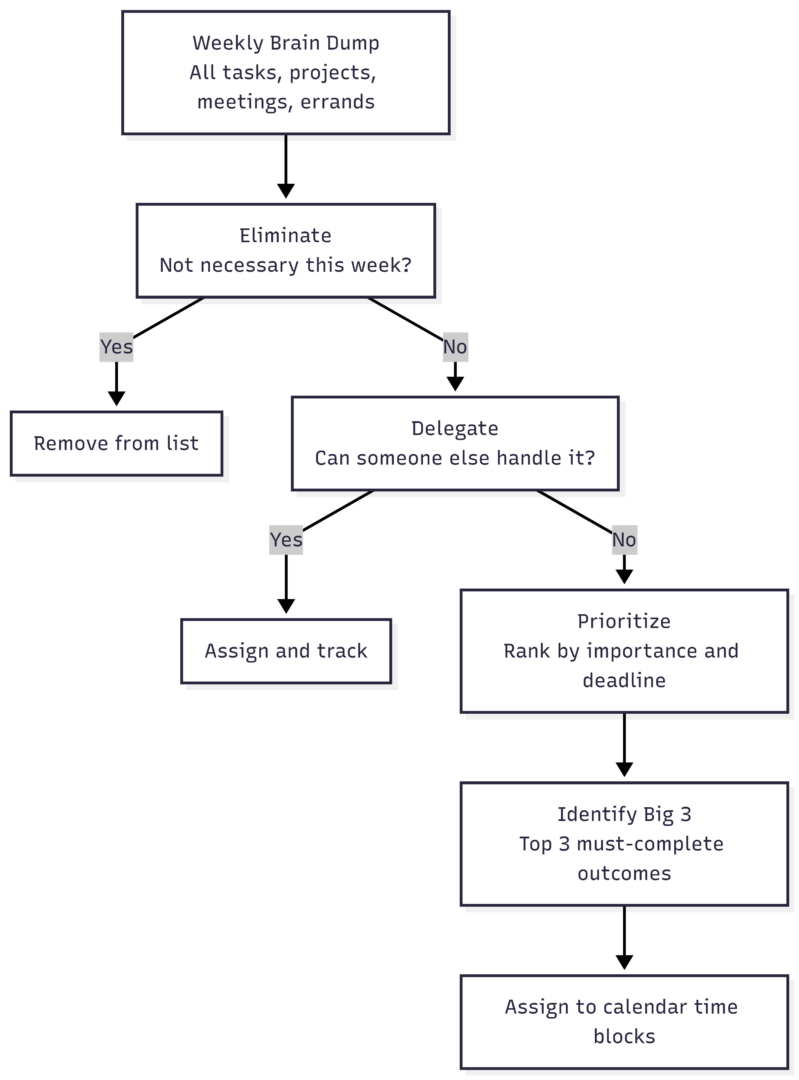
Assign hard deadlines to everything that remains. Self-imposed deadlines on tasks without external due dates are not optional — they are how you prevent low-urgency work from drifting indefinitely. The output of this session is a ranked task list and a clear sense of what success looks like for the week before it begins.
Tip 2: Time-Block Your Calendar Around Energy, Not Just Hours
Time blocking — assigning specific calendar windows to specific tasks — is the most effective scheduling technique for remote workers. It converts a to-do list from a wish list into a scheduled commitment.
The key principle most people miss: block by energy, not just by clock.
Identify your peak cognitive window — the hours when your focus is sharpest and your best thinking happens. For many people this is the first 2–3 hours of the workday. For others it is mid-morning or early afternoon. This window is sacred. Protect it for your most cognitively demanding work: writing, analysis, complex problem-solving, strategic thinking.
Sample weekly time-block structure:
| Time Slot | Activity Type | Example Tasks |
|---|---|---|
| First 60–90 min of day | Deep work block | Writing, analysis, complex projects |
| Mid-morning | Collaborative work | Meetings, client calls, team check-ins |
| Post-lunch (low energy) | Admin and shallow tasks | Emails, expense reports, scheduling |
| Late afternoon | Review and planning | Task reviews, end-of-day shutdown |
Batch similar tasks together. Replying to email three times a day in scheduled windows is dramatically more efficient than checking it constantly. The same applies to Slack messages, meeting follow-ups, invoicing, and any other task that requires the same cognitive mode. Batching reduces the mental cost of context-switching, which research consistently identifies as a major productivity drain.
Consolidate meetings. If possible, group all virtual meetings into one or two windows — for example, Tuesday and Thursday mornings — rather than allowing them to fragment every day. A meeting in the middle of a deep work block does not cost only the meeting time; it breaks focus before and recovery time after, often consuming two or three times its actual duration in lost productivity.
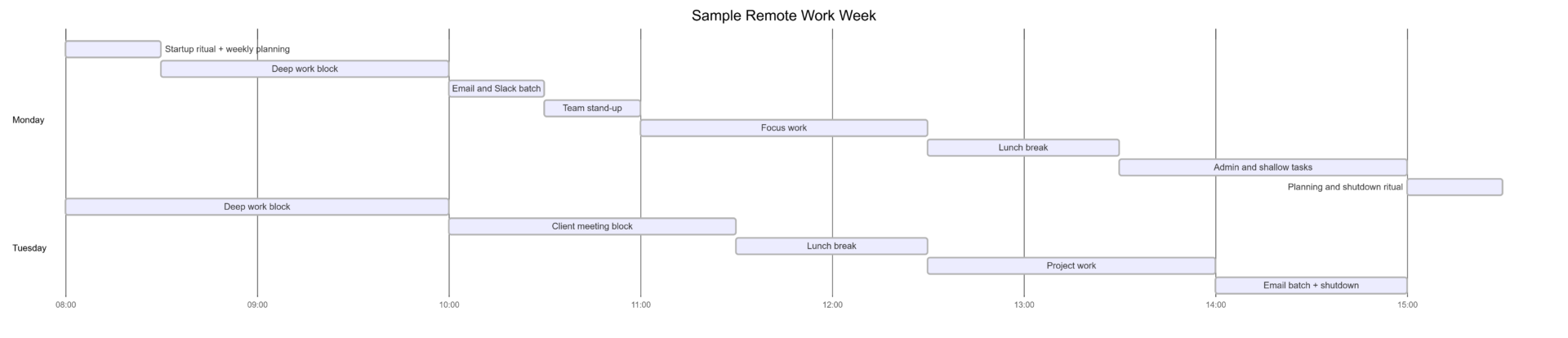
Leave buffer blocks between calendar items. A 10-minute gap before and after meetings gives you time to prepare, recover, and avoid the accumulated lateness that cascades through an overloaded day.
Tip 3: Schedule Breaks as Non-Negotiable Appointments
Remote workers share a common pattern: breaks shrink or disappear as workloads increase. This is the opposite of what physiology requires. Sustained mental output demands periodic recovery — not as a reward for finishing, but as a structural requirement for maintaining output quality.
Three types of breaks to schedule:
Micro-breaks (5–10 minutes every 60–90 minutes) — Stand up, walk around, refill water, look out a window. These interrupt visual fatigue and postural strain. The Pomodoro Technique formalizes this as 25-minute work intervals followed by 5-minute breaks, with a 20–30 minute break after every four cycles.
Lunch break (30–60 minutes, away from desk) — A proper lunch break is non-negotiable. Eating at a keyboard while working is not a break — it is a continuation of the workday with added food. Leave the workspace physically. Even a brief walk outside or a meal at a table away from screens produces measurable afternoon performance improvement.
Movement breaks (15–30 minutes, 1–2 times daily) — Scheduled physical movement — a walk, a gym session, a home workout — is one of the most effective cognitive reset tools available. Remote workers who walk during a midday break consistently report better afternoon focus than those who remain sedentary.
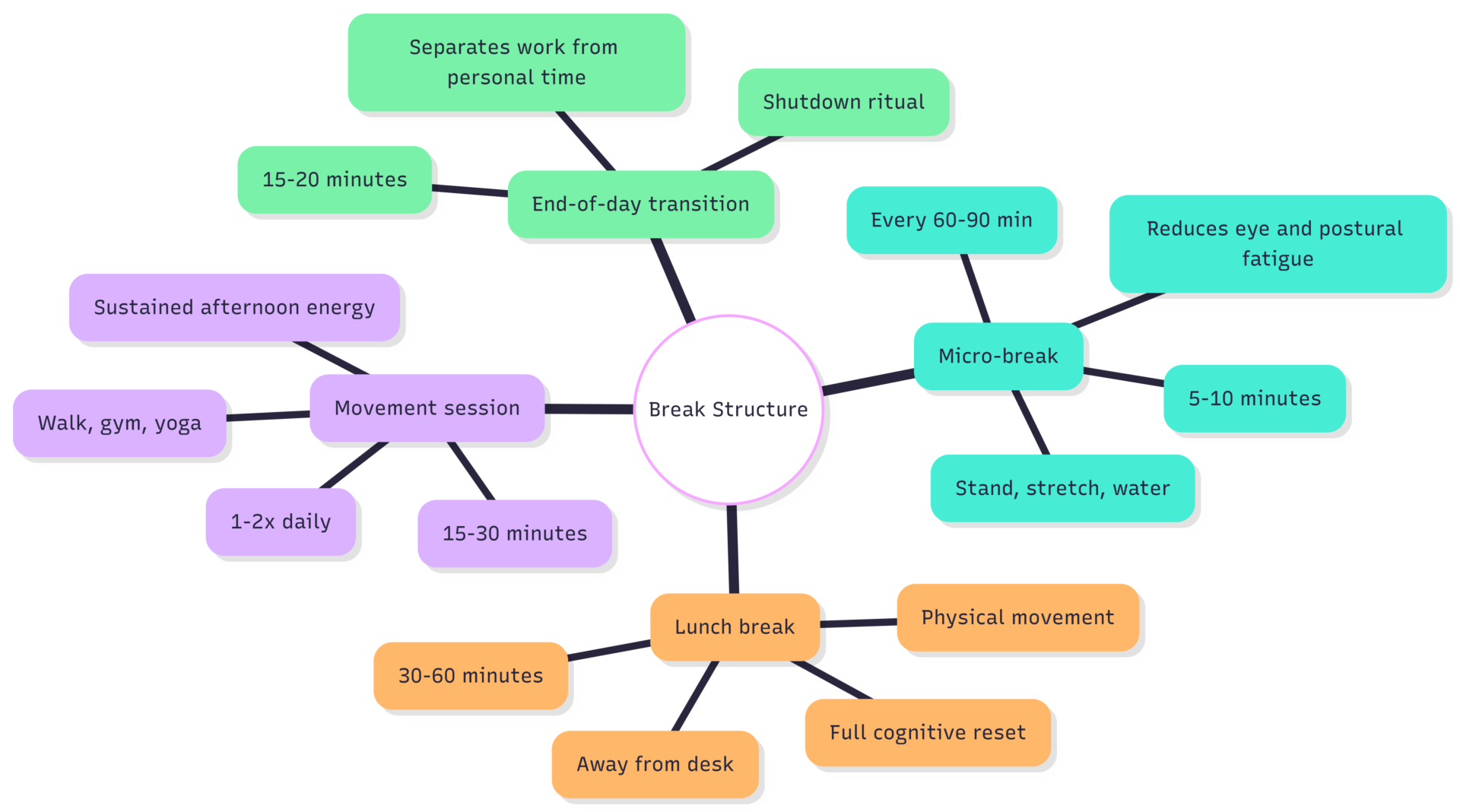
Treat scheduled breaks the same way you treat scheduled meetings: they are blocked time that you do not cancel on yourself. When breaks are not scheduled, the first thing that disappears when a deadline looms is rest — which is precisely when rest is most needed.
Tip 4: Build Strict Startup and Shutdown Rituals
In a conventional office, the commute does psychological work. The physical transition from home to office signals “work mode.” The reverse commute signals “rest mode.” Remote workers receive neither signal automatically.
Without substitute rituals, two failure patterns emerge: starting work late and drifting into the day unfocused, or working past a reasonable stop time because there is no environmental cue that the day is over.
Startup Ritual (15–20 minutes)
A morning startup ritual is a repeatable sequence that primes your brain for focus. It does not need to be elaborate. Effective examples include:
- Review your Big 3 for the day
- Open your calendar and confirm your time blocks
- Check for any urgent messages that require a response before deep work
- Make coffee or tea and sit at your desk intentionally
- Put on noise-cancelling headphones or a focus playlist
The sequence matters more than its specific contents. Repetition creates a conditioned association: when you do these things, your brain begins to shift into work mode.
Shutdown Ritual (15–20 minutes)
A shutdown ritual is the most underused tool for remote work-life balance. It formally closes the workday and reduces the background “open tabs” that keep your brain semi-engaged with work during personal time.
A complete shutdown ritual includes:
- Review what was completed against the day’s Big 3
- Write tomorrow’s task list and block the first priority into tomorrow’s calendar
- Close all work tabs and applications
- Turn off work notification channels (Slack, email, Teams)
- Physically step away from the workspace
Many experienced remote workers add a brief physical transition after shutdown — a walk, a gym session, or even simply changing clothes — to reinforce the psychological shift. Without a deliberate shutdown, remote workers average significantly more hours per week than in-office counterparts, with diminishing quality in the extra hours.
Tip 5: Choose and Configure the Right Digital Tools
Digital tools do not fix scheduling problems on their own — but poorly chosen or poorly configured tools create friction that erodes even the best plans. The right stack is small, integrated, and set up to support focus rather than interrupt it.
Core Tool Stack for Remote Schedule Management
| Category | Tool Options | Primary Use |
|---|---|---|
| Calendar | Google Calendar, Outlook Calendar | Time blocking, meeting scheduling |
| Task management | Asana, Trello, ClickUp, Notion | Task capture, priority tracking, project visibility |
| Team communication | Slack, Microsoft Teams | Async updates, quick questions, team coordination |
| Time tracking | Clockify, Toggl Track | Focus session tracking, billable hour recording |
| Focus timer | Forest, Be Focused, Pomofocus | Pomodoro intervals, distraction blocking |
| Note-taking / planning | Notion, Obsidian, Apple Notes | Weekly brain dumps, daily planning, reflection |
Critical Configuration Settings
Owning the tools means configuring them to serve your schedule rather than override it.
Notification management is the highest-impact configuration change most remote workers never make. Slack and Teams, left at default settings, produce a near-continuous stream of interruptions that make sustained deep work effectively impossible. Set notification hours to match your working window, mute during all deep work blocks, and communicate expected response times to your team so they are not surprised when replies are not immediate.
Separate browser profiles for work and personal use eliminate the friction of accidentally landing in personal accounts during work sessions and vice versa. Most major browsers support this natively.
Calendar visibility — sharing your calendar with your team with clearly labeled blocks — reduces the likelihood of colleagues booking meetings into your focus windows without realizing they are there.
Setting Team Communication Expectations
| Communication Type | Recommended Channel | Expected Response Time |
|---|---|---|
| Urgent: needs response in <1 hour | Phone call or direct message | Within 1 hour during work hours |
| Standard: needs response today | Slack / Teams DM | Within 2–4 hours during work hours |
| Non-urgent: can wait 24 hours | Within one business day | |
| Task-specific updates | Project management tool | Async; within work hours |
| Social / non-work | Dedicated social channel | No expectation |
Agreeing on these norms with your team reduces the anxiety that drives constant notification-checking and makes async work possible without communication breaking down.
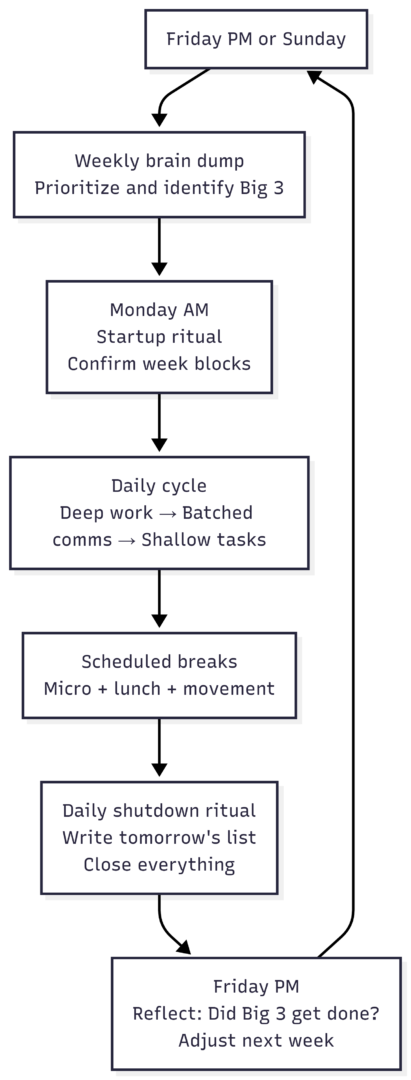
Putting It Together: Sample Weekly Planning Framework
FAQs
Physical separation — even a room divider, a designated chair, or a closed door — creates the sensory cues that help the brain distinguish work mode from rest mode. If a separate room is not available, consistent use of the same spot, the same desk setup, and the same startup sequence trains the association over time.
The most widely used and researched method is time boxing: allocating fixed calendar blocks to specific tasks rather than working from an open to-do list. Combine it with the Pomodoro Technique for focus interval management and batch scheduling for communications.
A standard productive remote workday is 6–8 focused hours. Research consistently shows that output per hour declines sharply after 6 hours of sustained cognitive work. More hours do not produce proportionally more output — they produce lower-quality work and faster burnout.
Configure communication tools to disable notifications outside defined working hours, remove work email from your personal phone if possible, and establish the shutdown ritual habit. The habit is more effective than willpower — once the ritual is associated with the end of work, the urge to check diminishes over time.
The framework adapts. The weekly brain dump and Big 3 identification still work for variable weeks — they just produce different specific blocks each week. The rituals and break structure remain constant even when the task content changes.
A sustainable remote work schedule is not about maximum productivity — it is about consistent, repeatable output without accumulating the fatigue and boundary erosion that eventually force a reset. These five tips, applied consistently, produce a week that gets important work done, preserves energy for personal life, and improves over time as you learn your own patterns.
Please share this 5 Tips for Planning a Weekly Schedule as a Remote Worker with your friends and do a comment below about your feedback.
We will meet you on next article.
Until you can read, 6 Steps to Optimize Your Remote Office Space