6 Steps to Optimize Your Remote Office Space
Your remote office space has a direct and measurable effect on your focus, physical health, and professional output. A poorly designed workspace causes eye strain, back pain, and mental fatigue that compounds across weeks and months. An optimized one removes friction from every hour of your workday. This guide covers six evidence-backed steps to build a home office that performs.
Why Workspace Optimization Matters
In a conventional office, facilities teams handle ergonomics, lighting, network infrastructure, and spatial design. Remote workers inherit all of that responsibility themselves — usually without training. The result is widespread improvised setups: laptops on kitchen tables, backs unsupported, cables sprawling across floors, and natural light hitting screens at the worst angle.
The consequences are not minor. Poor ergonomics cause musculoskeletal injuries. Poor lighting causes eye strain and disrupts circadian rhythm. Poor spatial boundaries cause psychological blur between work and rest. Fixing these issues does not require a full renovation — it requires deliberate, sequential choices.
Step 1: Invest in Ergonomics
Physical comfort determines how long you can sustain focused, quality work without fatigue or pain. Ergonomics is the highest-return investment in any home office because its benefits accumulate with every hour you work.
Chair
Your chair is the foundation. An ergonomic chair should provide adjustable lumbar support that keeps the lower spine in its natural inward curve, seat height that allows feet to rest flat with knees at approximately 90 degrees, and armrests that let shoulders relax rather than hunch.
| Chair Tier | Examples | Price Range |
|---|---|---|
| Entry ergonomic | HON Ignition 2.0, Sihoo M57 | $150–$300 |
| Mid-range | Humanscale Freedom, Steelcase Leap (refurbished) | $400–$700 |
| Premium | Herman Miller Aeron, Steelcase Leap V2, Haworth Fern | $900–$1,800 |
A chair in the $300–$500 range from a reputable ergonomic brand — not a generic office chair — is the minimum worth considering for full-time remote work.
Monitor Position
Screen placement is the most commonly misconfigured element in home offices. The top edge of the monitor should sit at or just below eye level, with the screen approximately 50–65 cm (20–26 inches) from your face. This position keeps the neck in neutral alignment rather than pushing it forward or tilting it up.
For laptop workers doing more than two hours of focused work daily, an external monitor is effectively non-negotiable. Working from a laptop screen requires tilting the head downward and forward, which places 20–30 lbs of additional load on the cervical spine over time.
Keyboard and Mouse
A separate keyboard and mouse allow the arms to rest at a natural angle rather than contorting to reach a laptop keyboard beside a screen. A compact mechanical keyboard and a low-profile ergonomic mouse cost $50–$150 combined and eliminate the most common wrist and shoulder strain associated with laptop-only setups.
Desk
| Desk Type | Best For | Approximate Price |
|---|---|---|
| Fixed standing height | Budget setups; standing-focused workers | $80–$250 |
| Traditional fixed height | Sitting-primary workflows | $100–$400 |
| Manual height-adjustable | Occasional sit-stand switching | $250–$500 |
| Electric sit-stand (motorized) | Frequent posture switching; premium builds | $400–$1,200 |
Electric sit-stand desks from brands like FlexiSpot, Uplift, or Autonomous represent a significant ergonomic upgrade for workers who experience lower back fatigue. Alternating between sitting and standing every 30–60 minutes reduces spinal load and counteracts sedentary fatigue.
Step 2: Control Lighting and Atmosphere
Lighting is the most underestimated variable in remote workspace design. The wrong lighting causes headaches, eye strain, and afternoon energy crashes. The right lighting keeps you alert, reduces visual fatigue, and produces a professional appearance in video calls.
Natural Light Positioning
Natural daylight is the best light source for focused work — but its positioning matters. Place your desk perpendicular to windows rather than facing directly toward them or sitting with your back to them. A window directly in front causes glare on the screen. A window directly behind creates a backlit silhouette effect that washes out your image on video calls.
Sheer blinds or frosted window film diffuse direct sunlight without eliminating the benefits of natural illumination.
Artificial Lighting Layers
A well-lit workspace uses three layers:
Ambient lighting — The room’s overall illumination. Avoid harsh overhead fluorescent tubes; use warm-to-neutral LED panels (2700K–4000K color temperature) for general coverage.
Task lighting — A dedicated desk lamp directed at your work surface, independent of the room’s ambient light. An adjustable LED desk lamp with color temperature and brightness control (such as the BenQ ScreenBar or Elgato Key Light) costs $60–$200 and dramatically reduces eye strain by eliminating the contrast between a bright screen and a dark room.
Bias lighting — LED strips mounted behind the monitor reduce perceived contrast between the screen and the surrounding wall, measurably reducing eye fatigue during long sessions. A quality bias lighting kit costs $15–$40.
Air Temperature and Quality
The optimal temperature for cognitive performance is approximately 22°C–24°C (71°F–75°F). Rooms significantly above or below this range impair concentration. A small desk fan or space heater gives you local temperature control independent of the rest of the home.
For air quality, a HEPA air purifier in a sealed home office reduces airborne particulates that can contribute to afternoon lethargy. Compact units from Levoit or Coway are effective for small rooms at $60–$150.
Step 3: Eliminate Visual and Audible Clutter
Clutter competes for attention. Research in environmental psychology consistently shows that visual disorder raises cortisol levels and reduces the ability to sustain focus. A clean, organized workspace is not an aesthetic preference — it is a productivity mechanism.
Cable Management
Unmanaged cables are the most visible source of desk clutter. A complete cable management system includes:
- Under-desk cable tray — mounts beneath the desk surface and collects power strips, excess cable runs, and adapters out of sight ($15–$40)
- Cable raceways — adhesive channels that route cables along walls to power outlets without dangling ($10–$25)
- Velcro cable ties — bundle cables from monitor, keyboard, mouse, and peripherals into clean runs ($8–$15)
- Desk grommet — a hole cover that routes cables through the desk surface rather than over the edge ($10–$20)
The complete outlay is under $100 and produces a workspace that looks and feels substantially more professional.
Desk Organization
Every item on the desk surface should earn its place. A monitor arm ($30–$80) elevates screens off the surface and reclaims workspace. Drawer dividers, desktop organizers, and vertical file holders keep papers, pens, and accessories accessible but contained. A single rule — nothing on the desk that is not used daily — removes most clutter.
Noise Control
Audible distractions from household activity, neighbors, or street noise are among the most cited productivity killers in home office environments.
Noise-cancelling headphones are the single most effective tool. Over-ear options with active noise cancellation:
| Product | ANC Quality | Price |
|---|---|---|
| Sony WH-1000XM5 | Industry-leading | ~$280–$350 |
| Jabra Evolve2 55 | Strong; work-optimized | ~$300–$400 |
| Bose QuietComfort 45 | Excellent; comfortable | ~$250–$320 |
| Anker Soundcore Q45 | Good; budget | ~$50–$80 |
For video call audio quality, a dedicated USB condenser microphone ($50–$150) outperforms any headset and dramatically improves how you sound to clients and colleagues.
Acoustic panels on walls reduce echo and reverb in video calls, improving perceived professionalism. Starter sets cost $30–$80.
Step 4: Optimize with Color, Plants, and Atmosphere
The aesthetic quality of a workspace influences mood, stress levels, and sustained attention in ways that compound across a long workday.
Color Psychology
Wall color and dominant palette choices have documented effects on cognitive states:
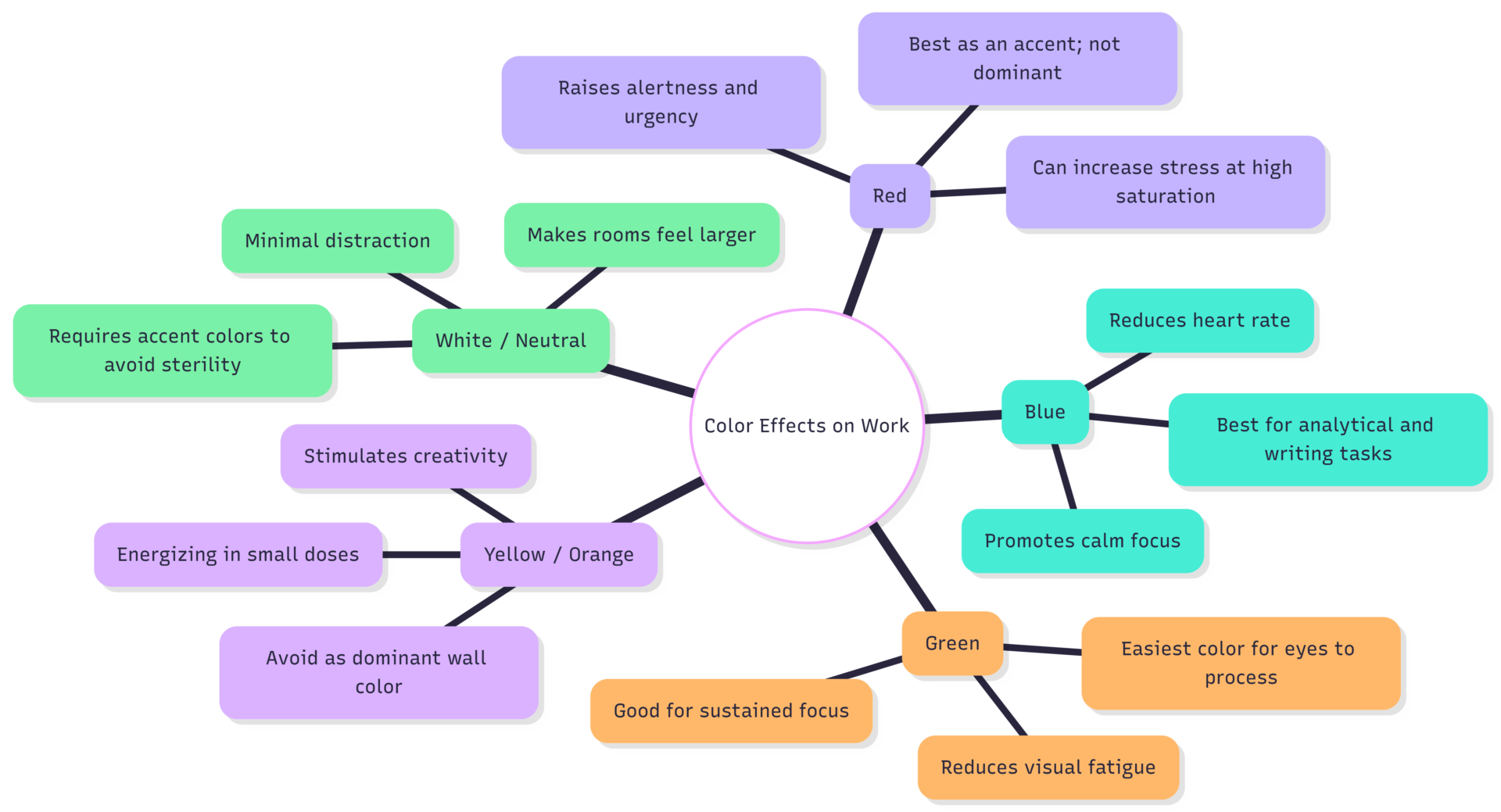
For most knowledge workers, a blue or green accent wall paired with neutral whites and greys produces a calm, focused environment. Avoid high-saturation colors on every wall — they cause visual fatigue.
Plants
Plants improve both the aesthetics and the air quality of a home office. Green hues are the easiest wavelength for the human eye to process, making plant-filled environments genuinely easier on visual attention over long periods.
Low-maintenance options suited to office conditions (indirect light, infrequent watering): pothos, ZZ plant, snake plant, and peace lily. A $15–$30 plant placed on or near the desk is one of the cheapest cognitive investments available.
Step 5: Define Physical and Psychological Boundaries
Boundary erosion — the gradual loss of separation between work and personal life — is among the most damaging long-term effects of unstructured remote work. The workspace itself is a primary tool for maintaining that boundary.
Physical Separation
The most effective boundary is a dedicated room with a door that closes. When that is not available:
- A room divider or curtain creates a visual partition between the workspace and the rest of the room (~$50–$150)
- Positioning the desk so it faces away from the bed removes the most psychologically conflicted overlap
- A Murphy bed or wall-mounted fold-down desk allows a single room to serve as both bedroom and office without them existing simultaneously
The core principle: when work is over, the workspace should become visually inaccessible or invisible.
Digital Boundaries
- Work notifications off outside defined hours
- Work apps not installed on personal phone
- Separate browser profiles for work and personal use
- A defined “shutdown ritual” — closing tabs, writing tomorrow’s task list, closing the laptop — that signals the workday is complete
Time Boundaries
A rigid start time and stop time are as important as the physical setup. Remote workers without defined stop times consistently log more hours than in-office counterparts, and the additional hours are typically low-quality, fatigue-affected work. Set an alarm for the end of your workday. When it sounds, stop.
Step 6: Continuously Iterate and Improve
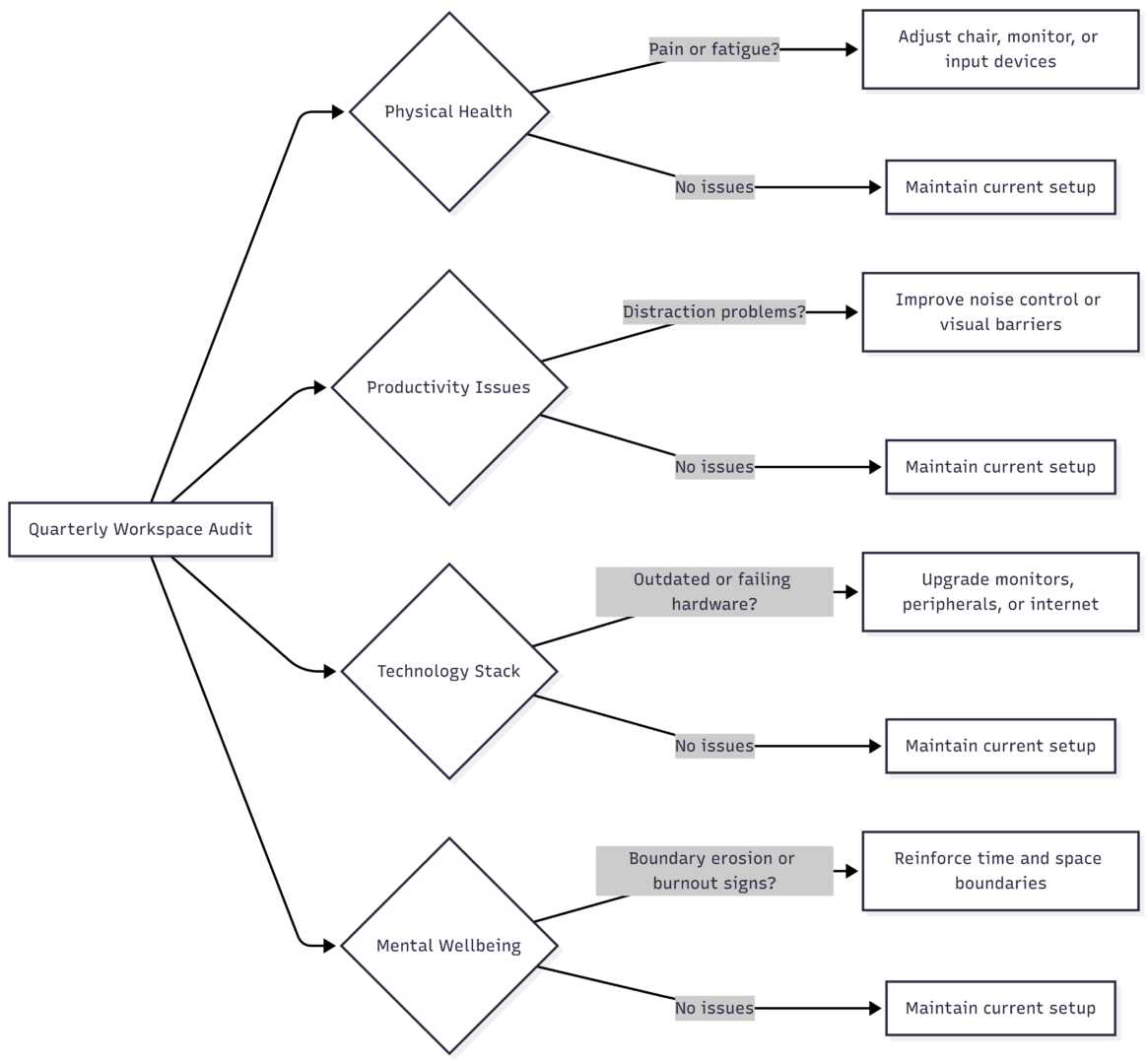
An optimized workspace is not a one-time setup — it evolves with your work patterns, health needs, and available resources. Schedule a quarterly workspace audit:
Complete Remote Office Equipment Checklist
| Category | Item | Priority | Approximate Cost |
|---|---|---|---|
| Seating | Ergonomic chair with lumbar support | Essential | $200–$900 |
| Desk | Height-adjustable or fixed work surface | Essential | $100–$800 |
| Display | External monitor (24″–27″) | Essential for laptops | $150–$500 |
| Display | Monitor arm | Recommended | $30–$80 |
| Input | External keyboard and mouse | Essential for laptops | $50–$150 |
| Audio | Noise-cancelling headphones | High priority | $50–$400 |
| Audio | USB condenser microphone | Recommended for calls | $50–$150 |
| Video | 1080p external webcam | Recommended | $60–$150 |
| Lighting | Adjustable LED desk lamp | High priority | $40–$200 |
| Lighting | Bias lighting strip | Recommended | $15–$40 |
| Cables | Under-desk cable management tray | Recommended | $15–$40 |
| Cables | Cable raceways and ties | Recommended | $15–$30 |
| Connectivity | High-speed internet (200 Mbps+) | Essential | Variable |
| Security | VPN subscription | Essential for sensitive work | $40–$100/year |
| Plants | Low-maintenance desk plant | Optional | $15–$30 |
| Air | HEPA air purifier (small room) | Optional | $60–$150 |
Total estimated investment for a solid mid-range setup: $600–$2,000, depending on what you already own. Many employers offer remote work stipends between $500 and $2,000 — check your employment agreement before purchasing.
FAQs
Ergonomics — specifically the chair and monitor position. These two factors affect every hour you spend working and their impact compounds daily. Everything else can be improved incrementally.
A functional mid-range setup costs $600–$1,200 built from scratch. At minimum, prioritize a proper ergonomic chair ($200+), an external monitor ($150+), and a quality desk lamp ($50+). Noise-cancelling headphones are the next most impactful investment.
Yes, measurably. Poor lighting causes eye strain and circadian disruption (especially blue-light-heavy screens in dark rooms). A bias-lit monitor with a proper desk lamp dramatically reduces afternoon fatigue compared to screen-only illumination.
Yes. Room dividers, fold-down desks, and dedicated lighting zones can create effective psychological boundaries in a single shared room. The goal is visual and sensory separation, not necessarily physical square footage.
They help in two ways: improved air quality in sealed rooms, and reduced visual fatigue due to green wavelengths being the easiest for the eyes to process. They are low-cost and long-lasting relative to their benefit.
Building a remote office that supports your work is a series of deliberate decisions, not a single expensive purchase. Start with ergonomics, control your lighting, eliminate clutter, and define the boundaries that protect your focus and personal time. Each improvement builds on the last, and the cumulative effect on daily output and long-term wellbeing is substantial.
Please share this 6 Steps to Optimize Your Remote Office Space with your friends and do a comment below about your feedback.
We will meet you on next article.
Until you can read, How to Transition from Onsite To Remote Work