
5 Types of Technology to Better Manage Your Remote Team
Remote work isn’t a temporary arrangement anymore — it’s simply how a large share of teams operate. Surveys of the shift toward distributed work consistently found that a majority of employees who moved to remote setups reported wanting to stay that way permanently, and most reported productivity holding steady or improving.
But none of that happens automatically. Managing people you never see in person requires a different technology stack than managing people down the hall, and picking the wrong combination of tools is one of the fastest ways to burn out both managers and their teams.
This guide breaks remote management technology into five practical categories — communication, location and activity tracking, project management, recognition, and learning and development — with specifications, pricing, and the trade-offs of each so you can build a stack that actually fits your team instead of one that just looks impressive on a vendor comparison page.
Why Remote Management Needs Its Own Tech Stack
In an office, a huge amount of management happens passively — a manager notices someone seems stressed, overhears a project update in passing, or catches a small miscommunication before it grows. None of that happens by accident when a team is distributed. Every one of those functions has to be replaced deliberately with a tool or a process, or it simply stops happening.

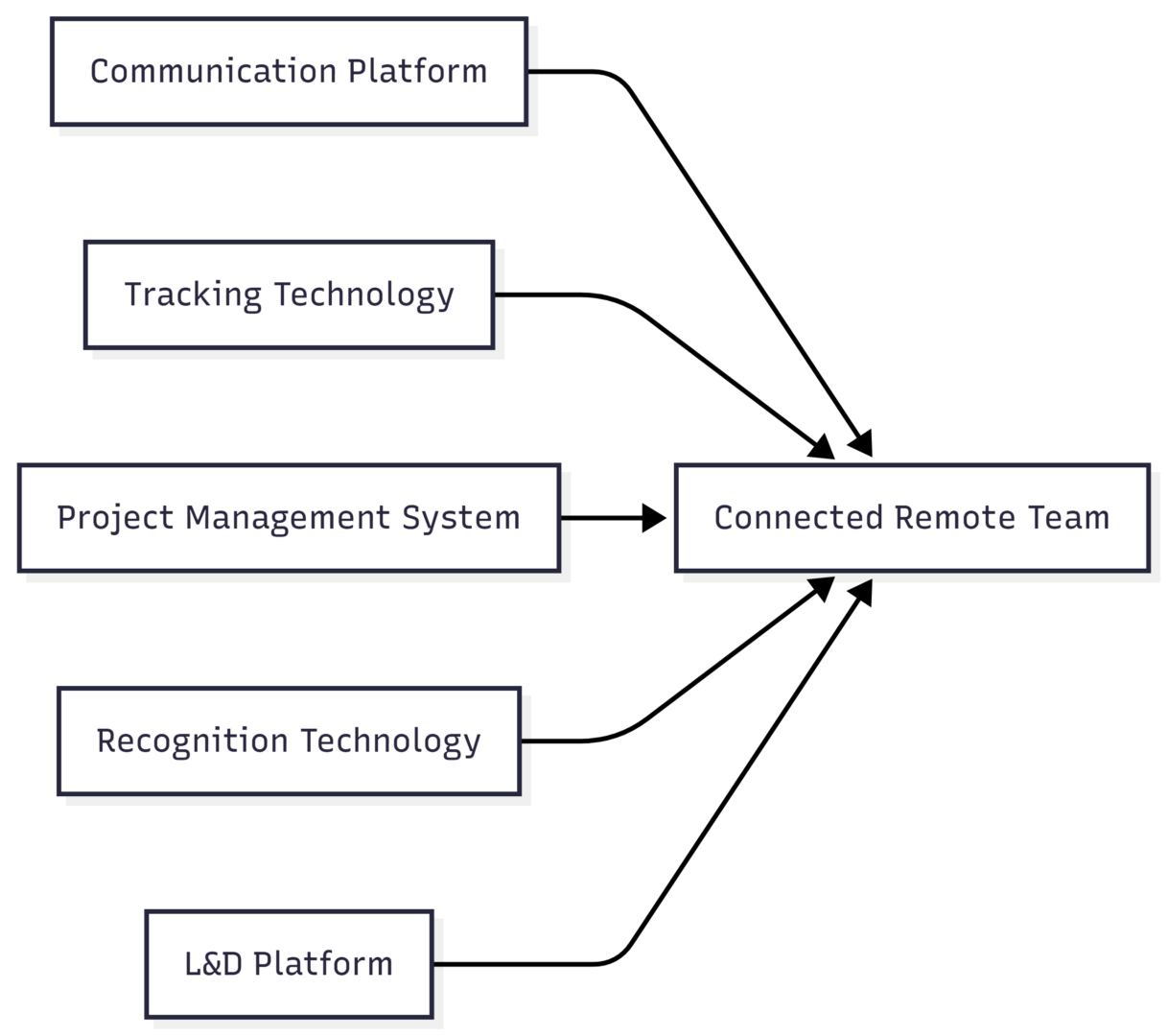
The five categories below map directly onto the gaps that open up when a team stops sharing a physical space.
1. Communication Platforms
Communication consistently ranks as the top challenge reported by remote workers, ahead of isolation, scheduling, or motivation. Without face-to-face defaults, teams either under-communicate (leaving people guessing) or over-communicate (burying important updates in noise). The right platform reduces both risks by giving every type of conversation a clear, predictable home.
Two broad approaches exist: piecing together a best-of-breed stack (a separate chat app, video tool, and file-sharing service), or standardizing on a unified suite that bundles everything together.
Specifications and Pricing:
| Platform | Type | Key Features | Starting Price |
|---|---|---|---|
| Slack | Instant messaging | Channels, threads, huddles, 2,600+ integrations | Free tier; paid from ~$7.25/user/month |
| Microsoft Teams | Unified suite | Chat, video, Office 365 integration, file co-editing | Included with Microsoft 365 Business Basic (~$6/user/month) |
| Google Workspace | Unified suite | Gmail, Meet, Chat, Docs, Drive | From ~$7/user/month |
| Zoom Workplace | Video conferencing | HD video, breakout rooms, webinar hosting, transcripts | Free tier; paid from ~$14/month |
What to look for: channel or topic-based organization (not one giant chat stream), searchable message history, screen sharing, and integrations with whatever project management tool you’re already using. If you go the piecemeal route, document explicit rules — which channel is for what, and what response time is reasonable — so the stack doesn’t become another source of confusion.
Trade-off to know: a unified suite reduces app-switching but locks you into one ecosystem; a best-of-breed stack gives more flexibility but requires more discipline to keep from fragmenting.
2. Location and Activity Tracking Technology
This category tends to generate the most hesitation, since “tracking” sounds like surveillance. Used well, though, it’s less about watching people and more about giving managers visibility they’d naturally have in an office — knowing who’s available, where field-based staff are, and how time is actually being spent across projects.
For field-based or hybrid roles — sales reps, delivery staff, service technicians — GPS and mileage tracking solve real logistical problems: coordinating who’s closest to a new job, verifying mileage reimbursements, and locating a team member quickly in an emergency. For fully desk-based remote teams, the equivalent tool is usually time-tracking or productivity-monitoring software rather than GPS.
Specifications and Pricing:
| Tool Type | Best For | Key Features | Starting Price |
|---|---|---|---|
| GPS/mileage tracking (e.g., Timeero-style tools) | Field and travel-based teams | Real-time location, mileage logging, timesheet integration | From ~$4–8/user/month |
| Time tracking (e.g., Clockify) | Fully remote desk-based teams | Timers, manual entry, reports, timesheets | Free tier; paid from ~$3.99/user/month |
| Activity monitoring (e.g., Hubstaff) | Teams billing hourly or managing contractors | Screenshots (optional), app/URL tracking, productivity reports | From ~$7/user/month |
How to introduce this without damaging trust: be transparent about exactly what’s tracked and why, tie it to a specific business need (billing accuracy, safety, resourcing) rather than blanket oversight, and avoid granular monitoring for salaried roles where output — not hours — is what actually matters. Overreach here is one of the fastest ways to tank morale in an otherwise well-managed remote team.
3. Project and Task Management Systems
Most remote collaboration happens around a specific piece of work — a project, a campaign, a client deliverable — and without a shared system to track it, work either duplicates or falls through the cracks. A solid project management tool gives every team member a single place to see what’s owed, by whom, and by when.
Specifications and Pricing:
| Tool | Style | Key Features | Starting Price |
|---|---|---|---|
| Asana | List/board/timeline hybrid | Task dependencies, custom reporting, goal tracking | Free for up to 10 users; paid from ~$10.99/user/month |
| Trello | Kanban boards | Drag-and-drop cards, Power-Ups, Butler automation | Free tier; paid from ~$5/user/month |
| Notion | All-in-one workspace | Wikis, databases, task boards, connected docs | Free for individuals; paid from ~$10/user/month |
| ClickUp | Highly customizable PM | Multiple views, native docs, time tracking built in | Free tier; paid from ~$7/user/month |
Core capabilities to prioritize:
- Shared to-do lists visible to the whole team, not just the assignee
- Clear task ownership and deadlines
- Built-in feedback and approval flows
- Real-time status updates (cloud-based, not spreadsheet-based)
Since these platforms are cloud-native by default, everyone works from the same live version of a project regardless of time zone — which matters more for distributed teams than for co-located ones, where a quick verbal update can (temporarily) paper over an outdated spreadsheet.
4. Employee Recognition Technology
Recognition is one of the easiest things to lose in a remote setting, not because managers stop caring, but because there’s no equivalent of the casual “nice work” said in passing on the way to a meeting. That gap is measurable — a significant share of employees consistently report not feeling adequately recognized for their work, and remote workers are especially exposed to that gap since almost none of it happens ambiently.
What good recognition technology does:
- Makes public, specific recognition easy to give in seconds
- Ties recognition to company values so it’s more than generic praise
- Surfaces recognition data to managers so patterns (or gaps) become visible
- Sometimes ties into tangible rewards — points, gift cards, or budget-based perks
Specifications and Pricing:
| Approach | Examples | Key Features | Starting Price |
|---|---|---|---|
| Dedicated recognition platforms | Bonusly, Motivosity | Peer-to-peer points, redeemable rewards, analytics | From ~$3–5/user/month |
| Built into existing tools | Slack kudos channel, Teams Praise app | Simple public shout-outs, no extra login | Free (bundled with existing platform) |
For smaller teams, a simple dedicated channel in an existing chat tool, with one rule — recognition must name something specific — often works just as well as a paid platform. Larger organizations tend to benefit more from a dedicated system, since recognition becomes harder to track and standardize as headcount grows.
5. Learning and Development (L&D) Platforms
Training is one of the first things to get deprioritized during a shift to remote work, but it shouldn’t be — engagement research consistently shows employees who feel empowered to keep learning are meaningfully more engaged in their roles. The catch is that in-person training material doesn’t translate directly to a virtual format; it usually needs to be restructured, not just streamed.
Specifications and Pricing:
| Platform Type | Examples | Key Features | Starting Price |
|---|---|---|---|
| Corporate LMS | Docebo, TalentLMS | Course authoring, certification tracking, reporting | From ~$5–8/user/month |
| Skill-based microlearning | LinkedIn Learning, Udemy Business | Short video courses, progress tracking, certificates | From ~$25–36/user/month |
| Internal wiki-based training | Notion, Confluence | Self-serve documentation, onboarding guides | From ~$8–10/user/month |
Making virtual L&D actually work:
- Break long sessions into shorter, modular content people can complete asynchronously
- Record live trainings so time zones don’t exclude anyone
- Pair formal courses with informal peer-led sessions for practical, role-specific knowledge
- Track completion and feedback, not just attendance
Putting the Five Categories Together
None of these five categories fully substitutes for the others — a strong communication platform doesn’t fix disengagement, and a great project management tool doesn’t replace recognition. The strongest remote management stacks layer all five deliberately rather than over-investing in one.
Common Challenges These Tools Solve
| Challenge | Root Cause | Technology That Helps |
|---|---|---|
| Miscommunication and delayed responses | No face-to-face default; unclear channels | Communication platforms |
| Difficulty tracking progress and output | No shared physical visibility into work | Project management + time/activity tracking |
| Feelings of isolation and disconnection | Loss of informal office interaction | Recognition tools + communication platforms |
| Uneven or missed training | In-person L&D doesn’t translate directly | Virtual/async L&D platforms |
| Accountability concerns for field or hourly roles | No way to verify location or hours worked | GPS and time-tracking tools |
Benefits of Investing in the Right Stack
- Increased flexibility. Employees gain more control over their schedule while managers retain enough visibility to confirm work is getting done.
- Stronger communication. A clear system for onboarding, file sharing, and daily updates directly improves culture and engagement, not just logistics.
- Better collaboration. Centralized project tools let teams coordinate across time zones without waiting for everyone to be online simultaneously.
- Easier accountability. Time and activity data highlight workflow bottlenecks early, before they become missed deadlines.
- Lower overhead. Eliminating physical office costs frees up budget that can go directly into better tools, training, or compensation.
- Higher engagement. Structured recognition and learning opportunities directly counter the two things remote employees report missing most: visibility and growth.
How to Choose the Right Tools for Your Team
Before comparing vendors, it helps to answer a few questions honestly:
- How distributed is the team — same time zone, a few overlapping zones, or fully global?
- Is the core challenge communication, accountability, culture, or all three?
- Does the team include field-based or hourly roles that need location or billing accuracy, or is everyone salaried and desk-based?
- What’s the realistic per-user budget, factoring in the full stack rather than one tool at a time?
- Which categories can be consolidated into a single platform (e.g., Microsoft Teams covering chat, video, and files) versus which genuinely need a specialized tool?
Avoid the trap of adopting a tool in every category just because it exists. A five-person team probably doesn’t need a dedicated recognition platform when a Slack channel does the job; a fifty-person distributed sales team almost certainly needs GPS and mileage tracking that a project management tool alone won’t provide.
Frequently Asked Questions
Not necessarily. Fully desk-based, salaried teams typically get more value from time-tracking than GPS tracking, while field-based teams need the reverse. The other four categories — communication, project management, recognition, and L&D — apply broadly regardless of role type.
It can, if introduced without context. Tie any tracking tool to a specific, transparent business reason, avoid granular monitoring for output-based roles, and communicate exactly what’s collected and why before rolling it out.
Over-investing in one category (usually communication) while neglecting recognition and L&D, both of which have a measurable, direct effect on engagement and retention.
Unified suites reduce app-switching and licensing complexity; best-of-breed stacks offer more flexibility but require clearer internal rules to avoid fragmentation. Team size and technical comfort should drive the decision more than feature checklists.
Track a few simple indicators: response times on key channels, on-time project completion rates, recognition frequency, and training completion rates. A short pulse survey every few weeks will also surface friction faster than waiting for an annual review.
Final Thoughts
Managing a remote team well isn’t about adopting every tool on the market — it’s about deliberately covering the five gaps that open up once a team stops sharing a physical space: communication, accountability, project visibility, recognition, and growth. Start by identifying which of these five areas is weakest for your team right now, invest in the right tool for that gap specifically, and build outward from there rather than trying to solve everything at once.
Please share this 5 Types of Technology to Better Manage Your Remote Team your friends and do a comment below about your feedback.
We will meet you on next article.
Until you can read, 16 Ways to Boost Remote Employee Engagement