
Best Video Conferencing App: Complete Guide for Every Team
Choosing the wrong video conferencing platform costs more than money—it costs time, focus, and team cohesion. With dozens of options available, the right pick depends entirely on your team size, existing software stack, budget, and whether you need basic calls or enterprise-grade webinar capabilities.
This guide breaks down the top-rated platforms across every category, with real specs and pricing so you can make the right call.
How to Pick the Right Platform
Before diving into individual tools, map your needs against three variables:
Ecosystem fit — If your team lives in Microsoft 365, Teams is the obvious choice. Google Workspace users will find Meet already baked into their workflow. Forcing a platform that fights your ecosystem creates friction.
Scale — A 10-person startup running weekly standups has completely different needs from an enterprise hosting quarterly all-hands calls with 5,000 attendees.
Bandwidth reality — Not all team members have fast connections. Platforms like Zoom and Google Meet handle bandwidth degradation more gracefully than others, automatically reducing video quality before dropping participants.
Top Picks at a Glance
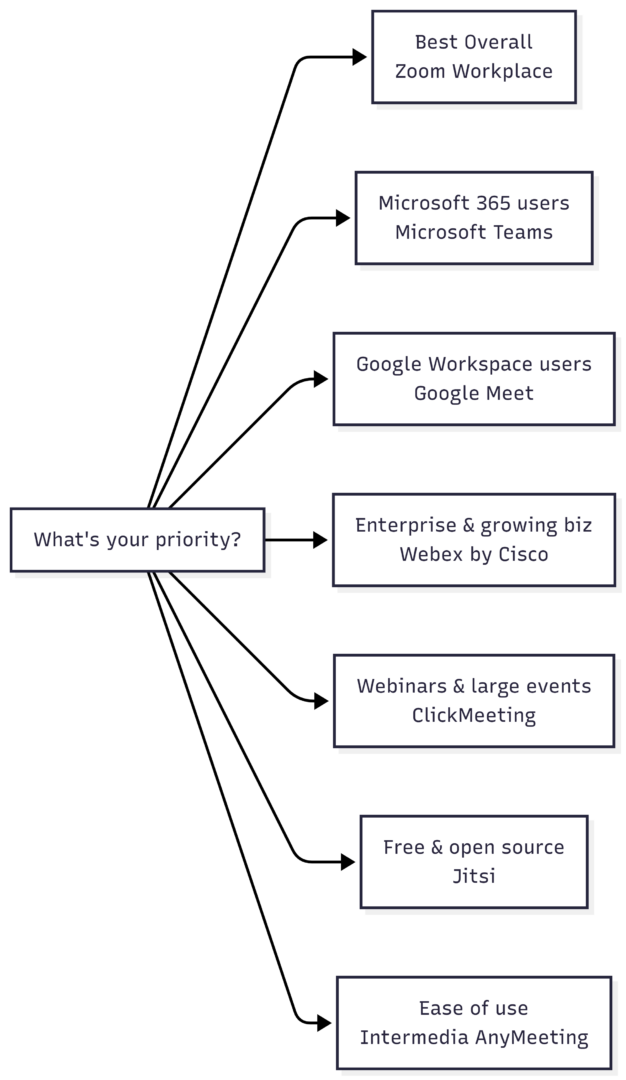
The Best Video Conferencing Apps, Reviewed
1. Zoom Workplace — Best Overall
Rating: 4.5/5 | Starting at $199/user/year
Zoom started as a simple meetings tool and has grown into a full collaboration platform. Zoom Workplace now bundles team chat, document editing, whiteboard sharing, and AI-powered tools alongside its core video conferencing, all designed to reduce the “toggle tax” of switching between apps.
The standout feature is the Zoom AI Companion, which can summarize in-progress meetings, answer questions about what was said earlier in a call, and auto-generate meeting notes. For teams with members across time zones or those prone to distraction, this alone justifies the subscription.
Who it’s for: Teams that need a reliable, feature-complete platform with room to grow. Also excellent for anyone who needs a consistent experience across devices and operating systems.
Key Features:
| Feature | Available |
|---|---|
| Free tier | ✓ |
| AI meeting summaries | ✓ (paid) |
| Whiteboard tools | ✓ |
| End-to-end encryption | ✓ |
| Breakout rooms | ✓ |
| Virtual/blur backgrounds | ✓ |
| Transcription | ✓ |
| Calendar integration | ✓ |
| 24/7 phone support | ✓ |
| Cloud storage | ✓ |
Pricing:
| Plan | Price | Participants |
|---|---|---|
| Basic (Free) | $0 | Up to 100, 40-min limit |
| Pro | $199/user/year | Up to 100, unlimited |
| Business | $269/user/year | Up to 300 |
| Enterprise | Custom | Up to 1,000+ |
Verdict: The industry standard for good reason. If you want one platform that handles everything from a two-person check-in to a 500-person company meeting, Zoom delivers.
2. Webex by Cisco — Best for Growing Businesses
Rating: 4.5/5 | Free tier available; paid plans from ~$25/user/month
Webex is one of the original enterprise video conferencing platforms and remains one of the most capable. It scales from a solo user to a global enterprise without requiring a platform change, making it a smart choice for companies in growth mode.
The Vidcast tool for asynchronous video recording is genuinely useful—teams can record walkthroughs, demos, or updates without scheduling a live call. Webex also supports gesture recognition to trigger emoji reactions and offers closed captions that are among the most accessible in the category.
The main drawback is cost. Paid plans are pricier than Zoom, and add-ons can make the total bill climb quickly. The non-enterprise tiers also cap cloud recording storage at 10GB.
Who it’s for: Mid-size to large businesses that need serious scalability, multi-platform support (including Linux), and enterprise security features without immediately committing to a custom enterprise contract.
Key Features:
| Feature | Available |
|---|---|
| Free tier | ✓ |
| AI meeting recap | ✓ |
| Whiteboard tools | ✓ |
| Async video (Vidcast) | ✓ |
| Gesture reactions | ✓ |
| Breakout rooms | ✓ |
| Closed captions | ✓ |
| Linux app | ✓ |
| End-to-end encryption | ✓ |
Verdict: The strongest enterprise-ready option outside Microsoft’s ecosystem. More expensive than Zoom but offers features and scalability that justify the premium for the right organization.
3. Microsoft Teams — Best for Microsoft 365 Users
Rating: 4.0/5 | Included with Microsoft 365 Business plans
If your organization runs on Microsoft 365, Teams is the natural choice. It integrates natively with Outlook calendars, SharePoint file storage, OneDrive, and the rest of the Microsoft suite. The video conferencing quality is excellent, and the Copilot AI features deliver genuinely useful conversation summaries and action item extraction.
The admin tooling is comprehensive—arguably overwhelming for smaller teams that don’t need that level of control. Third-party integrations and add-ons also push costs up quickly.
Who it’s for: Any organization already paying for Microsoft 365. The value proposition is compelling when Teams is already included in your subscription.
Key Features:
| Feature | Available |
|---|---|
| Free tier (limited) | ✓ |
| Copilot AI summaries | ✓ (paid) |
| Microsoft 365 integration | ✓ |
| Whiteboard tools | ✓ |
| Breakout rooms | ✓ |
| Channel-based messaging | ✓ |
| SharePoint file sharing | ✓ |
| External guest access | ✓ |
Verdict: Exceptional for Microsoft shops. Mediocre for everyone else—the integration advantages disappear if you’re not in the Microsoft ecosystem.
4. Google Meet — Best for Google Workspace Users
Rating: 4.0/5 | Included with Google Workspace plans
Google Meet is browser-first—no downloads required, which eliminates one of the most common friction points when clients or external guests join a call. The transcription capabilities are best-in-class, supporting real-time captions in 69 languages with live speech translation between English and five other languages.
The Gemini AI integration adds meeting summaries, action items, and smart features, but accessing the full feature set requires both a Google Workspace for Business subscription and a separate Gemini add-on. The lack of native whiteboard tools is a notable gap compared to Zoom and Webex.
Who it’s for: Teams running Google Workspace who want a frictionless, browser-accessible meeting tool. Also strong for global teams that need multilingual caption support.
Key Features:
| Feature | Available |
|---|---|
| Browser-only access (no download) | ✓ |
| 69-language captions | ✓ |
| Live speech translation | ✓ (6 languages) |
| Gemini AI features | ✓ (add-on) |
| Screen annotation | ✓ |
| Recording | ✓ (Workspace plans) |
| Native whiteboard | ✗ |
| Monthly billing | ✗ |
Verdict: The best option for Google Workspace teams. Less compelling outside that ecosystem, particularly given the absence of a monthly billing option.
5. ClickMeeting — Best for Webinars and Large Events
Rating: 4.0/5 | Starting at $32/month
ClickMeeting is purpose-built for large online events rather than everyday team meetings. Its base plans support up to 1,000 attendees, with custom enterprise tiers supporting up to 10,000 participants—far beyond what Zoom or Teams offer at comparable price points.
The interface is polished and specifically designed for presenter-audience dynamics: registration pages, waiting rooms, polls, and moderated Q&A are all built in. AI-powered transcription and breakout rooms round out the feature set.
The per-attendee pricing model means costs scale quickly for organizations running frequent large events.
Who it’s for: Businesses that run regular webinars, online training sessions, or large virtual events where the presenter-to-audience model matters more than collaborative meetings.
Pricing:
| Plan | Price | Max Attendees |
|---|---|---|
| Live 25 | $32/month | 25 |
| Live 100 | $69/month | 100 |
| Live 1000 | $209/month | 1,000 |
| Enterprise | Custom | Up to 10,000 |
Verdict: The top pick for webinar-first use cases. Overkill—and expensive—for regular team meetings.
6. Intermedia AnyMeeting — Best for Ease of Use
Rating: 4.0/5 | Contact for pricing
AnyMeeting earns its “ease of use” designation through consistently positive user feedback about its onboarding experience. The interface avoids the feature bloat that makes Teams and Webex feel overwhelming for new users.
Screen sharing works directly in the browser without a plugin, and keyboard and mouse sharing during presentations is a feature you won’t find in most competitors. The transcription and annotation tools are solid.
The main gap is breakout rooms—AnyMeeting doesn’t support them, which limits its usefulness for workshop-style meetings.
Who it’s for: Small to medium businesses that prioritize simplicity and fast onboarding over an exhaustive feature list.
7. Free and Open-Source Alternatives
For teams with budget constraints or privacy requirements, two options stand out:
Jitsi Meet — Fully open-source, completely free, no account required. Join or host meetings directly in the browser. For self-hosted deployments, it gives organizations full control over their data. The trade-off is that performance and reliability are self-managed in hosted environments.
Whereby — Browser-based, light on system resources, and designed for small teams. Persistent room URLs mean your meeting link never changes—useful for recurring calls with the same group. The free tier is limited to four participants.
Feature Comparison: All Platforms
| Platform | Free Tier | Max Participants | AI Features | Whiteboard | Breakout Rooms | Best For |
|---|---|---|---|---|---|---|
| Zoom Workplace | ✓ (40-min limit) | 1,000+ | ✓ AI Companion | ✓ | ✓ | General use |
| Webex by Cisco | ✓ | 1,000+ | ✓ AI assistant | ✓ | ✓ | Enterprise |
| Microsoft Teams | ✓ (limited) | 1,000 | ✓ Copilot | ✓ | ✓ | Microsoft shops |
| Google Meet | ✓ (60-min) | 1,000 | ✓ Gemini | ✗ | ✓ | Google Workspace |
| ClickMeeting | ✓ (trial) | 10,000 | ✓ transcription | ✓ | ✓ | Webinars |
| AnyMeeting | — | 200 | ✓ transcription | ✓ | ✗ | Ease of use |
| Jitsi | ✓ (unlimited) | ~75 | ✗ | ✓ | ✓ | Privacy/budget |
| Whereby | ✓ (4 people) | 100 | ✗ | ✗ | ✗ | Small teams |
The Bandwidth Question
One of the most overlooked factors when choosing a video conferencing platform is performance on mixed or slow connections. If any team members work from locations with inconsistent internet:
Zoom handles low bandwidth the best of any mainstream platform. It degrades gracefully—reducing video quality and resolution before dropping participants. The desktop app also manages bandwidth more efficiently than the browser version.
Google Meet is similarly efficient and benefits from Google’s global infrastructure. The browser-first approach means there’s no heavy client to maintain, which can help on older hardware.
Webex and Microsoft Teams both perform well on fast connections but can struggle noticeably when bandwidth drops. Both have settings to manually reduce video quality, but they don’t adapt as automatically as Zoom.
For teams where bandwidth is a persistent issue, setting a default of “audio only” with optional video join is often more reliable than any platform-level optimization.
Making the Final Choice
The right platform is almost always determined by one or two non-negotiable factors:
- Microsoft 365 users → Teams
- Google Workspace users → Google Meet
- Webinars or large events → ClickMeeting
- Enterprise with multi-platform needs → Webex
- Privacy or open-source requirement → Jitsi
- Everything else → Zoom Workplace
The productivity gains from picking one platform and committing to it outweigh most feature differences between tools. Consistency reduces the friction of mixed-device, mixed-connection teams far more than any individual feature.
Pricing and features are subject to change. Always verify current plan details on each provider’s website before purchasing.
Please share this Best Video Conferencing App: Complete Guide for Every Team with your friends and do a comment below about your feedback.
We will meet you on next article.
Until you can read, Desert Dunes Nomad Tent Office 4K HD Wallpapers