
Biggest Remote Work Challenges and Solutions
Remote work is no longer a niche perk — it’s a standard way of working for a large share of the workforce. But the shift away from the office hasn’t eliminated problems, it’s just changed their shape. Isolation replaces water-cooler chat. Notification overload replaces the tap on the shoulder. “Always on” replaces the walk out the door at 5 p.m.
The good news: nearly every major remote work challenge has a well-tested solution. This guide breaks down the biggest pain points for both employees and employers, backed by current research, and pairs each one with practical fixes you can put in place immediately.
Remote Work Adoption at a Glance
| Metric | Finding |
|---|---|
| Workers who prefer remote arrangements | A majority of employees say they’d choose remote work if given the option |
| Workers willing to take a pay cut for flexibility | Roughly 1 in 4 would accept lower pay to keep working remotely |
| Remote workers reporting feelings of isolation | Around 6 in 10, according to recent workforce surveys |
| Remote workers citing productivity as a top challenge | Just over half |
| Increase in after-hours email checking vs. office workers | About 40% more frequent |
These numbers point to a consistent theme: remote work solves the commute problem but introduces new problems around connection, boundaries, and oversight — and those are the challenges worth solving deliberately.
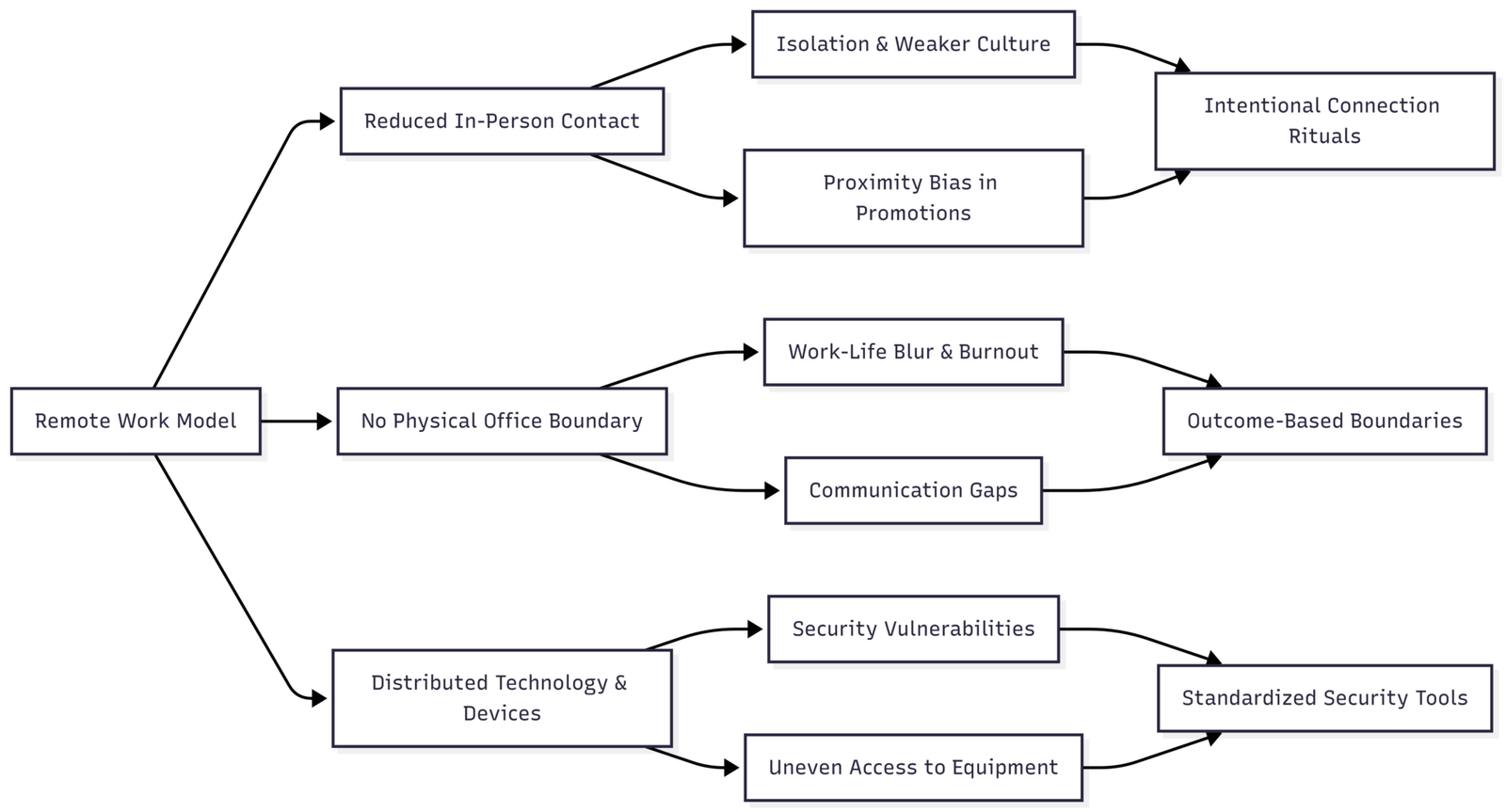
How the Core Challenges Connect
Challenges Employees Face
1. Isolation and Mental Health Strain
Offices provide a steady stream of low-effort social contact — the coffee machine, the shared lunch table, a quick question dropped at someone’s desk. Remote work removes almost all of it, and the effect compounds over time.
Even employees who initially welcome the quiet often find that prolonged isolation chips away at motivation and mood. Remote workers report higher rates of anxiety and disconnection than in-office or hybrid peers, and the drop-off tends to be gradual enough that people don’t notice it happening until it’s already affecting their work.
Fix: Build recurring, low-stakes social contact back into the week — a standing virtual coffee chat, an optional non-work channel, or participation in an outside community or coworking space. The goal isn’t more meetings; it’s replacing the accidental social contact that used to happen for free.
2. Work-Life Boundaries Collapsing
Without a commute or a physical building to leave, the line between “at work” and “off work” gets blurry fast. Many remote employees end up working longer hours than they did in the office, driven by an unspoken expectation to stay reachable. Checking email well outside normal hours becomes routine, and over time this erodes rest, increases stress, and eventually drags down the same productivity remote work was supposed to protect.
Fix: Treat the boundary as a deliberate design choice, not something that happens automatically. A dedicated workspace — even a corner of a room used only for work — trains the brain to associate that spot with “on” and everywhere else with “off.” Hard stop times, notification schedules, and a closing ritual (shutting the laptop, changing clothes, a short walk) all help recreate the psychological “commute home” that used to end the day.
3. Communication Breakdowns
In-person conversation carries tone, body language, and instant clarification. Text-based communication carries none of that, which means a short, focused message can easily read as curt or annoyed. Add time zones and staggered schedules, and a question that would take two minutes face-to-face can turn into a half-day delay and a confusing thread of follow-ups.
Fix: Standardize how the team communicates before problems pile up. Pick one primary hub for messaging, default to written async updates over meetings whenever a live conversation isn’t essential, and record video calls so people in other time zones aren’t left out. Setting explicit norms — which channel is for what, and how fast a response is expected — removes a huge share of the ambiguity that causes friction.
4. Technology and Equipment Gaps
Remote work runs entirely on technology employees may not have optimized for professional use — unreliable home internet, aging laptops, and no IT department down the hall to fix problems on the spot. Under bring-your-own-device policies, employees often absorb the cost and hassle of maintaining their own setup, and the quality of that setup varies enormously by household income and location. Rural workers in particular can be stuck with limited broadband options regardless of how much they’re willing to spend.
Fix: Employers get the most value from standardizing equipment rather than leaving it to chance — company-issued laptops, a hardware stipend, or a fixed reimbursement for internet and a proper headset. A consistent baseline setup also cuts down dramatically on support tickets and lost productivity from troubleshooting.
5. Staying Focused and Productive
Distractions at home are constant and varied: kids, pets, deliveries, chores in plain sight. Internal distractions — procrastination, the pull of a phone within arm’s reach — add another layer. Without colleagues visibly working nearby, the ambient social pressure that keeps people on task in an office simply isn’t there, and many remote workers report struggling to build a consistent daily structure without it.
Fix: Shift the standard of evaluation from hours logged to outcomes delivered. When performance is measured by finished work rather than visible activity, the pressure to “look busy” disappears and employees can structure their day around when they’re actually most productive.
6. Career Visibility and Advancement
“Out of sight, out of mind” is a real risk in remote careers. Spontaneous mentorship, hallway conversations with leadership, and the chance to demonstrate skills beyond a formal job description all happen less often — or not at all — for people who aren’t physically present. This isn’t a hypothetical concern: some companies have explicitly tied advancement opportunities to in-office attendance, forcing employees to choose between flexibility and career growth.
Fix: Remote employees benefit from being more deliberate about visibility than they’d need to be in an office — documenting wins, requesting regular one-on-one feedback, and proactively joining cross-team projects that put their work in front of decision-makers.
Challenges Employers Face
1. Measuring Productivity Without Micromanaging
Managers used to visual oversight often struggle when they can no longer see work happening. Some overcorrect with intrusive monitoring software, which damages trust and morale faster than it improves output. The harder problem is that traditional measures like hours worked don’t map cleanly onto outcome-based work, and not every role has an easily quantifiable deliverable.
Fix: Define success by deliverables and deadlines, not activity. Transparent project-tracking tools that show what’s been completed — rather than software that tracks keystrokes or screen time — build accountability without the surveillance overhead that erodes trust.
2. Preserving Collaboration and Culture
Company culture used to spread through proximity — shared spaces, informal knowledge transfer, spontaneous problem-solving. None of that happens automatically on a distributed team; it has to be engineered. New hires in particular tend to take longer to feel connected to a remote-first organization, since the usual channels for absorbing “how things work here” don’t exist in the same form.
Fix: Replace what proximity used to provide with structured alternatives: virtual team-building, an open non-work channel that functions as a digital water cooler, and — where budget allows — periodic in-person retreats. None of these need to be elaborate; consistency matters more than scale.
3. Security Risks Across a Distributed Workforce
A distributed workforce multiplies the attack surface. Home networks, personal devices, and public Wi-Fi at coffee shops all introduce vulnerabilities that are far harder to monitor and control than a single office network. The data at risk — customer records, financial information, proprietary IP — makes this one of the highest-stakes challenges on this list, and cybersecurity consistently ranks near the top of CEO concerns for exactly that reason.
| Security Measure | What It Protects Against |
|---|---|
| Company-approved VPN | Data interception on home or public Wi-Fi |
| Multifactor authentication | Compromised passwords and credential theft |
| Endpoint protection software | Malware on employee-owned devices |
| Mandatory security training | Phishing and social engineering attacks |
| Device encryption | Data exposure from lost or stolen hardware |
Fix: Treat security tooling as a baseline requirement, not an optional add-on — a company-issued VPN, mandatory multifactor authentication, and endpoint protection installed before a device ever connects to company systems. Regular, short training sessions on phishing and safe Wi-Fi use close most of the remaining gap.
4. Proximity Bias and Equity
In hybrid teams, employees who show up in person often get more attention, better assignments, and faster advancement than equally capable remote colleagues — a well-documented pattern known as proximity bias. Meeting dynamics compound the problem: remote participants dialing into a room full of in-person colleagues tend to speak less and get talked over more, and scheduling across time zones can quietly push the burden of inconvenient meeting times onto remote staff.
Fix: Build equity checks into management practices — rotate meeting times across time zones, default to fully remote-friendly meeting formats (one person per screen, even for those in the same building), and audit promotion and assignment data periodically to catch proximity bias before it hardens into a pattern.
5. Keeping Everyone Equipped and Supported
Consistent access to working tools directly affects both productivity and job satisfaction, but distributed teams make gaps easy to miss. An employee stuck with outdated hardware or no local IT support can lose hours to a problem that would take minutes to fix in an office.
Fix: Provide company-owned devices or hardware stipends, maintain a responsive remote IT support channel, and run regular check-ins specifically about what employees need to do their jobs — don’t wait for people to escalate a problem before addressing it.
Practical Checklists
For employees:
- Schedule regular check-ins to maintain social connection
- Set a dedicated workspace and firm start/end times
- Over-communicate in writing to avoid tone misreads
- Keep equipment updated and know how to reach IT support
- Document achievements and request feedback proactively
For employers:
- Standardize communication tools and response-time norms
- Evaluate performance by outcomes, not hours online
- Provide hardware stipends and responsive tech support
- Enforce baseline cybersecurity requirements for every device
- Audit for proximity bias in assignments and promotions
The Bottom Line
Remote work challenges are real, but none of them are unsolvable — they mostly stem from the loss of the informal structure an office used to provide for free: casual social contact, a physical boundary between work and home, ambient oversight, and a shared culture that spread through proximity.
Replacing that structure deliberately, rather than assuming it will happen on its own, is what separates remote teams that thrive from ones that quietly struggle. Companies that invest in clear communication norms, outcome-based management, strong security defaults, and intentional culture-building are the ones best positioned to keep the benefits of remote work without absorbing its downsides.
Please share this Biggest Remote Work Challenges and Solutions your friends and do a comment below about your feedback.
We will meet you on next article.
Until you can read, Does Working from Home Save Companies Money?


