
How Do You Decide Which AI Model to Use for What?
With multiple capable AI systems now available, the question has shifted from “which AI is best?” to “which AI is best for this specific task?” Each major platform has genuine strengths, and switching between them constantly wastes time and breaks your workflow.
The better approach is understanding what each tool is actually good at, matching it to your task type, and sticking with a default choice until there’s a clear reason to switch. This guide breaks down how to think about model selection, compares the major platforms by use case, and covers the newer shift toward AI agents that don’t just answer questions but complete tasks on your behalf.
Quick Decision Guide
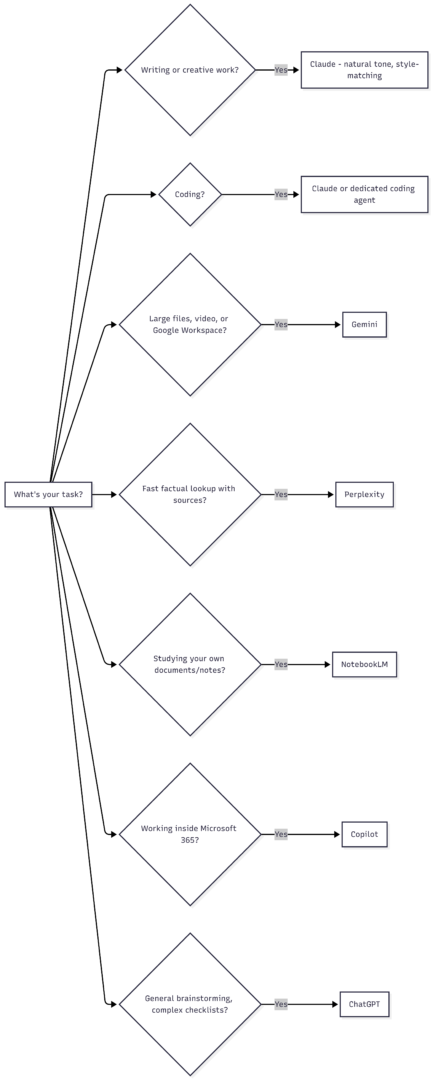
Understanding the Three Layers: Models, Apps, and Harnesses
Choosing an AI tool used to mean picking a chatbot and typing questions into it. That’s no longer the full picture. Three separate layers now determine what an AI experience actually looks like:
- Models are the underlying “brains” — what determines how well the system reasons, writes, codes, or analyzes data. This is what people mean when they say “Claude writes better” or “Gemini handles data better.”
- Apps are the products you actually interact with — a chatbot website, a mobile app, or a specialized tool like a coding assistant.
- Harnesses are the systems that let a model take real action — browsing the web, writing and running code, editing a spreadsheet, or completing a multi-step task without constant back-and-forth prompting.
The same underlying model can behave very differently depending on which app and harness it’s running in. A model answering questions in a basic chat window is a fundamentally different experience than the same model operating inside a coding agent with access to a terminal and file system. This is why “which AI should I use” increasingly depends less on which company’s model is technically strongest, and more on which app and harness best fits the task.
Comparing the Major AI Models by Strength
| Platform | Best For | Notable Weakness |
|---|---|---|
| ChatGPT (OpenAI) | General versatility, following complex multi-step instructions, brainstorming | Can be less precise on nuanced writing tone |
| Claude (Anthropic) | Natural-sounding writing, style-matching, clean code on the first attempt | No native video generation |
| Gemini (Google) | Large file handling, native video/audio understanding, Google Workspace integration | Chatbot interface historically less capable at producing finished documents |
| Microsoft Copilot | Deep integration with Windows and Microsoft 365 apps | Feature set most valuable only within the Microsoft ecosystem |
| Perplexity AI | Fast, web-connected factual lookups with direct source citations | Less suited to long-form creative or technical work |
| NotebookLM (Google) | Summarizing and querying your own uploaded documents/notes | Not designed for general open-ended tasks |
Choosing a Model Within Each Platform
Most people default to whatever model a chatbot suggests, which is often a mistake. Each platform typically offers multiple model tiers, and the default is frequently optimized for speed and casual conversation rather than accuracy.
| Platform | Default Behavior | What to Select for Serious Work |
|---|---|---|
| ChatGPT | Auto-selects a model, often a lighter/faster one | Manually select the “Thinking” or extended-reasoning variant |
| Gemini | Offers a fast default model | Select the “Pro” or “Thinking” tier for complex tasks |
| Claude | Offers a balance of speed and capability by default | Select the top-tier model and enable extended thinking for hard problems |
| Copilot | Uses a standard model by default | Premium tiers unlock access to more advanced underlying models |
For casual questions where being exactly right doesn’t matter, default models are fine. For anything you’re using for real work — analysis, code, research, or a decision you’ll act on — manually selecting the strongest available model and reasoning mode makes a measurable difference in accuracy.
Matching AI Tools to Specific Tasks
| Task | Recommended Tool | Why |
|---|---|---|
| Long-form writing, editing, tone-matching | Claude | Strongest at natural, human-sounding prose |
| Coding and debugging | Claude or a dedicated coding agent | Cleaner code generation, strong first-pass accuracy |
| Data analysis on large files/spreadsheets | Gemini or Claude for Excel | Native large-file handling; spreadsheet-specific tooling |
| Fast factual research with citations | Perplexity | Built specifically for web-grounded, cited answers |
| Studying your own notes or source material | NotebookLM | Purpose-built for source-grounded summarization |
| Complex multi-step checklists/brainstorming | ChatGPT | Strong at following detailed, structured instructions |
| Work inside Word, Excel, Outlook, Teams | Microsoft Copilot | Native integration across Microsoft 365 |
| Presentations built from research | Claude or ChatGPT | Both can generate structured slide decks with citations |
| Image generation | Gemini or ChatGPT’s built-in generator | Dedicated image tools built into both platforms |
| Video generation | Gemini | Native video generation tools; Claude currently lacks this |
Pricing at a Glance
Access to advanced models generally requires a paid plan, since free tiers are optimized for speed and casual conversation rather than accuracy or depth.
| Platform | Free Tier | Paid Entry Tier (Approx.) | What Paid Unlocks |
|---|---|---|---|
| ChatGPT | Limited access, weaker default model | ~$20/month | Advanced reasoning models, more usage, image generation |
| Claude | Limited access, weaker default model | ~$20/month | Top-tier model access, extended thinking, higher usage limits |
| Gemini | Limited access via Google account | ~$20/month | Pro-tier model, NotebookLM enhancements, higher limits |
| Microsoft Copilot | Basic access with Microsoft 365 | ~$20–30/month (Premium tier) | Deeper app integration, advanced model access |
| Perplexity | Limited daily queries | ~$20/month | Higher query limits, advanced model access |
Institutional or enterprise plans (common at universities and large companies) often bundle several of these tools together, sometimes with tiered access — a free general tier for everyday use, and a higher-cost tier requiring approval for advanced models, coding tools, or higher usage limits.
The Shift From Chatbots to AI Agents
The biggest recent change in how these tools work isn’t which company has the smartest model — it’s the move from AI that answers questions to AI that completes tasks. This is where the “harness” concept matters most.
Coding Agents
Dedicated coding tools give an AI model direct access to a codebase, a terminal, and the ability to write, run, and test code independently. Instead of copy-pasting code snippets back and forth, you describe what you want built, and the tool works through the implementation, coming back when finished or stuck. These tools are most valuable for anyone who writes code regularly, but they’re increasingly capable enough to build simple tools and websites even for non-coders willing to direct the process.
Document and Spreadsheet Agents
Specialized integrations for Excel, PowerPoint, and similar tools let an AI act more like a junior analyst inside the application itself — you describe the outcome you want (a pivot analysis, a formatted report, a cleaned-up dataset) and the AI executes it directly in the file, which makes the output easy to verify since it’s in a familiar, editable format.
General-Purpose Task Agents
A newer category of tools extends this same agentic approach beyond coding and spreadsheets to general desktop work — organizing files, extracting data from PDFs into structured formats, or drafting a document from scattered source material. These tools plan a task, break it into subtasks, and execute them with the user able to watch or step in as needed.
Research and Knowledge Tools
Tools built specifically for synthesizing information — turning uploaded documents, notes, or sources into summaries, structured outlines, or presentations — serve a different purpose than general chat. These are particularly useful for students, researchers, or anyone regularly working through a large volume of source material rather than starting from a blank page.
A Practical Framework for Choosing
Rather than re-evaluating every single task, most people benefit from settling on a primary tool for the majority of their work and switching only when a task clearly falls outside that tool’s strengths.
- Pick one default platform based on your most common task type (writing-heavy work favors Claude, general brainstorming and structured tasks favor ChatGPT, data-heavy or Google-integrated work favors Gemini).
- Pay for the advanced tier if you’re using AI for real work rather than casual questions — the accuracy gap between free and paid models is significant.
- Manually select the strongest available model for complex tasks rather than trusting an “auto” mode, which often defaults to a faster, less capable option.
- Switch tools only for a clear mismatch — for example, moving to Perplexity specifically for a cited factual lookup, or to NotebookLM when working through a large set of your own source documents.
- Consider a coding or task agent if you regularly do repetitive, well-defined work (data cleanup, file organization, spreadsheet analysis) that could be handed off entirely rather than done conversationally.
Conclusion
There’s no single “best” AI model — there’s a best model for a given task, and the right choice depends on what you’re trying to accomplish. Claude tends to lead on writing quality and coding cleanliness, ChatGPT on broad versatility and structured instruction-following, Gemini on large files and Google ecosystem integration, and specialized tools like Perplexity and NotebookLM on narrower jobs they’re purpose-built for.
The most efficient approach isn’t constantly comparing outputs across every tool — it’s picking a primary platform that matches your most frequent task type, paying for advanced model access if the work matters, and reaching for a specialized tool only when there’s a genuine mismatch. As these platforms increasingly shift from answering questions to completing tasks directly, the tool you choose will matter even more than the model underneath it.
Frequently Asked Questions
For casual questions, free tiers are usually fine. For real work — analysis, code, research you’ll rely on — paid tiers unlock significantly more accurate models and are generally worth the cost.
For occasional specialized needs (a cited factual lookup, a large data file, studying your own notes), yes. For everyday work, constantly switching tools costs more in lost focus than it gains in marginal quality improvement.
A chatbot answers questions in a back-and-forth conversation. An agent can independently plan and execute multi-step tasks — writing and testing code, organizing files, or completing a project — with much less manual guidance required.
Claude and dedicated coding agents are generally strongest for clean code generation and independent implementation, though other platforms have narrowed the gap considerably.
Perplexity is strongest for fast, cited factual lookups; ChatGPT and Claude both offer deep research modes suited to longer, more structured research tasks; NotebookLM is best when working from your own uploaded source material.
Please share this How Do You Decide Which AI Model to Use for What? with your friends and do a comment below about your feedback.
We will meet you on next article.
Until you can read, 5 Tools Every Social Media Manager Needs