
How AI Can Help You Work Better From Home
Working from home removes the easy in-person moments that used to smooth out a workday — the quick hallway question, the glance at a coworker’s screen, the meeting that naturally wraps up when everyone’s in the room.
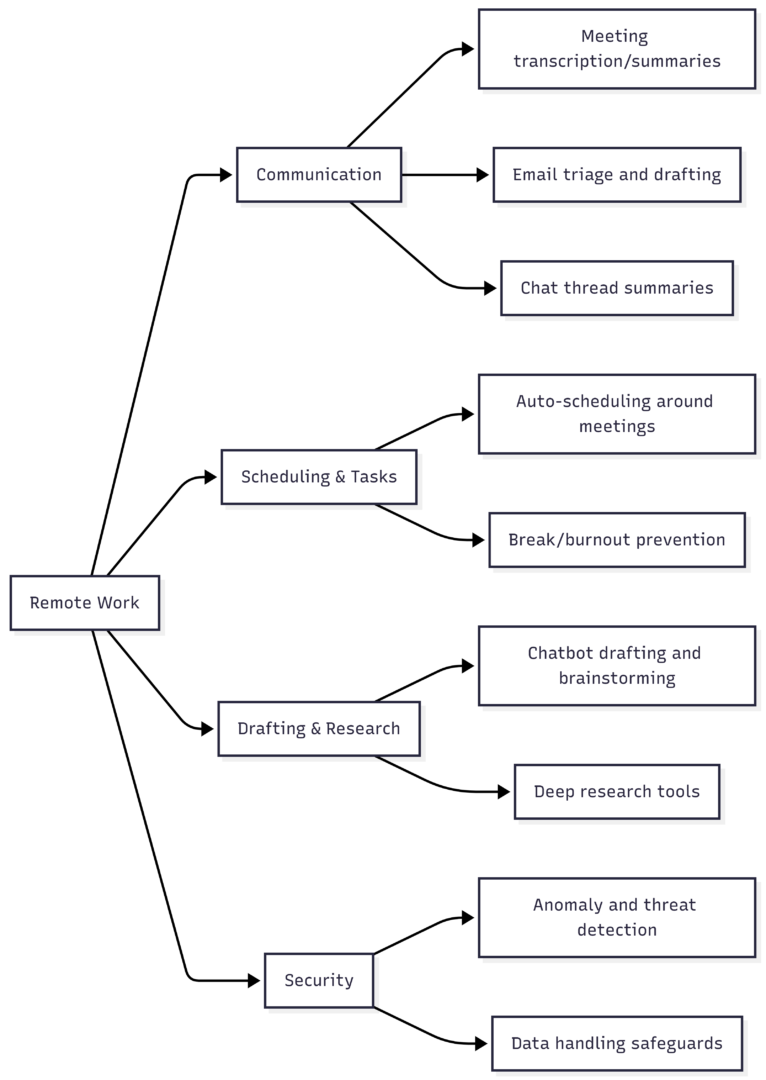
AI tools are increasingly filling those gaps: triaging inboxes, summarizing meetings, auto-scheduling your day, and even handling entire chains of repetitive tasks without you touching them. This guide covers the practical ways AI can improve a remote workday, the tools worth trying, and the precautions worth taking before you rely on them.
Where AI Fits Into a Remote Workday
Start With a General-Purpose Chatbot
Before diving into specialized tools, it’s worth spending time with a general AI chatbot. These tools can draft and edit emails, summarize documents, brainstorm ideas, and answer questions — functioning like an always-available collaborator for the kind of quick input you’d normally get from a coworker nearby.
| Use Case | How a Chatbot Helps |
|---|---|
| Drafting emails or reports | Generates a first draft you edit rather than writing from scratch |
| Brainstorming | Produces multiple angles or options quickly |
| Summarizing documents | Condenses long reports or articles into key points |
| Explaining unfamiliar topics | Breaks down concepts before a meeting or task |
This is often the highest-leverage AI habit to build first, since it applies to nearly every type of remote work, regardless of industry or role.
Managing Communication and Meetings
Communication overload is one of the biggest friction points in remote work — long email threads, meetings you can’t fully focus on while taking notes, and chat channels that pile up while you’re offline.
| Task | AI Tool Type | Example Tools |
|---|---|---|
| Meeting transcription and summaries | Video call AI features | Built into most major video conferencing platforms |
| Standalone meeting notes/action items | Dedicated transcription apps | Note-taking AI assistants |
| Email triage and draft replies | Email AI assistants | AI features built into major email clients |
| Long chat thread summaries | Team chat AI assistants | AI features built into team messaging platforms |
Meeting Transcription and Summaries
AI-generated meeting transcripts and summaries let you stay fully present in a conversation instead of splitting attention between listening and note-taking. Most major video conferencing tools now include this natively, automatically producing a transcript, key takeaways, and a list of action items after each call.
Email Triage
AI can sort an inbox by priority, flag messages that need a response, and draft replies to routine questions — leaving you to review and send rather than compose from scratch. This is particularly useful for anyone managing a high volume of routine correspondence, like customer inquiries or scheduling requests.
Chat Thread Summaries
Long, asynchronous chat threads are common in remote teams, especially across time zones. AI summarization tools can catch you up on what happened while you were offline and flag what actually needs your attention versus what resolved itself — a genuinely underrated use case, since it reduces the anxiety of returning to dozens of unread messages.
Organizing Time and Tasks
Without the natural rhythm of an office day, remote workers often either overwork or lose structure entirely. AI scheduling tools address both problems.
| Feature | What It Does |
|---|---|
| Smart auto-scheduling | Places tasks around existing meetings and estimated energy levels throughout the day |
| Deadline-aware prioritization | Reorders tasks automatically as deadlines shift |
| Break enforcement | Monitors screen time and prompts rest periods to reduce burnout |
| Cross-timezone coordination | Suggests meeting times that work across a distributed team |
Smart Calendars
AI-powered scheduling tools can automatically block time for deep work, arrange tasks around existing meetings, and adjust your calendar as priorities shift — removing the manual effort of constantly reorganizing your own day.
Break and Burnout Monitoring
Some tools track screen time and prompt regular breaks, addressing one of the more common downsides of remote work: without the natural cues of an office (colleagues leaving for lunch, a walk to a meeting room), it’s easy to work through breaks entirely.
Where AI Actually Saves Time (and Where It Doesn’t)
Based on how remote workers and consultants describe their real day-to-day use, AI tools consistently deliver value in a narrower set of tasks than the marketing suggests.
| Works well | Doesn’t work as well |
|---|---|
| First-pass triage of inbound requests | Fully autonomous decision-making without review |
| Summarizing long threads before a call | Creative strategy or pitch development end-to-end |
| Auto-drafting responses to common questions | Complex judgment calls about shifting priorities |
| Overnight or async data pulls | Deep customization without ongoing maintenance |
| Converting messy notes into structured summaries | Cross-tool integrations that require minimal hand-holding |
The consistent theme: AI performs best on narrow, repetitive, well-defined tasks — the “grunt work” before and after a decision — rather than making the decision itself. Most tools currently function more as assistants than fully autonomous agents, meaning a human still reviews and directs the meaningful choices.
Task Chaining: Getting More Value From AI Workflows
One of the more useful ways to think about AI adoption is at the workflow level rather than the individual task level. Research on AI automation has found that how tasks are sequenced matters as much as which individual tasks get automated.
The key idea is task chaining — linking several AI-compatible tasks together so AI can execute them as a continuous sequence, rather than automating isolated steps that still require constant human handoffs. Each handoff between AI and a human requires review and validation, which slows the overall process down.
When a chain of adjacent tasks is well-suited to AI, bundling them together can improve overall efficiency even if AI performs slightly worse than a human would on any single step in isolation, because it removes the repeated coordination cost.
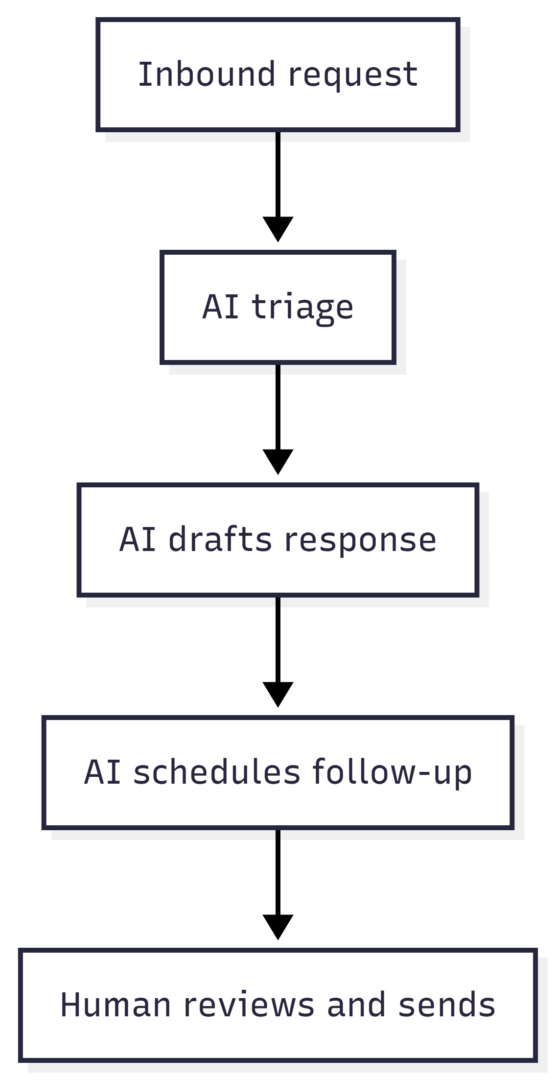
The practical takeaway: rather than asking “can AI do this one task,” it’s more useful to ask “can I redesign this workflow so that several adjacent steps can run through AI before a human needs to step in?” This is especially relevant for remote roles involving repetitive coordination work — client updates, reporting, or routine data gathering — where chaining several steps together produces bigger time savings than automating any single step alone.
AI Tools by Platform
Most major workplace software has added AI features directly into the tools remote workers already use daily.
| Platform | AI Feature | Best For |
|---|---|---|
| Video conferencing tools | Auto-generated transcripts, summaries, action items | Meeting-heavy schedules |
| Team chat apps | Thread summarization, Q&A on past discussions | High-volume async communication |
| Email clients | Long-thread summaries, draft replies | Heavy inbox management |
| Notes/knowledge apps | Q&A over your own notes, auto-organization | Personal knowledge management |
| Scheduling/task apps | Auto-scheduling, workload balancing | Structuring an unstructured remote day |
| Microsoft 365 | Integrated assistant across Outlook, Word, Excel, PowerPoint | Microsoft-centric workflows |
| Google Workspace | Integrated assistant across Docs, Sheets, Slides | Google-centric workflows |
Rather than adopting an entirely new tool, checking whether the software you already use daily has added AI features is often the fastest path to improvement — most major platforms have rolled these out as built-in upgrades rather than separate products.
Security Considerations for Remote AI Use
Remote work already expands the attack surface for cyber threats — personal devices, home networks, and cloud-based tools all create more entry points than a centralized office environment. AI cuts both ways here: it strengthens defenses, but it also introduces new risks if used carelessly.
How AI Strengthens Remote Security
- Continuous monitoring: AI can analyze network traffic at a scale humans can’t, flagging anomalies in real time
- Adaptive threat detection: Systems improve over time by learning from past incidents and evolving attack patterns
- Reduced reliance on large in-house security teams: Automated monitoring extends protection for organizations that can’t staff round-the-clock security
Precautions When Using AI Tools
| Risk | Precaution |
|---|---|
| Sharing sensitive data with general-purpose chatbots | Use enterprise-grade tools designed for confidential data; avoid pasting sensitive personal or financial information into consumer chatbots |
| AI-generated inaccuracies (“hallucinations”) | Always review AI-drafted content before sending or acting on it, especially for factual claims |
| Over-reliance on unreviewed automation | Keep a human review step for decisions with real consequences |
| Token/usage costs scaling with automation | Monitor usage on paid AI agent tools, since costs can climb quickly with heavy automation |
Enterprise-focused AI tools are generally built with stronger data-handling safeguards than free consumer chatbots, which are often not designed to handle sensitive information like financial details or personal identifiers.
Getting Started: A Practical Approach
- Start with a general chatbot for everyday drafting, brainstorming, and summarizing — it applies to nearly any role.
- Add AI features already built into your existing tools (video calls, email, chat, notes apps) before adopting new standalone software.
- Identify your most repetitive, well-defined tasks — these are the best candidates for chaining together into an automated sequence.
- Keep a human review step for anything involving judgment, sensitive data, or content you haven’t verified.
- Expect a learning curve — most people see limited value at first and only realize meaningful time savings after adjusting how their workflow is structured around AI, rather than just bolting AI onto an unchanged process.
Conclusion
AI won’t replace the value of in-person collaboration, but it can meaningfully close the gap for remote workers — catching you up on missed conversations, triaging routine communication, keeping your schedule realistic, and strengthening security across a more exposed remote setup.
The biggest gains don’t come from adopting the flashiest new AI agent, but from identifying the repetitive, well-defined parts of your workflow and letting AI handle them end-to-end, while keeping human judgment in the loop for anything that actually requires it.
Start with the tools already built into the software you use daily, and expand from there based on what actually saves you time.
Frequently Asked Questions
Begin with a general-purpose AI chatbot for drafting and brainstorming, then check whether the tools you already use daily (email, video calls, chat) have added AI features you haven’t tried yet.
Consumer chatbots generally aren’t designed to handle sensitive data like financial or personal identifying information. Use enterprise-grade tools with stronger data protections for anything confidential.
Not yet for most practical purposes. AI performs best on narrow, repetitive tasks, while judgment calls and creative decisions still benefit from human review.
For well-defined, repetitive tasks like meeting summaries, email triage, and status reporting, the time savings are real and consistently reported. For open-ended creative or strategic work, the benefit is much smaller.
AI-driven monitoring tools can detect unusual network activity and emerging threats faster than manual review, which is especially valuable for organizations without large in-house security teams.
Please share this How AI Can Help You Work Better From Home with your friends and do a comment below about your feedback.
We will meet you on next article.
Until you can read, How Do You Decide Which AI Model to Use for What?